
Think of virtual staging AI as an instant interior designer in your pocket. It’s a technology that uses artificial intelligence to take a photo of an empty, uninspired room and digitally furnish it in a matter of seconds. You get a professionally staged marketing image without the expense, hassle, or time commitment of traditional methods.
What Is Virtual Staging AI and Why Does It Matter
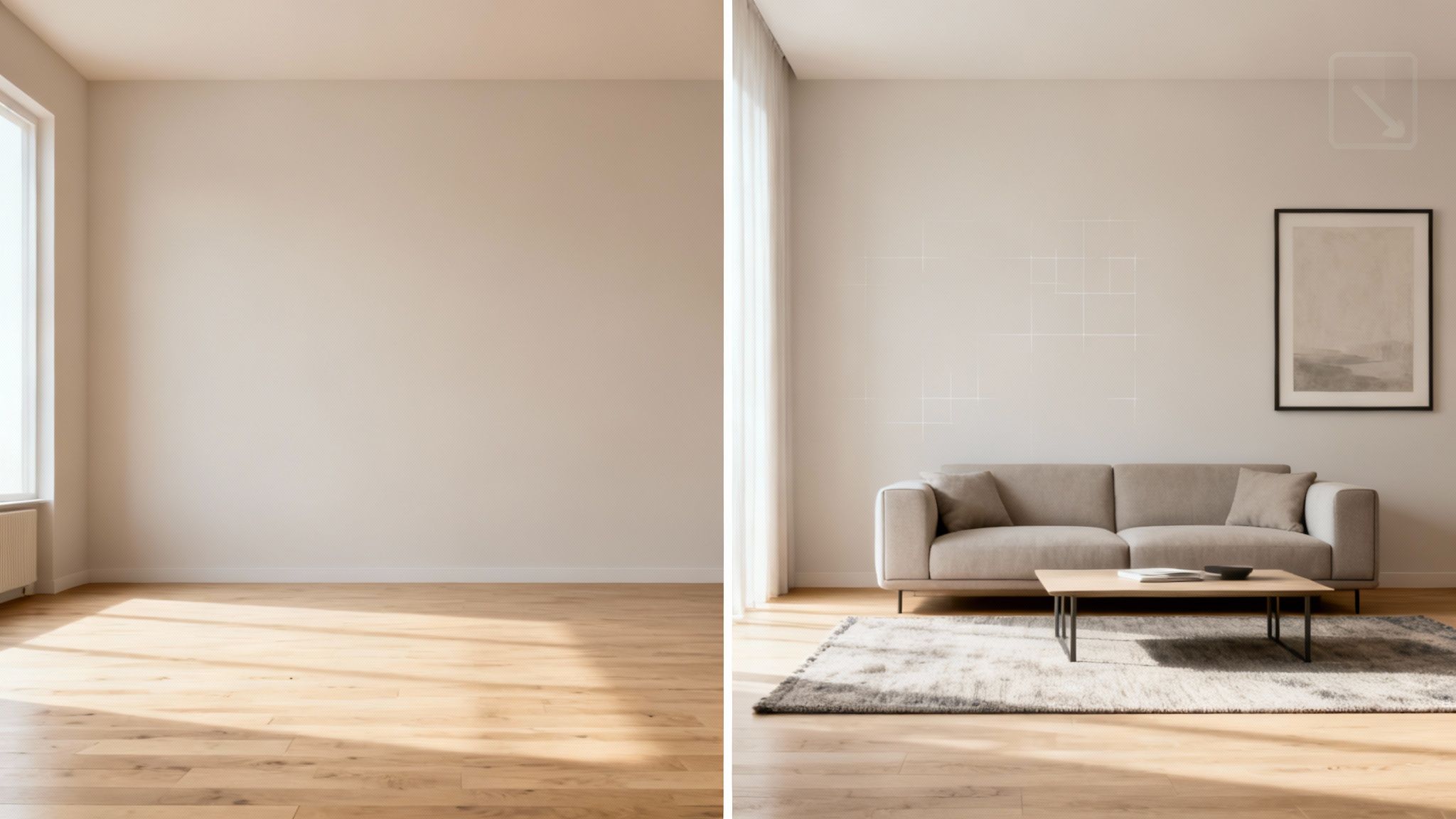
If you’ve ever tried to sell a vacant property, you know the challenge. Empty rooms feel cold and impersonal, making it tough for buyers to see themselves living there. This is where virtual staging AI completely changes the game by bridging that critical "imagination gap."
Instead of coordinating furniture rentals and waiting weeks for a physical stager, you just upload your photos. In less than a minute, the AI analyzes the room's dimensions, lighting, and style, then fills it with photorealistic furniture and decor. It’s a seamless process that delivers stunning results, fast.
The Shift from Manual to Automated Design
Not long ago, "virtual staging" meant hiring a 3D artist to manually place digital furniture into photos. It was a step up from physical staging, but still slow and often expensive.
Virtual staging AI automates this entire workflow. It democratizes high-end property marketing, removing the need for specialized design skills and making it accessible to everyone.
This shift empowers all kinds of professionals:
- Real Estate Agents: Market listings faster and stand out online, driving more views and in-person showings.
- Homeowners: Showcase their property’s true potential to help justify a higher asking price.
- Interior Designers: Quickly generate multiple design concepts for clients, making the approval process much smoother. See how designers are using these tools in various interior design use cases.
This isn't just about convenience; it’s about powerful economic shifts. The market for this technology is exploding, projected to grow from USD 574.35 million in 2026 to an incredible USD 4,730.46 million by 2035. Why? It’s driven by massive cost savings. Modern AI platforms have slashed the price of creating a staged image from over $50 to as little as $0.17. You can dive deeper into these virtual staging market trends to see where the industry is headed.
More Than Just Pretty Pictures
At its core, virtual staging AI is about creating an emotional connection. An empty room is just a box with walls, but a well-staged room tells a story. It helps a buyer imagine their future life unfolding within those walls.
By transforming a cold, vacant space into a warm and inviting home, virtual staging AI doesn't just decorate a room—it sells a lifestyle. This is why it has become an indispensable tool in modern property marketing.
Ultimately, this technology has fundamentally changed how properties are sold. The first impression no longer happens at the front door; it happens online with the first click. By presenting a home in its absolute best light from that initial moment, agents can capture buyer interest immediately, boost engagement, and close deals faster.
How Virtual Staging AI Technology Works
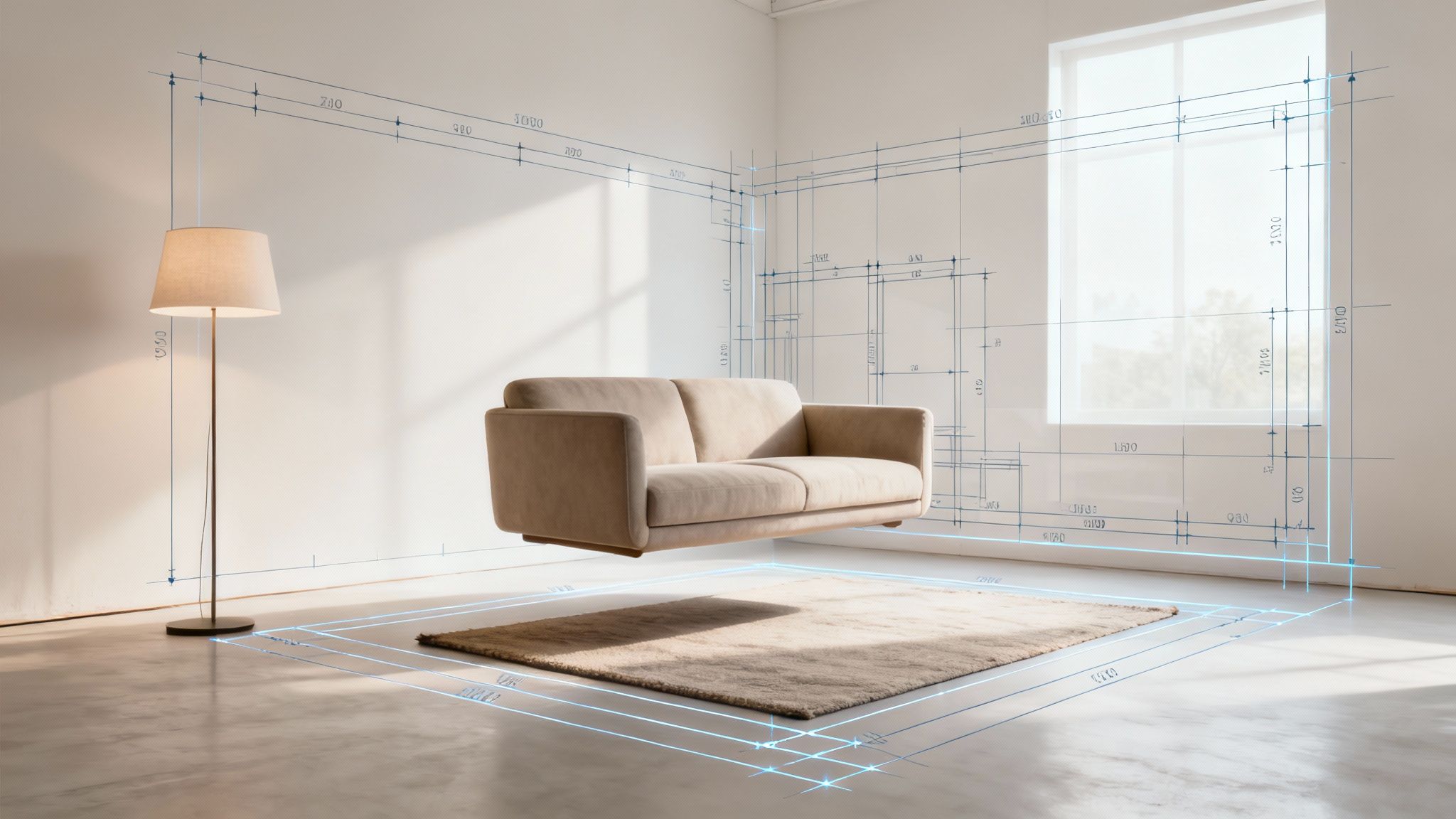
To really get what makes virtual staging AI so impressive, it helps to peek behind the curtain. What seems like instant magic is actually a sophisticated, two-part process where a pair of distinct AI models work in perfect harmony: computer vision and generative AI.
Think of it as a collaboration between a skilled architect and a creative interior designer. Before any furniture is chosen, the architect first needs to understand the space inside and out. That’s the first step.
The First Step: Computer Vision Analysis
When you upload a picture of an empty room, a computer vision model immediately goes to work. This isn't just about looking at a flat image; this AI is trained to "see" and interpret the space in three dimensions, much like we do. It scans every detail to build a complete digital understanding of the room.
The model meticulously identifies and maps out the critical elements:
- Architectural Features: It pinpoints the walls, floors, ceilings, windows, and doors to create a basic 3D model of the room's structure.
- Lighting and Shadows: It analyzes every light source, figuring out its direction and intensity to understand how shadows should realistically fall.
- Perspective and Depth: The algorithm calculates the camera's original angle and the room’s proportions to establish accurate dimensions.
This analysis creates a precise digital blueprint. The AI now knows the room’s layout, its unique lighting, and its physical constraints. This groundwork is crucial for making sure any furniture added later looks like it truly belongs there.
The Second Step: Generative AI Creation
With the blueprint ready, the generative AI takes the stage. This is the creative powerhouse. Using the detailed map from the computer vision analysis, the model starts populating the room based on the interior design style you've selected.
This AI has learned from millions of high-quality interior design images, so it understands what makes a "Modern Farmhouse" look different from a "Japandi" style. It doesn't just drop random objects into the scene. It thoughtfully selects and arranges furniture, decor, and textures to create a cohesive and inviting space.
The AI renders each virtual item with perfectly matched lighting and shadows, so the final image looks stunningly photorealistic. This intelligent, two-step workflow is what sets advanced platforms apart—they can maintain a room’s original character while showing its full potential. You can see how platforms like RoomStudioAI deliver these high-quality results in just a matter of seconds.
The rise of this technology is part of a much larger trend. Artificial intelligence is projected to add up to USD 15.7 trillion to the global economy by 2030. Within real estate alone, the shift is already here: 85% of agents are using AI, and 95% of brokerages plan to adopt AI tools in the near future.
In short, computer vision acts as the architect, understanding the space and its rules. Generative AI then steps in as the interior designer, furnishing the room beautifully while following the architect's plans.
This powerful combination ensures the final result isn't just a pretty picture. It's an accurate, believable vision of a property’s potential—transforming an empty photo into a compelling marketing tool that helps buyers connect with a home before they even walk through the door.
The Business Case for Virtual Staging AI
Beyond the cool tech, what truly matters is how virtual staging AI impacts the bottom line. For anyone in real estate, interior design, or property management, these tools aren't just about making pretty pictures. They're a strategic move that can seriously boost revenue, save time, and give you an edge over the competition. The data tells a compelling story.
The whole point of a property listing is to grab a buyer's attention and make them want to see more. The numbers are clear: staged properties simply outperform empty ones. On average, staged homes sell 75% faster, and an incredible 83% of virtually staged properties sell for the asking price or even higher. When you bring AI into the mix, the results get even better, driving a 72% increase in online traffic and helping listings sell for up to 22% more. These aren't just vanity metrics; they represent a real, measurable return on your investment. You can dig into more key real estate marketing statistics that back this up.
Boosting Sales and Engagement for Real Estate Agents
For real estate agents, it all comes down to speed and profitability. Let's be honest, photos of empty rooms are cold and uninspiring. They make it easy for potential buyers to just keep scrolling. Virtual staging AI flips the script by creating an instant emotional hook.
When you show a room's potential, you're helping buyers imagine themselves living there. This simple shift has a massive impact on your most important metrics:
- Faster Sales Cycle: Staged homes don't linger on the market. That means less time spent on one listing and more time to chase the next one.
- Higher Offers: When buyers connect emotionally with a home, they see its true value. That connection often translates into stronger, more competitive offers.
- Increased Online Views: In a sea of listings, professionally staged photos are the ones that get the clicks, drawing in more qualified leads from sites like Zillow and Redfin.
The math just makes sense. Why spend thousands on physical staging when you can get the same, or better, results for a tiny fraction of the cost? It makes professional staging a viable strategy for every single listing, not just the luxury ones. You can get a feel for the investment by exploring different virtual staging pricing models and see just how affordable it is.
Accelerating Client Approvals for Interior Designers
Every interior designer knows the struggle: trying to get a client to see the vision that’s so clear in your head. Virtual staging AI is the ultimate bridge between your concept and their reality.
Instead of just showing mood boards and trying to describe a feeling, you can generate multiple photorealistic concepts in minutes. This lets clients see exactly how a design will look in their own space, which means faster decisions and fewer painful revisions.
This completely changes the workflow. Suddenly, you can handle more projects without ever compromising on quality. Want to show a client their living room in Modern, Japandi, and Coastal styles? That’s no longer a week-long project; it’s something you can do in an afternoon. This ability to instantly present tangible options makes the approval process smoother, builds incredible client confidence, and cements your status as the expert.
Attracting Tenants for Property Managers
In the world of property management, a vacant unit is a liability. It's tough to market an empty apartment because potential tenants just can't get a feel for the space from photos of bare walls. How big is it, really? Will my couch fit?
Virtual staging AI solves this problem instantly. By digitally furnishing vacant units, you make them look welcoming and ready for someone to move right in. This helps your rental listings pop in a crowded market and gets more qualified tenants to apply. A beautifully staged photo can easily be the one thing that convinces a renter to book a viewing, helping you cut down on those costly vacancy periods and keep your property owners happy.
Your First Virtual Staging AI Project
Ready to jump into your first virtual staging AI project? It’s far easier than most people think. These tools are designed to be incredibly intuitive, letting you turn a simple photo of an empty room into a show-stopping marketing asset in just a few minutes.
Let's walk through the exact steps you’ll take. We'll go from a blank canvas to a polished, professional image that grabs the attention of potential buyers and clients. The whole process is built for speed and simplicity.
Step 1: Prepare Your Source Photo
Everything starts with a good photo. While the AI is powerful, it needs a clean, well-lit image to work its magic. Think of it like this: the better the ingredients, the better the final dish. A great source photo is your number one ingredient.
Before uploading your picture, keep these simple but crucial tips in mind:
- Lighting is everything. Shoot during the day to get as much natural light as possible. Open the blinds, pull back the curtains, and let the light pour in. You want to avoid dark corners or harsh shadows that can confuse the AI’s understanding of the space.
- Find the best angle. Stand in a corner to capture the widest possible view of the room. This gives the AI a clear sense of the room's layout and dimensions, which helps it place furniture much more accurately.
- Resolution matters. Use a decent camera or even a modern smartphone. A crisp, high-resolution image gives the AI more detail to work with, which always leads to a more believable and professional-looking final image.
Step 2: Define Your Staging Goal
Next, what are you trying to accomplish? Modern AI staging tools are surprisingly flexible and can handle a few different scenarios, so it's good to know your goal from the start.
Are you starting with a completely empty room, or does the space already have furniture that needs a refresh?
- Furnish an Empty Room: This is the classic use case. You upload a photo of a vacant space, and the AI fills it with furniture and decor based on the style you choose.
- Redesign an Existing Room: If the room is currently furnished but looks cluttered or dated, many platforms can now digitally "empty" the room for you. This creates a blank slate for the AI to work on, letting you completely reimagine the space with new, more appealing furnishings.
The whole point of this effort is to drive real-world results—from boosting engagement online to securing faster sales at higher prices.
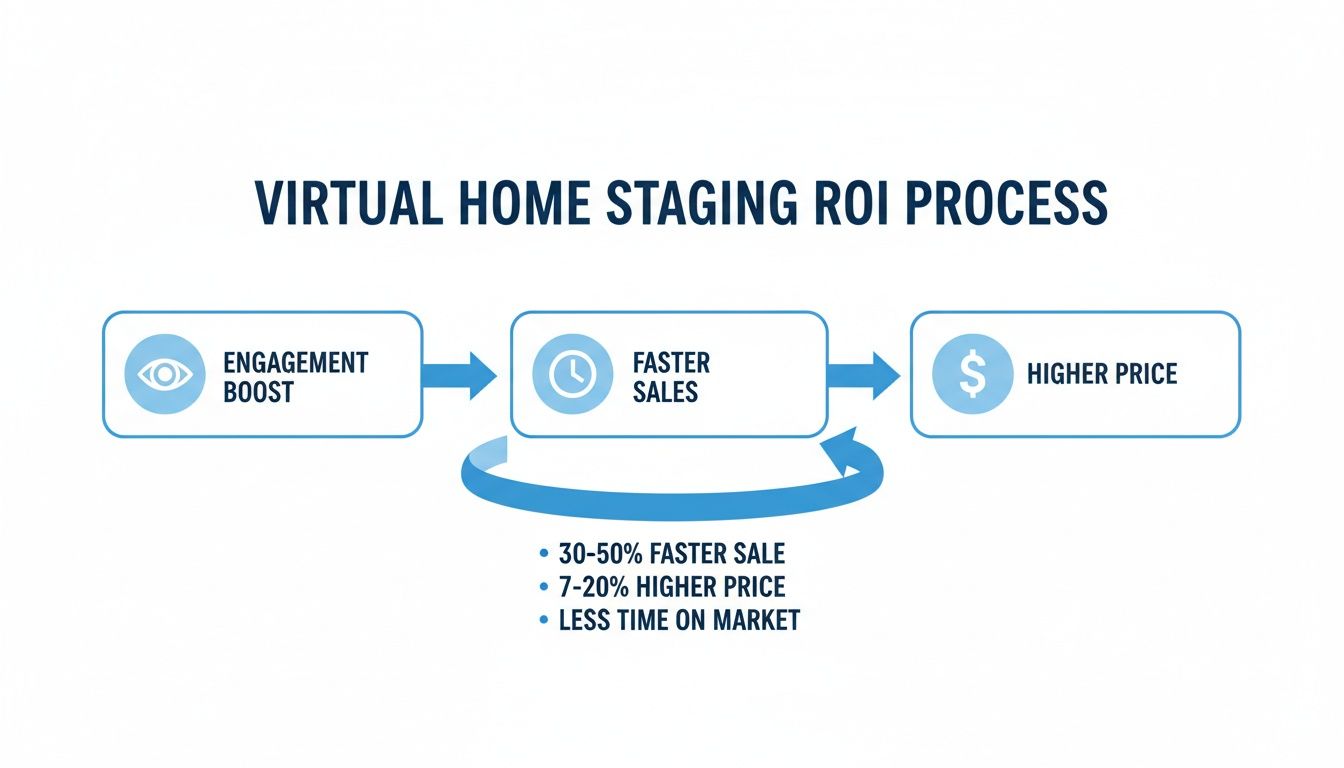
As you can see, better visuals create a direct line to heightened buyer interest and a better outcome for your sale.
Step 3: Select Your Design Style
Here's where the fun really begins. The best AI tools come loaded with a library of professionally curated interior design styles. The key is to pick one that complements the property's architecture while also appealing to your target buyer.
Choosing the right style isn't just about aesthetics; it's about telling a story that helps a potential buyer envision themselves living there. A cozy Modern Farmhouse look might resonate with a family, while a clean Japandi or Minimalist design could be perfect for attracting young professionals.
Some of the most popular styles you’ll find include:
- Modern: Known for clean lines, simple color palettes, and materials like metal, glass, and steel.
- Coastal: Light, airy, and beach-inspired, with a focus on natural textures and soft, neutral colors.
- Japandi: A beautiful blend of Japanese and Scandinavian design that emphasizes simplicity and natural elements.
- Rustic: Draws inspiration from the outdoors with lots of raw wood, stone, and a warm, inviting feel.
Once you’ve made your choice, you’re ready to hand things over to the AI. If you want to see these styles in action, you can sign up for a free trial with RoomStudioAI and start experimenting right away.
Step 4: Generate and Use Your Image
With your photo uploaded and your style selected, all that's left is to click "generate." The AI gets to work, analyzing the room’s dimensions and layout to produce a fully furnished, photorealistic image—often in under 30 seconds.
Once the image is ready, take a moment to review it. If it’s not quite right, most platforms let you generate a few different variations until you land on the perfect one. When you have the shot you love, simply download it in high resolution and start using it everywhere: MLS listings, property websites, social media, and client presentations.
How to Choose the Right Virtual Staging AI Tool
With so many virtual staging AI tools popping up, picking the right one can feel like a shot in the dark. But here’s the thing: they aren't all the same. The platform you choose directly impacts the quality of your listings, how fast you can work, and ultimately, your bottom line.
Making the right choice isn't about finding the tool with the most bells and whistles. It's about zeroing in on a few key factors that separate the truly professional platforms from the rest of the pack.
It All Starts with Image Quality
Let's be blunt: a poorly staged photo is worse than an empty one. If the virtual furniture looks fake, flat, or just off, it immediately breaks the buyer's trust. That’s why photorealism is non-negotiable.
The AI has to be smart enough to analyze the light, shadows, and angles in your original photo and make the virtual items fit perfectly. When you're testing a tool, get picky. Does the shadow from that virtual armchair feel right? Does the digital rug actually look like it’s sitting on the hardwood floor? The best AI tools make the added furniture look so real you can’t tell it was ever an empty room.
Also, check the output resolution. For professional listings on sites like Zillow or for print marketing, you need crisp, high-resolution images. Settle for nothing less than 4K downloads.
Speed and Features That Actually Matter
Beyond a pretty picture, the tool has to work for your schedule. The whole point of AI is speed, right? See how long it takes to go from uploading a photo to having a finished, staged image ready to go. The top platforms can get it done in under a minute. Think about that—you could stage an entire house in the time it takes to grab a coffee.
Next, look at what the tool can do besides just adding furniture. The most valuable platforms offer features that solve real-world problems for real estate professionals.
Here are a few must-haves:
- Clutter Removal: This is a lifesaver. The ability to digitally empty a room filled with furniture or clutter gives you a blank canvas without ever lifting a box.
- Virtual Renovation: A great feature for fixer-uppers. Tools that let you change wall colors, swap out flooring, or even remove a non-load-bearing wall can show buyers a home's true potential.
- Style Options: You need variety. A deep library of design styles—from Mid-Century Modern to Coastal—means you can stage the home to appeal directly to your target buyer.
A great virtual staging AI tool isn't just about adding furniture. It's a complete visual marketing partner, giving you everything you need to make a property shine.
Feature Checklist for Selecting Your AI Tool
Choosing the right platform can be tricky. This checklist is designed to help you cut through the noise and compare tools based on the features that truly matter for professional-quality results.
| Feature | Importance Level | What to Look For |
|---|---|---|
| Photorealism | Critical | Realistic lighting, shadows, and textures. Look for examples in their gallery that are indistinguishable from reality. |
| Turnaround Speed | High | Generation time under 60 seconds per image. A slow tool will bog down your workflow. |
| High-Resolution Output | Critical | Minimum of 4K resolution for sharp, professional images suitable for MLS and print. |
| Item Removal/Declutter | High | Ability to automatically remove existing furniture and clutter to create a clean slate. |
| Virtual Renovation | Medium | Features like changing wall colors, flooring, or minor architectural edits (e.g., "AI wall removal"). |
| Style & Furniture Library | High | A wide and varied selection of design styles and furniture to match different property types and buyer tastes. |
| Ease of Use | High | An intuitive, straightforward interface that doesn't require a steep learning curve. Look for a free trial. |
| Commercial License | Critical | Clear terms that grant you the rights to use the images for all your marketing and listing needs. |
| Customer Support | Medium | Accessible support (chat, email) in case you run into issues or have questions. |
By using this checklist, you can objectively score different platforms and find the one that best fits your business needs, ensuring you invest in a tool that delivers both quality and efficiency.
Don't Forget Usability and Pricing
Finally, the tool has to be easy to use. A clunky interface with a confusing workflow completely defeats the purpose of using a fast AI tool. You want a clean dashboard that makes the whole process feel effortless. The best way to judge this is to try it yourself. Platforms like RoomStudioAI offer a free AI interior design trial so you can get a feel for the workflow before you commit.
And of course, there’s the cost. Most services use a subscription or a pay-per-image model. Think about how many listings you stage a month to figure out which structure makes more financial sense for you. Most importantly, read the fine print on licensing. Make absolutely sure your plan includes commercial usage rights. This gives you the legal green light to use the images everywhere—on the MLS, social media, your website, and in print ads.
Common Questions About Virtual Staging AI
Jumping into any new technology brings up questions, and that’s a good thing. When it comes to something as crucial as marketing a property, you need to feel confident before you dive in. People often ask about the ethics, accuracy, and practical limits of using virtual staging AI.
This section tackles those common questions head-on. My goal is to give you straight answers so you can feel completely comfortable putting these powerful tools to work and getting incredible results.
Is Virtual Staging AI Ethically Sound?
This is probably the most important question of all, and the answer is a firm yes—as long as it's done right. Ethical use boils down to a single guiding principle: transparency. Virtual staging is a marketing tool designed to show a property’s potential, not to mislead anyone about its current state.
The golden rule is to never use the tech to hide or change the property's permanent physical features. For instance, adding virtual furniture to an empty room is perfectly fine and helps buyers imagine themselves living there. But using AI to paint over a giant crack in the wall or digitally remove a structural pillar? That crosses the line into misrepresentation.
To keep everything above board and maintain trust, just follow these best practices:
- Disclose, Disclose, Disclose: Always label digitally staged images clearly. A simple disclaimer like "Virtually Staged" is all it takes. Most Multiple Listing Service (MLS) organizations actually require this now.
- Show Both Versions: A fantastic way to build trust is to include both the empty and the staged photos in your listing. This gives buyers the full story—the reality of the space and its exciting possibilities.
- Focus on Potential: Remember, the goal isn't to trick someone into thinking the home comes with designer furniture. It's to help them see how they could truly live in and love the space.
How Accurate Is the Furniture Scale and Placement?
That's a fair question. Nothing breaks the illusion faster than a couch that looks comically small or a chair that seems to be floating a few inches off the ground. The good news is that the accuracy of modern virtual staging AI has come a long, long way. Today’s top tools are remarkably precise.
Sophisticated AI models use computer vision to analyze a room’s depth, perspective, and dimensions before a single piece of furniture is placed. This is how it ensures that a virtual sofa is scaled perfectly for the living room and a digital dining table fits naturally in the dining area. The AI is also smart enough to analyze the light sources in the original photo, rendering realistic shadows that "ground" the virtual items and make them look like they genuinely belong there.
While the technology is incredibly advanced, the quality of your original photo is still the biggest factor. A clear, well-lit, high-resolution image taken from a good angle will always deliver the most believable and stunning results.
Does This Technology Work on Difficult Rooms?
What about those tricky spaces? The ones with weird angles, awkward layouts, or not-so-great lighting? This is where professional-grade AI really shines. Basic tools might stumble, but the best platforms are trained specifically to handle these kinds of complexities.
Here’s how a robust AI tackles common challenges:
- Complex Room Shapes: The AI first maps out the room's geometry, whether it's an L-shaped living area or a bedroom with a slanted ceiling. It then places furniture in a way that works with the architecture, sometimes even suggesting layouts the owner hadn't thought of.
- Poor Lighting: While a bright, sunny room is always ideal, advanced AI can definitely work with photos taken in lower-light situations. The model analyzes the existing light and renders all the virtual furniture with matching brightness, contrast, and shadows to create a cohesive image.
- Unusual Angles: Photos shot from odd angles can confuse simpler AI. But top-tier platforms have been trained on millions of images, so they can correctly interpret perspective from almost any viewpoint and place furniture without it looking distorted or out of place.
What Is the Learning Curve for New Users?
One of the best things about virtual staging AI is how easy it is to use. These platforms were built for pros who are experts in their own fields—like real estate or interior design—not necessarily in complex design software.
Honestly, the learning curve is practically flat. The whole workflow is incredibly simple and usually takes just a few clicks:
- Upload your photo.
- Pick a design style from a menu (like Modern, Coastal, or Japandi).
- Click a button to generate the final image.
Most people can create their first professionally staged photo within a few minutes of signing up. The interfaces are designed to be clean and intuitive, completely removing the technical hurdles that once made virtual staging a job for specialists. You don't need to know a thing about 3D modeling or photo editing to get brilliant results.
The entire process is built for speed and efficiency, letting you focus on what you do best—marketing the property—instead of getting bogged down learning new software.
Ready to see just how simple and powerful virtual staging AI can be? With RoomStudioAI, you can transform your property photos in seconds. Start your free trial today and create stunning, client-ready visuals that capture attention and drive sales.
Ready to redesign your space?
Try our AI interior design tool and see your room transformed in seconds.
Try Free Design

