In the world of real estate, the camera can be your best friend or your worst enemy. Real estate photography editing software is what makes the difference. It's the secret weapon agents and photographers use to take a perfectly good property photo and turn it into an image that truly sells. Think of it as a digital darkroom, where you polish every shot to create a powerful first impression online and make a property look its absolute best.
Why Better Photos Mean Faster Sales

Let's face it: the property market is incredibly crowded. Most buyers start their journey by endlessly scrolling through online listings. Your photos are the first thing they see, and if they're not compelling, you’ve lost them in a split second. A potential buyer will swipe right past their dream home simply because the photos were dull, dark, or crooked.
This is where real estate photography editing software becomes so critical. It’s not about making a property look like something it isn't. It’s about presenting it in its most flattering light—the same way you’d open the blinds and turn on all the lights before a showing.
The Financial Impact of High-Quality Visuals
The link between stunning photos and sales performance isn't just a hunch; it's a proven fact. Listings featuring professional-grade images consistently sell faster and fetch higher prices. There's a simple psychology at play here. Properly edited photos help you:
- Forge an Emotional Connection: Bright, airy, and inviting photos allow buyers to picture themselves living in the home.
- Spotlight the Best Features: Smart editing can draw the eye directly to a home’s biggest selling points, whether it's the gleaming new countertops or the gorgeous hardwood floors.
- Instill Confidence: Polished, professional visuals send a clear message: this property is well-cared-for, and the agent means business.
The market for real estate photography editing software is currently valued at around USD 2.397 billion and is expected to rocket to USD 4.5 billion by 2035. That explosive growth isn't just a trend; it shows how fundamental high-quality visuals have become to any serious marketing strategy.
More Than Just Pretty Pictures
At the end of the day, using good editing software is a smart business decision. It gives agents, stagers, and designers complete control over a property's story. For instance, virtual staging can instantly furnish an empty room, helping buyers see a house's potential instead of just four blank walls. If you want to see just how powerful staging can be, explore our guide on inspiring living room ideas.
By investing in the right editing tools, you're not just making photos look better. You're creating more effective marketing that gets real results: more calls, faster sales, and happier clients.
Mastering the Core Editing Features
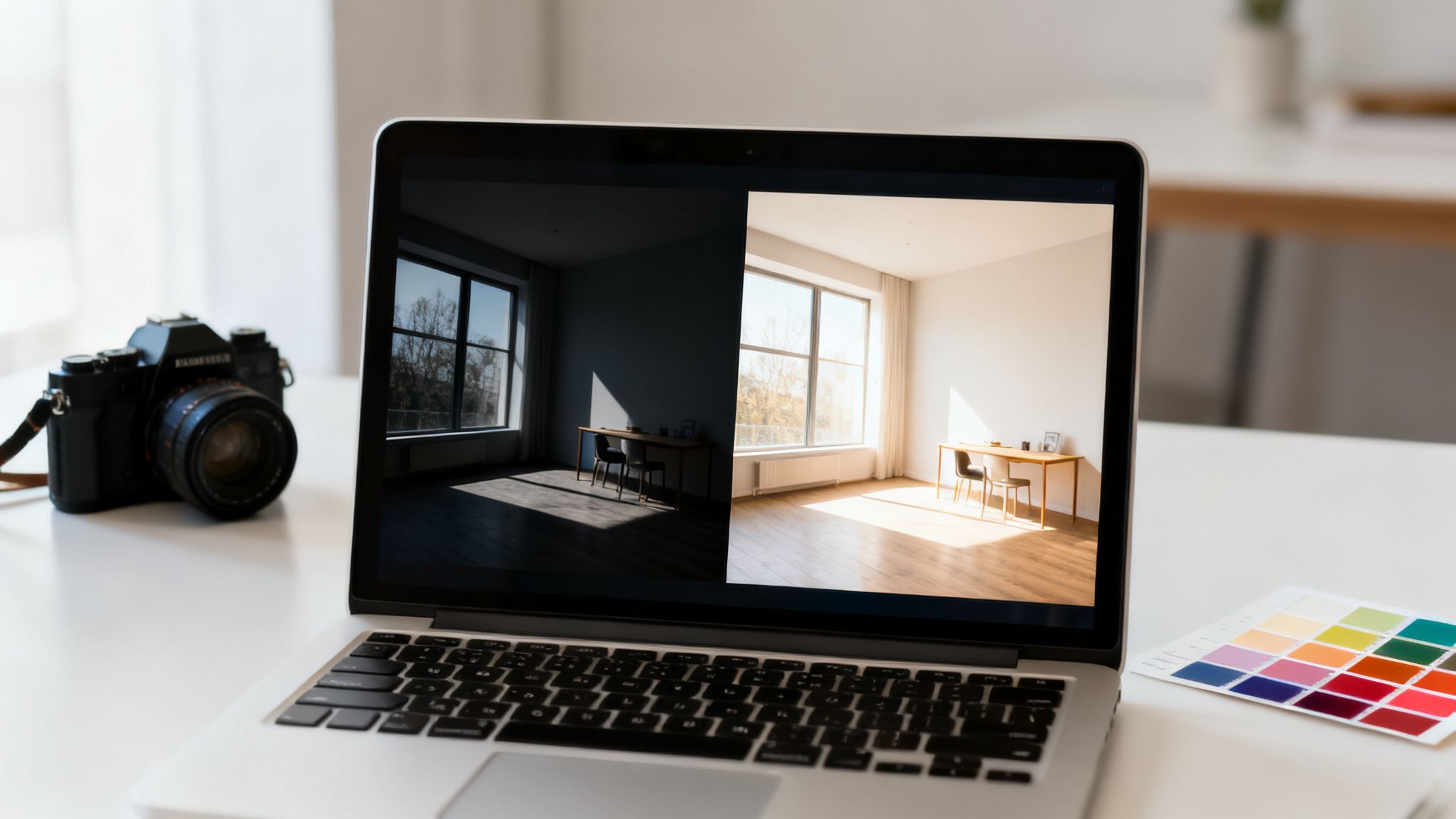
Diving into real estate photography software can feel a little intimidating at first. The dashboards are full of sliders and technical terms, but the truth is, a handful of core features do most of the heavy lifting. Once you understand what these tools do, you’ll have the power to turn a good photo into a great one that stops scrollers in their tracks.
Think of this software less like a complicated machine and more like a digital toolkit. Each tool has a very specific job, and learning to use them together is the secret to presenting a property in its most appealing—and accurate—light. Let's pull back the curtain on the essential features that make every listing shine.
HDR Merging for Perfect Lighting
Ever tried to snap a picture of a room with a bright, sunny window? Your camera has to make a tough choice. It either exposes for the beautiful view, plunging the room into shadow, or it exposes for the room, turning the window into a big white blotch. Our eyes can process both at once, but a camera lens can’t.
This is exactly the problem High Dynamic Range (HDR) merging was built to solve.
The software takes several photos of the same scene at different exposure levels—one dark, one medium, and one bright—and intelligently blends them. The result is a single, perfectly balanced image where you can see the rich wood grain of the floor and the lush green trees outside the window. It’s the key to creating photos that feel expansive and true to what you see in person.
Perspective Correction for Straight Lines
When you photograph interiors, especially with a wide-angle lens to capture the whole space, you’ll often notice the walls seem to bend or lean inward. It’s a distracting optical illusion called "keystoning," and it can make an otherwise great shot feel unprofessional.
Perspective correction is the tool that snaps those lines back to where they belong. It digitally straightens all the vertical and horizontal lines so they run perfectly parallel, just as they should.
This one small tweak makes a huge psychological difference. Straight lines communicate stability, quality, and space, making rooms feel larger and more grounded. It’s a non-negotiable step for producing architectural-grade images that build a buyer’s confidence from the first glance.
A properly corrected image feels clean and professionally handled. It tells a potential buyer that every detail of the property and its presentation has been carefully considered, building trust from the very first click.
Exposure and Color Corrections
These are the fundamental tools of any photo editor. While HDR gets the overall light balance right, these fine-tuning adjustments are what make an image truly come to life. Think of it as the final polish.
- Exposure and Brightness: These sliders are your best friend for brightening up shadowy corners and making a room feel airy and inviting. Dark, gloomy photos are a major turnoff for online buyers.
- Contrast: This adds depth and dimension, preventing photos from looking flat or washed out. Proper contrast makes the difference between light and dark areas more distinct and pleasing.
- White Balance: This simple adjustment ensures that whites look actually white, not tinged with yellow or blue from indoor lighting. Getting the white balance right allows all the other colors in the room, from the wall paint to the cabinet finish, to look accurate and vibrant.
- Saturation and Vibrance: These control the intensity of the colors in your photo. A little boost can make a lawn look healthier or a blue sky more brilliant, but use a light touch—the goal is to enhance, not create an unrealistic, cartoonish look.
Sky Replacement for Perfect Weather
Nothing kills the vibe of a beautiful home faster than a dull, overcast sky. It can make an amazing property look drab and uninviting. This is where sky replacement becomes one of the most powerful tools in your arsenal.
With just a couple of clicks, you can instantly swap a dreary, gray sky for a picture-perfect blue one with a few fluffy clouds. This isn’t about being deceptive; it’s about good marketing. You can’t control the weather on photo day, but you can control the first impression a buyer has of the property.
A stunning exterior shot with a perfect sky creates immediate curb appeal, encouraging buyers to click through and see the rest of the listing. When you master these tools, you gain complete control over your visual marketing, a topic we explore further when discussing the benefits of AI tools like RoomStudioAI.
To help put it all together, here’s a quick summary of how these core features directly translate into a more effective property listing.
Essential Editing Features and Their Impact
| Feature | What It Does | Impact on Listing |
|---|---|---|
| HDR Merging | Blends multiple exposures to create a single image with perfectly balanced light in shadows and highlights. | Prevents dark interiors and blown-out windows, showing off both the room and the view in a single, appealing shot. |
| Perspective Correction | Straightens vertical and horizontal lines that appear distorted by wide-angle lenses. | Makes spaces feel larger, more stable, and professionally photographed, building buyer trust and confidence. |
| Color Correction | Adjusts white balance, saturation, and contrast to ensure colors are vibrant and true to life. | Presents the property accurately, making paint colors and material finishes look their absolute best. |
| Sky Replacement | Swaps a dull or overcast sky with a bright, clear one. | Creates powerful curb appeal and a positive first impression, making the entire property feel more inviting. |
As you can see, each of these features solves a specific visual problem. By using them together, you can ensure your listing photos are not just pictures of a house, but powerful marketing assets that drive interest and help properties sell faster.
How AI Is Changing the Game in Property Photo Editing
Artificial Intelligence isn't some far-off idea anymore. It's here, and it’s completely reshaping how we edit photos for real estate. For years, editing has been a meticulous, manual process—tweaking shadows, adjusting colors, and removing blemishes. It works, but it’s a massive time sink.
AI steps in as a sort of hyper-efficient assistant. It automates all those repetitive, time-consuming tasks with incredible speed.
Think of it this way: traditional photo editing is like a master carpenter building a custom table from scratch. It takes skill, patience, and a lot of time. AI-powered editing is more like an advanced manufacturing plant that can produce a perfect table in minutes. It handles complex jobs like color balancing, sky replacement, and even removing unwanted objects, freeing you up to focus on your clients and strategy.
This shift means you no longer have to be a professional photo editor to get professional results. Agents, designers, and stagers can now create stunning marketing images in minutes, right from their own computer or phone.
Speed and Efficiency Gains
The first thing you’ll notice when using AI in real estate photography editing software is just how fast everything becomes. Tasks that used to eat up hours of your day are now done with a few clicks. This isn't just about convenience; in a market where timing is everything, speed gives you a serious competitive edge.
Picture this: you have a new listing, but the photos need work. Every day spent editing is a day that property isn't in front of potential buyers. AI completely collapses that timeline, letting you get listings live faster than ever.
The numbers back this up. AI-driven tools can cut editing time by up to 70% and improve your entire workflow efficiency by 50%. With 58% of photographers already using AI, it’s safe to say this is the new standard, not just a passing trend.
AI-Powered Virtual Staging and Decluttering
Beyond simple fixes, AI is a powerhouse for transformative edits that used to require specialized design firms and big budgets. Two of the most impressive examples are virtual staging and object removal.
AI Virtual Staging: This is where you can take an empty room and digitally furnish it in seconds. Old-school methods involved painstakingly placing and scaling 3D furniture models. AI, on the other hand, instantly analyzes the room’s dimensions, lighting, and perspective to drop in furniture that looks like it truly belongs there. It’s a brilliant way to help buyers see the potential in a vacant space.
AI Object Removal: Sometimes a room is just… cluttered. Personal photos, dated furniture, or just too much stuff can distract buyers. AI can identify and erase these items seamlessly, intelligently filling in the background as if they were never there. This "decluttering" creates a clean, inviting canvas that appeals to a much wider audience.
These features aren't just for luxury listings anymore. Tools like RoomStudioAI make it incredibly easy for anyone to stage or declutter a room. Want to see for yourself? Give our free AI interior design tool a try and see just how simple it is.
AI doesn’t just make editing faster; it makes it smarter. It understands the context of an image—the difference between a sofa and a shadow—and performs edits that look completely natural and convincing. This helps buyers form an emotional connection with the space.
Making Professional Editing Accessible to Everyone
At the end of the day, the biggest impact of AI is that it puts truly powerful editing tools into more people's hands. You no longer need to be a Photoshop wizard to get incredible results. Modern AI platforms are built with simple, intuitive interfaces that guide you right through the process.
This levels the playing field. It means independent agents and smaller firms can create marketing materials that look just as polished as those from big-name brokerages with huge budgets. By handling the technical heavy lifting, AI lets you focus on what really matters: your creative vision for presenting every property in its absolute best light to find the perfect buyer.
Choosing the Right Editing Software for Your Needs
Picking the right real estate photography editing software can feel overwhelming. You're faced with a mountain of features, a tangle of subscription models, and enough technical jargon to make your head spin. But here’s the thing: the "perfect" tool isn't a one-size-fits-all solution. The best software is the one that fits neatly into your workflow, whether you're a real estate agent, home stager, or interior designer.
Think of it like choosing a vehicle. An agent running between appointments needs a fast, reliable, and simple-to-use car to get from A to B. A designer delivering custom furniture needs a spacious van with specialized racks. Both get the job done, but their tools are built for entirely different purposes. Your software choice should be just as deliberate.
Let’s break down what truly matters for each professional, so you can find the features that deliver real value for your business.
For the Time-Pressed Real Estate Agent
For real estate agents, time is the one thing you can't get more of. Your main job is to get listings in front of buyers as fast as humanly possible, without letting the quality slip. That means your ideal software should be all about speed, simplicity, and features that make an immediate impact.
Here's what should be on your checklist:
- Ease of Use: You don't have time for a steep learning curve. Look for a clean interface, one-click enhancements, and smart automation that handles the heavy lifting—like color correction and sky replacement—for you.
- Speed and Efficiency: How fast can you turn a raw photo into an MLS-ready masterpiece? Software that processes images in seconds, not hours, is a complete game-changer. Cloud-based tools are a huge plus, letting you edit from anywhere.
- Virtual Staging Capabilities: Empty rooms are a dead end for buyers' imaginations. A tool offering fast, believable AI virtual staging isn't just a nice-to-have anymore; it's a fundamental marketing tool that helps buyers see a home's true potential.
- Mobile Accessibility: The power to make a quick edit or stage a photo on your phone between showings is a massive advantage.
For the Visionary Home Stager
Home stagers are professional storytellers. Your canvas is the home, and your job is to craft a visual narrative that creates an emotional connection with a buyer. Your software, then, needs to be a powerful visualization tool that brings your creative concepts to life, whether the property is furnished or totally empty.
Key software features for stagers include:
- Advanced Virtual Staging: You need more than just dropping a generic sofa into a room. Look for software with a diverse catalog of styles, layout-aware object placement, and the ability to customize designs to match a property's unique character.
- Object Removal and Decluttering: So often, the first step is showing clients what’s possible. The ability to digitally erase existing furniture or clutter is essential for creating a blank slate to build your vision on.
- High-Resolution Output: Your portfolio is your calling card. Make sure the software exports crisp, high-quality images that look fantastic on the web and in print.
For the Detail-Oriented Interior Designer
As an interior designer, you need a mix of creative freedom and practical collaboration tools. Your software has to do more than just help you visualize designs—it needs to make communicating that vision to your clients effortless. For you, precision and collaboration are everything.
For a designer, software isn't just for marketing—it's a critical part of the client communication process. The right tool bridges the gap between a concept in your head and a client's complete understanding and approval.
Your must-haves should include:
- Design Flexibility: The ability to play with multiple styles, color palettes, and furniture layouts in a photorealistic setting is non-negotiable. This is what allows for quick brainstorming and refinement before you commit to physical changes.
- Collaboration Features: Look for tools that let you share designs with private links, get client feedback directly on the images, and keep multiple projects organized in one place.
- Realistic Rendering: The final image has to be a true-to-life representation of real-world lighting, shadows, and textures. This manages client expectations and ensures what they see on screen is what they’ll get in their home.
Of course, choosing the right platform means balancing these powerful features with cost. To get a feel for how different plans cater to professional needs, it’s worth exploring the various pricing options available for AI design tools.
To make the decision even clearer, here’s a table that breaks down the distinct priorities for each role.
Software Selection Guide for Different Professionals
| Consideration | Real Estate Agent | Home Stager | Interior Designer |
|---|---|---|---|
| Primary Goal | Fast, high-impact marketing | Creating compelling visual narratives | Client visualization and collaboration |
| Must-Have Feature | One-click AI enhancements and speed | Advanced virtual staging and object removal | Realistic rendering and feedback tools |
| Key Metric | Time to market for new listings | Quality of visual presentation | Client satisfaction and design approval |
| Ideal Interface | Simple, intuitive, and mobile-friendly | Powerful, with a rich feature set | Flexible, with strong collaboration options |
Ultimately, the best real estate photography editing software is the one that feels like a natural extension of your workflow, saving you time while elevating the quality of your work.
Common Editing Mistakes to Avoid
Knowing how to use real estate photography editing software is only half the job. The real trick is knowing what not to do. Even with the best tools at your fingertips, a few common slip-ups can make a property look fake or unprofessional, and that’s a quick way to lose a buyer's trust.
The goal is always to present an enhanced version of reality, not a work of fiction. Every tweak you make should be in service of showing the home accurately and beautifully. By avoiding these classic mistakes, you'll make sure your photos are powerful assets, not liabilities that send buyers running.
The Danger of Over-Editing
This is the biggest and most damaging mistake we see. It’s so easy to get carried away and push those editing sliders just a little too far. You crank up the saturation to make the grass greener, or you overdo the sharpening to make the countertops look extra crisp. Suddenly, the image looks artificial, and buyers can spot it a mile away.
When a lawn looks almost neon or the wood grain on the cabinets is so sharp it hurts your eyes, it just feels wrong. It makes potential buyers suspicious and leaves them wondering what else you’re trying to hide.
- The Problem: Over-the-top colors, extreme contrast, and hyper-sharpened details make a home look cartoonish and inauthentic.
- The Solution: Less is more. Make small, subtle adjustments and constantly flip back to the original to keep yourself grounded. The goal is to make the room look like it does on its best possible day, not like a scene from a video game.
Inconsistent Editing Across a Listing
Picture this: you're scrolling through a gallery, and the living room photos are warm and inviting, but the kitchen shots are cool and blueish, and the bedroom is something else entirely. It’s jarring. This kind of inconsistency makes a listing feel cobbled together and unprofessional.
Think of each photo as a chapter in a story. If the visual style keeps changing, it breaks the narrative and makes it impossible for a buyer to get a cohesive feel for the home.
A consistent editing style creates a seamless virtual tour. It allows a buyer's eye to move smoothly from one space to the next, helping them form a holistic and positive impression of the entire property.
To avoid this, lock in a consistent color balance, exposure level, and general vibe for the entire photo set. Most editing platforms let you create presets, which are a lifesaver. You can apply the same polished look to every image with just one click, ensuring a professional, unified gallery.
Ignoring Important Details
While you're focused on the big picture, it’s surprisingly easy to miss the little things that can drag down an otherwise great photo. These small flaws might seem minor, but they can distract buyers and suggest a lack of attention to detail.
Keep an eye out for these common oversights:
- Window Views: Blown-out, completely white windows are a dead giveaway of amateur editing. Use HDR techniques to show the beautiful view outside. Seeing that backyard or city skyline makes the space feel bigger and more connected to its environment.
- Reflections: Nobody wants to see you or your camera flash in the reflection of a mirror, window, or stainless steel appliance. These are distracting but usually easy to fix with cloning or object removal tools.
- Lens Distortion: Wide-angle lenses are essential, but they can make straight lines look curved or tilted. Taking a moment to correct the perspective is a signature of professional work.
Starting with Low-Resolution Images
Finally, and this is a big one, you can't edit your way out of a bad source file. Starting with a low-resolution image is like building a house on a shaky foundation—it’s destined to fail. When you try to brighten, sharpen, or enlarge a low-quality photo, you end up with noise, grain, and ugly pixelation.
Always shoot in the highest resolution your camera can handle. This gives your real estate photography editing software plenty of data to work with, leading to clean, crisp images that look fantastic on any screen, from a phone to a high-definition monitor.
Integrating AI Staging into Your Workflow
While your go-to editing software is brilliant for the technical stuff—fixing a crooked shot or brightening a dark corner—there's a new wave of AI tools that are completely changing the game for agents and designers. These platforms don't replace your trusty editor. Instead, they work alongside it, taking on the creative, high-impact tasks that used to cost a fortune and take days to complete.
Think of it this way: traditional software polishes what's already there. AI staging tools, on the other hand, build a vision of what could be there. They're not just tweaking pixels; they're transforming empty spaces into dream homes.
From Empty Room to Client-Ready in Minutes
The real magic of AI staging is speed. An agent can walk into a vacant, uninspiring room, snap a photo, and have multiple, fully-furnished, photorealistic concepts ready in less than a minute. This isn't just about dropping random furniture into a picture. Modern platforms like RoomStudioAI are smart enough to understand the room's layout, placing furniture in a way that makes sense with the existing architecture and lighting.
This opens the door to rapid A/B testing with different design styles. Want to see if the room looks better as a minimalist retreat, a modern hub, or a breezy coastal getaway? You can generate all three looks and tailor your marketing to specific buyer tastes, no interior design degree required.
The real value here is the ability to transform a space almost instantly. It radically simplifies the workflow for agents and designers, allowing them to create client-ready concepts and powerful marketing visuals with incredible ease and speed.
A Market That's Hungry for Better Visuals
This isn't just a niche trend; the demand for specialized visual services is exploding. The real estate photo editing market is already valued at around USD 1.2 billion, but it's on track to more than double, hitting USD 2.5 billion by 2033. This massive growth signals a clear shift in the market toward high-impact visuals like virtual staging that deliver a serious return on investment.
This infographic breaks down some of the most common editing mistakes that AI helps you avoid by ensuring every image is consistent and professional.
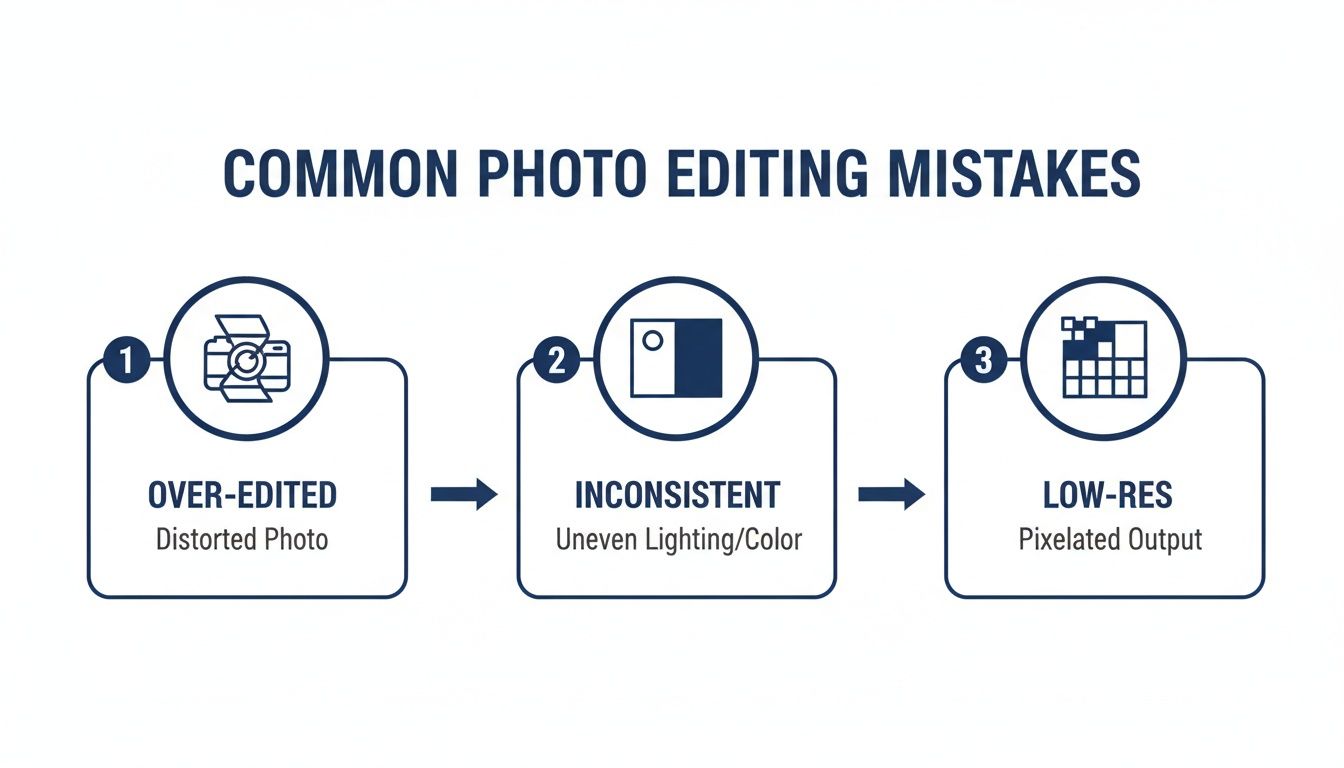
As you can see, it’s all too easy to fall into traps like over-saturating colors, creating an inconsistent look across your listing photos, or exporting low-resolution files. These little mistakes can erode a potential buyer's trust.
By bringing a dedicated AI staging tool into your process, you sidestep these common pitfalls and add a powerful new service to your marketing arsenal. Some platforms even include features like "shop the look," which lets potential buyers identify furniture from the staged photos and find links to purchase the real products. This approach is a game-changer for designers, and you can see more examples of how these tools are used for interior design use cases.
Ultimately, these platforms make professional-grade property visualization accessible, fast, and scalable for everyone.
Frequently Asked Questions
Jumping into the world of real estate photography editing software can feel a bit overwhelming. Let's tackle some of the most common questions that come up so you can move forward with confidence.
What Is the Best Software for a Beginner in Real Estate Photography
If you're just starting out, the best software is always going to be something that doesn't feel like you need an engineering degree to use it. Look for a simple interface and features that do a lot of the heavy lifting for you.
AI-driven tools are fantastic for this, especially for jobs like virtual staging or redesigns, because they completely sidestep the technical headaches. For basic photo touch-ups, find a program with good presets or one-click fixes. These make tricky tasks like color correction and balancing exposure much less intimidating, helping you get a professional look without a massive learning curve.
Can Editing Software Really Help Sell a House Faster
Without a doubt. Think about where people start looking for homes these days—online. In fact, a whopping 97% of buyers begin their search on the web. Professional, polished photos are what make a listing pop off the screen.
Great images grab a buyer's attention and help them form an emotional connection. Features like virtual staging are a game-changer here; they turn an empty, echoing room into a potential home in a buyer's mind. Listings with stunning visuals simply get more clicks, which leads to more showings and, you guessed it, a quicker sale.
Is It Better to Use Desktop Software or an Online Platform
This really boils down to how you work. Desktop software, like Photoshop, is incredibly powerful and lets you work offline, but it can be complicated and often requires a significant upfront investment.
Online platforms, on the other hand, are all about convenience and speed. They offer AI-powered features, are usually much more intuitive, and let you work from anywhere on any device. For a busy agent or stager who needs to get great results fast without being chained to one computer, the flexibility of a web-based tool is a huge plus in this market.
Ready to see what your property photos are truly capable of? With RoomStudioAI, you can virtually stage, declutter, and completely redesign any space in just a few seconds. Try RoomStudioAI for free and see the difference AI can make.
Ready to redesign your space?
Try our AI interior design tool and see your room transformed in seconds.
Try Free Design

