Using a free online room design tool is a fantastic way to play with furniture layouts, test-drive color palettes, and experiment with different styles—all without spending a dime. Think of it as your personal design sandbox, a place to hash out ideas and avoid expensive mistakes before you so much as buy a sample pot of paint.
What a Free Online Room Design Tool Can Realistically Do
At their core, free online room design tools are like a "digital test drive" for your interior concepts. They give you a chance to see a rough preview of your vision before committing any real time or money. It's crucial, however, to know that "free" usually means a freemium model. The basic features are there for everyone, but the really powerful stuff is often kept behind a paywall.
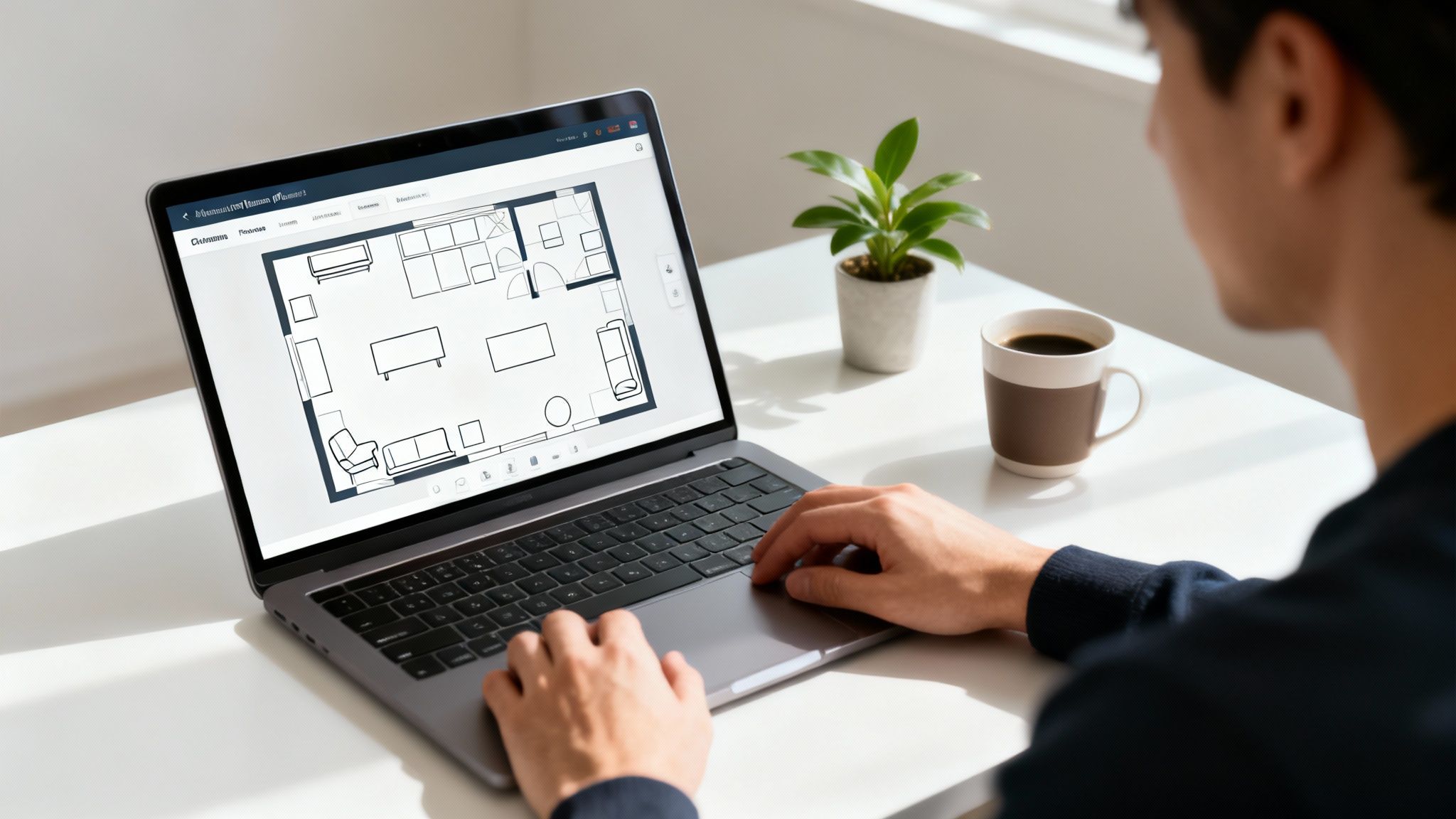
Managing your expectations is the secret to getting the most out of these tools. They are brilliant for initial brainstorming and basic space planning, but they definitely have their limits. Knowing what those are will help you figure out if a free tool is all you need, or if you should be looking for a more professional solution.
The Freemium Trade-Off
Most free platforms give you a solid foundation to start with, but they'll nudge you toward an upgrade for the advanced features. It’s a perfectly fair business model, but you need to know what you're getting into from the outset.
The real magic of a free design tool is its power to kill the guesswork. It takes a fuzzy idea in your head and turns it into a concrete visual plan, giving you the confidence to actually start the project.
You’ll typically find that the limitations fall into a few predictable categories. If you know what they are ahead of time, you can work around them or decide if paying for more makes sense for you.
- Limited Furniture Libraries: The free version usually comes with a basic, generic catalog of furniture and decor. It’s great for blocking out a layout, but you probably won’t find that specific armchair you've been eyeing from your favorite store.
- Lower-Resolution Exports: Any images you save will likely be standard definition and might have a watermark. That's perfectly fine for your own reference, but it won't cut it for a professional client presentation or a real estate listing.
- Personal Use Only: Read the fine print. Most free tools are licensed strictly for personal, non-commercial use. This means a real estate agent using a free render to market a home is likely violating the terms of service.
For most homeowners planning a weekend room makeover, these trade-offs are no big deal. Just being able to confirm that the new sectional will fit or that a moody, dark accent wall won't make the room feel like a cave is a huge win.
But if your project needs higher-quality images, commercial rights, or more advanced features, you might want to look at AI-powered platforms. These newer tools often offer clear, predictable pricing and options built for business use. For example, you can learn more about professional AI alternatives like RoomStudioAI that cater specifically to designers and real estate agents.
The Non-Negotiables: What to Look for in a Free Room Planner
Diving into the world of free online room design tools can feel a bit like the Wild West. There are dozens of options, and they all claim to make your design dreams a reality. So, how do you separate the genuinely helpful tools from the glorified-doodle apps?
It really comes down to a handful of core features. Think of this as your practical checklist. A tool might have some flashy extras, but if it doesn't nail these fundamentals, you’re likely to end up with more frustration than inspiration.
Layout Accuracy and Measurement Tools
First things first: accuracy. This is the absolute bedrock of any useful design tool. If you can't trust the measurements, everything else is just guesswork. That perfect sofa you found online is useless if it shows up and blocks the only walkway in your living room.
A good planner has to let you input precise dimensions—wall lengths, ceiling height, and the exact placement of doors and windows. This is what turns a creative sketch into a workable, real-world schematic.
A design plan without accurate measurements is just a pretty picture. It’s the difference between knowing a piece of furniture might fit and knowing it will fit.
A Quality 3D Visualization Engine
Once your floor plan is locked in, it’s time to bring it to life. This is where the 3D rendering engine proves its worth. You need to see more than just a top-down, blueprint view; you need to feel the space. How does light from the window hit the floor? How much visual weight does that armchair really have in the corner?
Look for tools that offer:
- Realistic Textures: Can you actually tell the difference between a wood floor and a laminate one?
- Natural Lighting: The tool should give you a sense of how sunlight changes the room's mood throughout the day.
- Smooth Navigation: You should be able to "walk" through your virtual room and see it from any angle without clunky controls.
A strong visualization engine closes the gap between an abstract floor plan and a space you can actually imagine living in. It helps you get a real feel for the room's flow, which is crucial for making smart choices, especially when you're designing a living room that truly works.
Robust Furniture and Decor Library
A design tool is only as useful as the pieces you can put inside it. While no free tool will have an infinite catalog, a good one should offer a solid, diverse library of generic furniture, lighting, and decor. This is what lets you experiment freely with different styles and layouts.
This feature is a huge part of why the interior design software market, valued at USD 5,373.8 million in 2024, keeps growing. E-commerce and design are merging, with retailers using these tools to give customers the confidence to click "buy." You can learn more about how technology is shaping home shopping by reading about the expanding interior design software market.
Simple Import and Export Options
Finally, your brilliant design shouldn't be held hostage by the software. Being able to export your work easily is a must-have. You’ll want to share your vision with a partner, send it to a contractor, or just save a copy for your own files.
At a minimum, look for options to save your plan as a standard image file (like a JPEG or PNG) or a PDF. Some of the more sophisticated tools might even let you export a 3D model, giving you maximum flexibility for whatever your project needs next.
How Different Users Get the Most from Design Tools
A free online room design tool isn't a one-size-fits-all magic wand. Its real power comes alive when you have a specific goal in mind. Whether you're a homeowner trying to avoid a costly sofa mistake or a real estate agent trying to make an empty listing pop, your approach will look very different.
By understanding these distinct workflows, you can stop just clicking around and start designing with purpose. Let's walk through three common scenarios to give you a practical playbook.
The core of any project, big or small, boils down to a few key steps: getting your measurements right, visualizing the possibilities, and then sharing your vision.
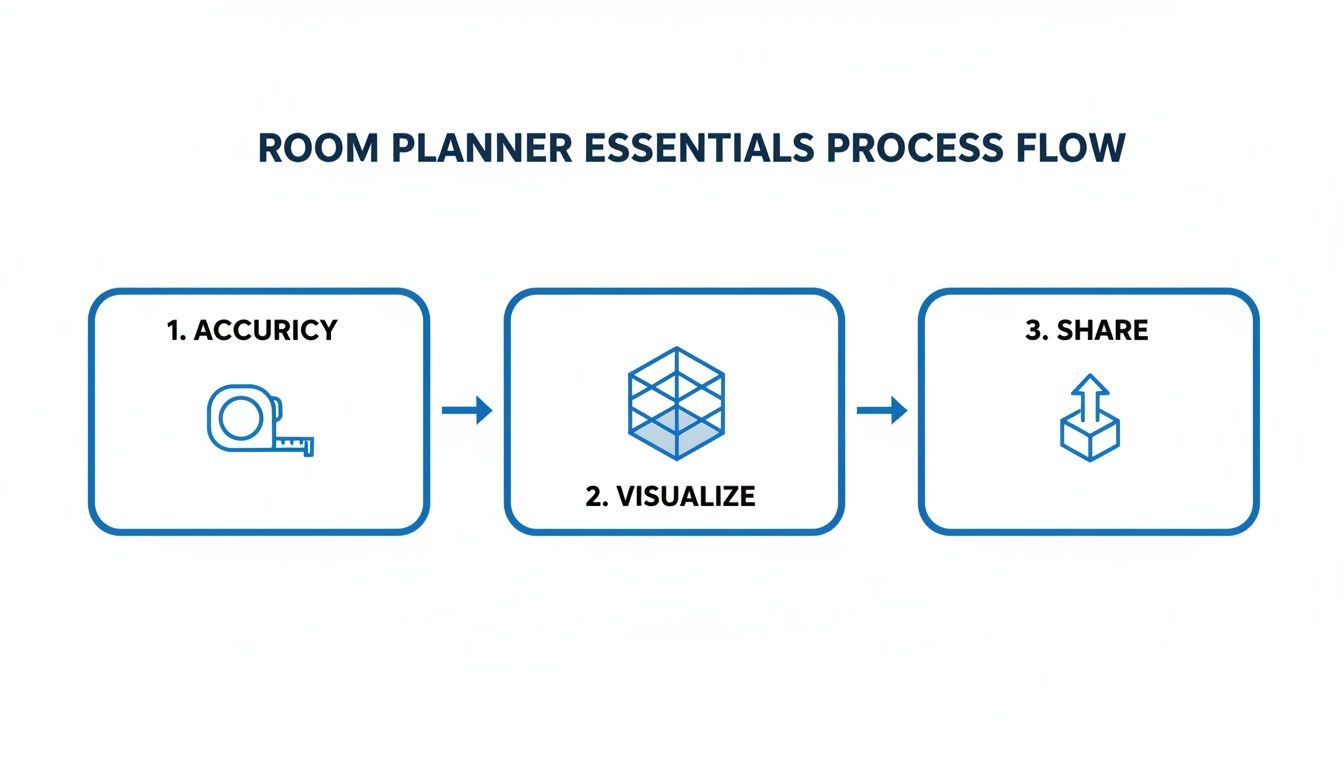
This simple flow—measure twice, visualize endlessly, and share the final plan—is the foundation for any successful room design.
The DIY Homeowner Redecorating a Living Room
For homeowners, it’s all about building confidence. You want to see how that oversized sectional really looks before you swipe your credit card. The workflow here is a practical journey from a blank slate to a finished concept you can trust.
Step-by-Step Homeowner Workflow:
- Measure and Map: Grab a tape measure. Get the real-world dimensions of your room—wall lengths, ceiling height, and the exact placement and size of every window and door.
- Build the Floor Plan: Plug those numbers into the tool to create a precise 2D floor plan. Think of this as the digital twin of your room, ready for you to play with.
- Experiment with Layouts: Start dragging and dropping generic furniture models. Does that sectional make the room feel cramped? Is there a better wall for the TV? Now’s the time to figure it out, risk-free.
- Visualize in 3D: Once you land on a layout that works, switch over to the 3D view. This is where you can start experimenting with wall colors, flooring, and even lighting to get a true feel for the room's atmosphere.
This process turns a fuzzy idea into a solid visual plan, giving you peace of mind that your new furniture will actually fit and your color palette will look as good in reality as it does in your head.
The Real Estate Agent Staging an Empty Listing
For real estate agents, the name of the game is speed and curb appeal. An empty room looks cold, sterile, and surprisingly small in online photos. Virtual staging helps buyers see a house, not just a property.
Here, the process is all about creating beautiful marketing assets—fast.
- Start with Photos: Instead of building a 3D model from scratch, you’ll begin with high-quality photos of the empty rooms.
- Select a Style: Pick a crowd-pleasing, neutral style like "Modern Farmhouse" or "Scandinavian" that has broad appeal.
- Furnish Digitally: Use the tool to add the essentials: a sofa and coffee table in the living room, a bed and nightstands in the master. The goal is to make the space feel inviting and functional, not to win a design award.
- Export for Listings: Generate high-resolution images to upload directly to your property listings, social media channels, and other marketing materials.
A well-staged photo can be the difference-maker. According to a study from the National Association of Realtors, an incredible 82% of buyers' agents said staging makes it easier for a buyer to visualize the property as their future home.
The Aspiring Interior Designer Creating a Concept
For up-and-coming designers, a free tool is a secret weapon for rapid concepting. It’s the perfect way to turn a client's vague ideas into a tangible mockup, getting their buy-in before you dive deep into pro-level software.
Rapid Concepting Workflow:
- Client Vision: It all starts with a conversation. Listen to the client's style preferences, functional needs, and look through their inspiration photos.
- Create a Mood Board: Quickly pull together a digital mood board, either inside the tool or on the side. This is where you’ll combine colors, textures, and examples of key furniture pieces.
- Build a 3D Mockup: Create a basic 3D model of the space and fill it with pieces that capture the mood board's aesthetic. It doesn't need to be perfect; it just needs to sell the vibe.
- Present and Iterate: Share the 3D mockup with your client for that crucial first round of feedback. This quick visual check-in makes sure you’re both on the same page before any serious time is invested.
This is a remarkably efficient way to hash out initial ideas. For designers looking to take the next step, our guide on leveraging technology for interior design explores more advanced strategies.
The Hidden Costs and Common Pitfalls of Free Software
The allure of an online room design tool free of charge is hard to resist, but as anyone who’s gone down that road knows, "free" rarely means without cost. The price you pay isn't always in dollars. More often, it's paid in your time, your patience, and the quality of your final design.
These hidden costs can quickly turn what should be an exciting creative project into a massive headache. Think of your time as the first real payment. Many free platforms are saddled with clunky, counterintuitive interfaces that demand hours of trial and error. What you save on a subscription, you can easily spend tenfold just trying to wrestle with awkward controls or find workarounds for the tool's built-in limitations.
The Quality and Usability Trap
Beyond the time sink, there's the inevitable letdown with the final product. After you’ve poured hours into getting a layout just right, you might be left with a low-resolution, pixelated image that completely fails to capture your vision. These grainy renders are okay for a quick personal sketch, but they fall flat for anything serious like a client presentation or a real estate listing.
This frustration only gets worse when you bump up against the technical guardrails.
- Limited Libraries: You’re often stuck with a small, generic collection of furniture and decor that can look a decade out of date.
- Flat, Unrealistic Renders: The 3D environments often lack convincing lighting and textures, making it impossible to get a true feel for the room's atmosphere.
- Zero Support: When you hit a bug or can’t figure something out, there's usually no one to turn to. You're on your own.
These issues mean your design ends up looking more like a rough concept sketch than a polished, professional visualization, defeating the whole purpose of the exercise.
Commercial Rights and Data Privacy
For any professional, this is the real deal-breaker: most free tools don't grant you the rights to use your designs for business. Dig into the terms of service, and you'll almost always find a clause stating that any images created are for personal, non-commercial use only. Using a render from one of these platforms for a real estate listing or in your design portfolio could land you in legal hot water.
This is a critical distinction in an industry that's rapidly shifting to digital-first delivery. The global interior design services market was valued at an impressive USD 48.44 billion in 2024, and its future growth depends on access to professional, legally sound digital tools. You can see the full analysis in this report on the interior design market's digital shift.
A "free" tool that restricts how you can use your own creations isn't truly free—it's a trade-off. You give up ownership and flexibility for zero upfront cost.
Finally, there’s the issue of data privacy. It's not always clear how some free platforms collect and use your data or your designs. It’s always a good idea to read the fine print. When you need professional results, predictable quality, and commercial rights, it’s time to look at tools built for the job. Take a look at our guide on pricing for AI design tools to understand how a paid plan directly solves these common frustrations.
When to Upgrade to AI-Powered Design Tools
While a traditional online room design tool free of charge is a great starting point for basic floor planning, you’ll eventually hit a wall. The classic, manual approach—building a room, placing every piece of furniture, and tweaking textures one by one—is a serious time sink. This is where AI-powered design tools come in, shifting the heavy lifting from you to an intelligent system.
Instead of asking you to construct a digital model from the ground up, AI platforms automate the most grueling parts of the process. You just upload a photo of your room, and the software gets to work, generating multiple photorealistic redesigns in a matter of seconds. It completely flips the script from manual creation to instant visualization.
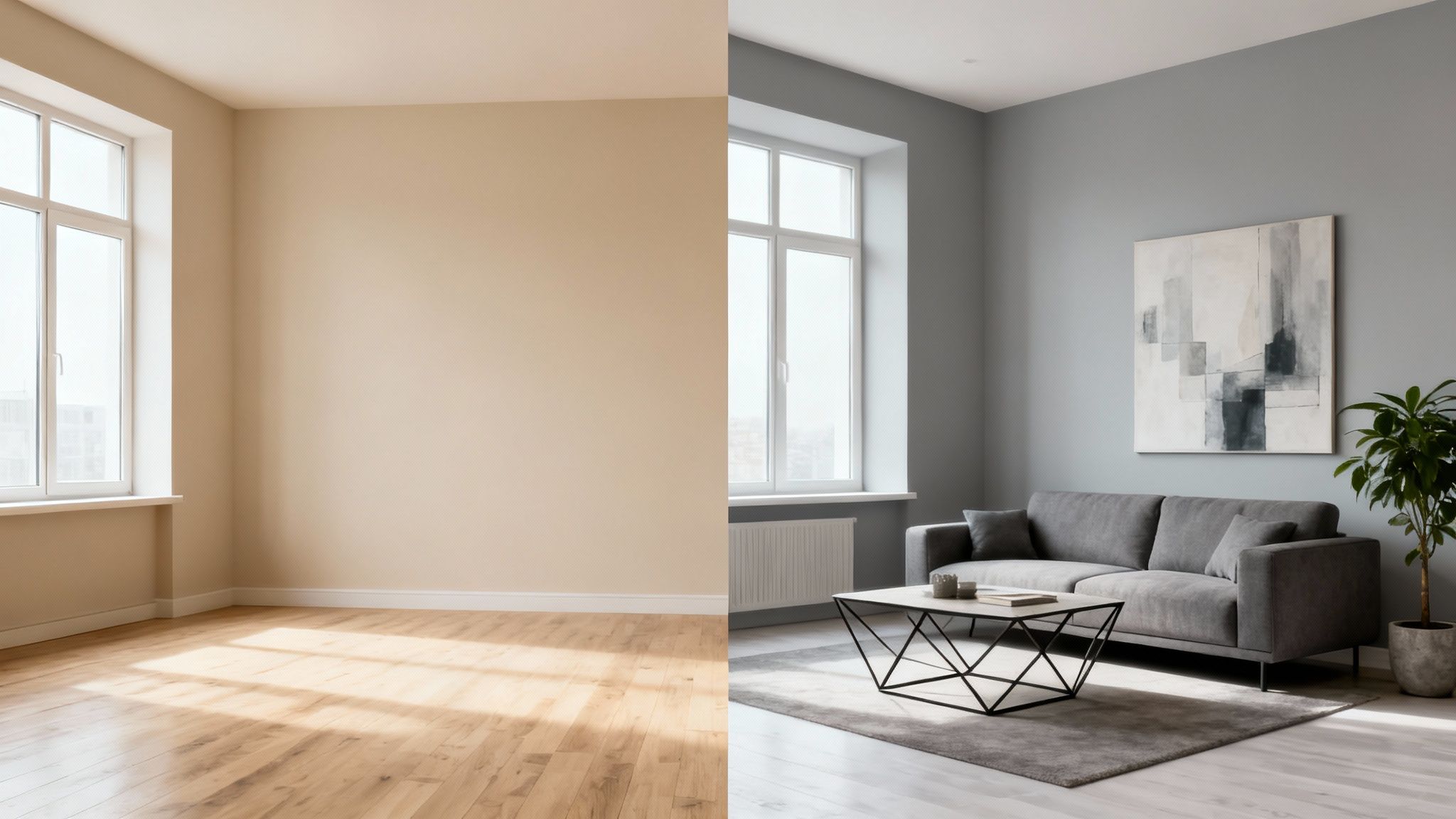
This image captures the magic of AI perfectly. It takes a blank canvas and instantly turns it into a fully realized, professionally styled space. The AI understands and preserves your room's unique architecture and lighting while layering in a cohesive new design concept.
The Core Benefits of AI Automation
The single biggest reason to upgrade is the massive boost in speed and creative efficiency. What might take hours of meticulous clicking and dragging in a traditional planner can now be done in under a minute. This speed unlocks the ability to experiment without consequence.
Think of AI design tools as a professional interior designer on fast-forward. They don't just give you a blank canvas; they deliver fully formed concepts tailored to your actual space, letting you explore dozens of possibilities in the time it would take to draw one.
This efficiency is driving a huge shift in the industry. The global room planner market was valued at around USD 1,432.8 million in 2025 and is expected to blow past USD 2,671 million by 2032. Online tools are leading the charge, making up nearly 50.9% of the market. It's a clear signal that people are moving toward more accessible and powerful design solutions, as detailed in this analysis of the room planner market.
Key Features That Define AI Tools
AI-driven platforms bring several distinct capabilities to the table that directly solve the most common frustrations with free software. These features are all about delivering professional-quality results with the ease of a simple web app.
- Layout Preservation: Unlike tools where you have to build a generic 3D box, AI respects your room’s actual architecture. It works with your real wall dimensions, window placement, and natural light to create a truly accurate render.
- Instant Style Exploration: Want to test out a completely different vibe? With a single click, you can see your living room transformed into a minimalist, coastal, or Japandi-style space without manually swapping every single object.
- Integrated Shopping: Many AI tools come with "shop the look" features. They identify the furniture and decor in the generated images and provide links to similar items from real retailers, closing the gap between inspiration and reality.
Ultimately, upgrading to an AI tool is the logical next step when your design ambitions outgrow the limits of basic planners. For anyone ready to see what this technology can do, check out our guide on how to get started with a free AI interior design tool.
Frequently Asked Questions
Jumping into the world of free design software can definitely bring up some questions. Let's clear up a few of the most common ones so you can pick the right tool for the job.
Can I Use Images from a Free Design Tool for My Business?
That’s a big one, and the short answer is almost always no. Most free room design tools have terms of service that explicitly restrict their use to personal, non-commercial projects. So, if you're thinking of using a render for a real estate listing, your professional portfolio, or any other money-making venture, you'd likely be breaking their rules.
For any kind of commercial work, you'll need to look for a platform with a dedicated professional or business license. These paid plans are what give you the legal green light to use the visuals for marketing and client presentations, saving you from a potential copyright headache later on. It’s always worth reading the fine print before you get too far into a project.
What Is the Biggest Difference Between Free and AI Design Tools?
It really comes down to the workflow and who does the work. With a typical free tool, you're the one in the driver's seat for everything. You have to pull out the tape measure, painstakingly build a 3D model of your room, and then manually drag and drop every single piece of furniture and decor.
An AI design tool flips that entire process on its head.
Instead of building from scratch, you just upload a photo of your actual room. The AI takes over from there, analyzing your space and generating a variety of complete, photorealistic redesigns in seconds, all while keeping your room's original architecture and lighting intact.
How Accurate Are the Furniture and Colors in These Tools?
This is where you'll see a lot of variation from one tool to the next. Free platforms often rely on generic 3D models and a basic palette of colors. They’re fantastic for getting a feel for a layout—for instance, figuring out if a big sectional works better than two separate armchairs—but you can’t count on the dimensions or colors to be a perfect match for real-world items.
It's best to think of them as a way to explore ideas, not as a precise shopping list. On the other hand, professional-grade tools, especially those that integrate with actual retail catalogs, tend to be much more accurate with both scale and color, bridging that gap between your digital plan and the final result.
Do I Need Design Experience to Use an Online Room Planner?
Absolutely not. The whole point of most free online design tools is to be user-friendly for beginners. They’re built with simple drag-and-drop interfaces that let pretty much anyone start mapping out a floor plan and playing with different arrangements right away.
There might be a small learning curve if you want to create a really polished, high-end look, but the core functions are designed to be incredibly accessible. AI-powered tools make it even easier by automating the tricky parts of design composition, so you can just focus on finding a style you love.
Ready to skip the manual work and get professional-quality results in seconds? RoomStudioAI uses the power of AI to transform your real room photos into stunning, photorealistic designs. Explore what you can create with RoomStudioAI today!
Ready to redesign your space?
Try our AI interior design tool and see your room transformed in seconds.
Try Free Design

