Ever felt that spark of an idea for a room makeover but hesitated, worried about how it would actually turn out? Imagine having a digital playground for your home, a space where you could move walls, swap out furniture, and splash wild colors on the walls, all without lifting a hammer or spending a penny. That’s exactly what interior design software gives you. It's a risk-free way to bring your vision to life.
What Is Interior Design Software?
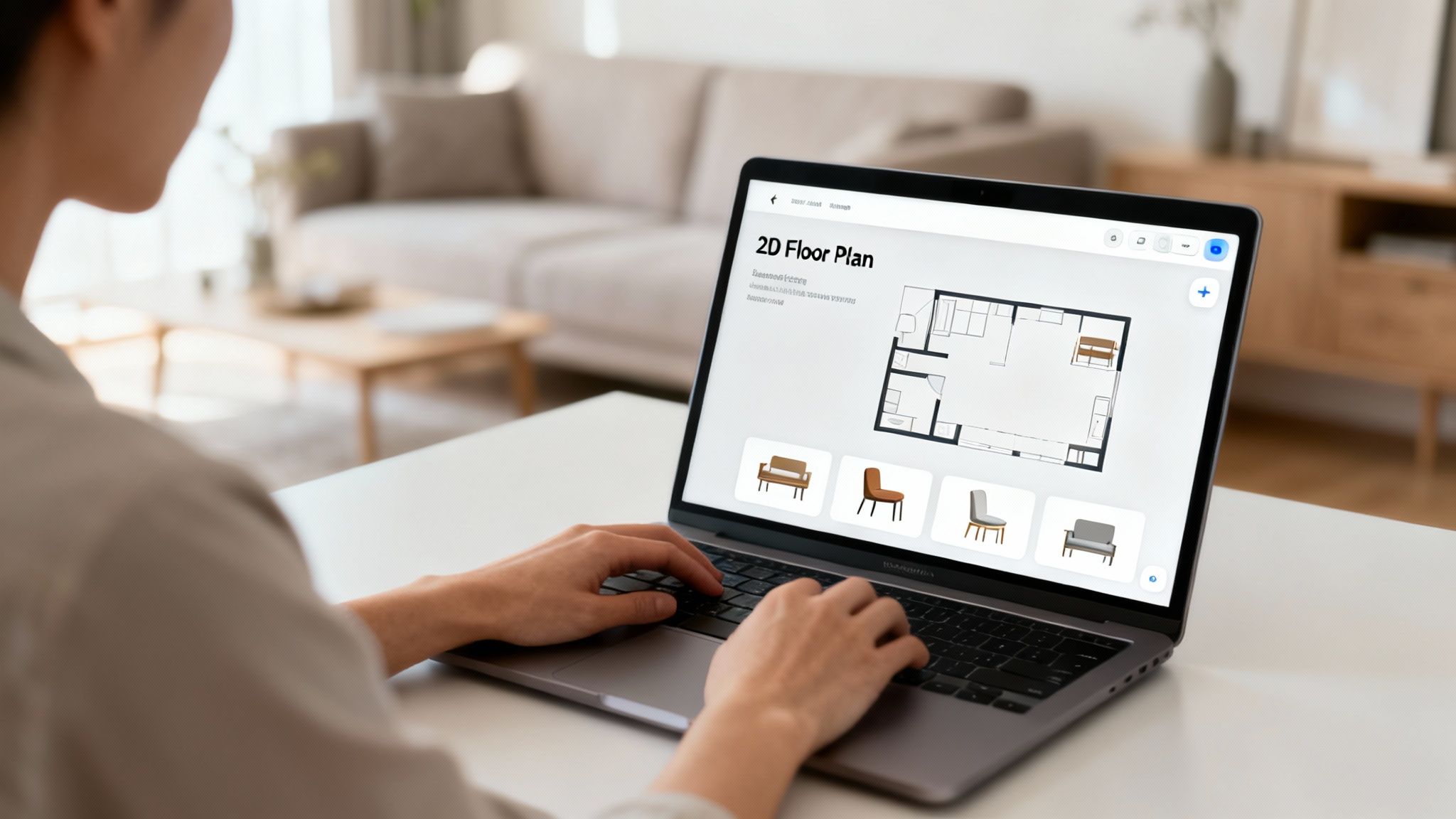
At its heart, interior design software is the bridge between your imagination and a real, livable space. It takes the guesswork and anxiety out of the design process, making it not just manageable but genuinely fun. Instead of trying to guess if that gorgeous oversized sofa will actually fit, you can drop a digital version into your room and see for yourself—instantly.
This freedom to experiment is a game-changer, especially when you're just starting out. You can try out that bold accent wall or that quirky furniture layout you saw online, and if it doesn't work? No problem. Just a few clicks and it's gone. The whole point is to remove the technical hurdles so you can focus purely on the creative side of things.
From Blueprint to Realistic Visualization
The beauty of most modern design software is how straightforward it is. You typically start with a simple 2D floor plan, which is just a flat, top-down map of your room. You’ll draw your walls, place doors and windows, and get the basic layout down.
Then comes the fun part: furnishing the space. You can drag and drop furniture, rugs, and lighting from huge online libraries right into your plan. Once everything’s in place, you hit a button, and the software magically converts your flat plan into a stunning 3D model that you can virtually walk through.
This immediate feedback loop is your best friend for avoiding costly mistakes. Is there enough room to walk around the coffee table? Do those textures clash? You’ll know right away. It's this accessibility that's driving huge growth in the market.
In fact, the global interior design software market is on track to hit USD 9,656.6 million by 2030. That boom is largely thanks to everyday homeowners and renters who want to plan their own projects without the cost of hiring a pro. You can discover more about this market trend on Grand View Research.
For anyone new to design, these tools offer the perfect blend of structure and creativity. They provide a clear path to visualize a space, making the entire process of interior design feel much less intimidating.
Let's break down exactly how these tools make the design process smoother for a beginner.
How Interior Design Software Helps Beginners
The table below highlights the key advantages, showing how software can help you avoid common pitfalls and bring your ideas to life with confidence.
| Benefit | How It Helps Beginners |
|---|---|
| Risk-Free Experimentation | Test out layouts, colors, and furniture styles without any financial or physical commitment. Undo mistakes with a click. |
| Accurate Space Planning | Ensure furniture fits and there's proper flow before you buy. No more "will it fit?" guesswork. |
| Visualizing the Final Look | See a realistic 3D preview of your design, helping you make better decisions on everything from paint to decor. |
| Budget Management | Many tools let you add products from real brands, helping you keep track of costs as you design. |
| Building Confidence | Successfully creating a digital plan empowers you to take on the real-world project with a clear vision. |
Ultimately, these platforms are about replacing guesswork with clarity, giving you a solid plan to follow.
Interior design software empowers you to make informed decisions. It replaces guesswork with certainty, ensuring the final result matches the vision you started with.
Key Features of Beginner Friendly Software
Diving into interior design software for the first time can feel like a lot to take in, but it really just comes down to a few key features that make a tool genuinely easy to use. Instead of getting bogged down in technical specs, think of it like learning to cook with a great recipe—you want clear instructions and the right ingredients at your fingertips. The best platforms don't expect you to be an architect; they guide you.
The absolute must-have is an intuitive drag-and-drop interface. This is a non-negotiable for beginners. It means you can grab a sofa, a coffee table, or a lamp and just pull it into your digital floor plan without navigating complicated menus or learning keyboard shortcuts. It’s a completely visual way to play with layouts and see how different pieces look together, making the whole process feel more like a creative puzzle than a technical chore.
The Power of a Digital Catalog
Right alongside that is a massive, pre-loaded object library. Think of this as your personal digital warehouse, stocked with endless furniture, decor, lighting, and material options. A deep and varied library is a game-changer because it lets you experiment with items that look and feel like real-world products, which helps ensure your final design is both beautiful and actually possible to create.
A good library will give you everything you need:
- A wide variety of furniture styles: Whether you're into sleek modern, cozy rustic, or eclectic bohemian, the options should be there.
- Diverse decor items: Rugs, plants, wall art, and all the little accessories are what make a space feel personal and lived-in.
- Different materials and finishes: You'll want to test out options for flooring, wall colors, and fabrics to get the look just right.
This feature saves you from the incredibly difficult task of building 3D models from scratch. Instead of being a 3D artist, you get to be a designer—browsing, selecting, and placing items just like you would if you were shopping for your home.
The best beginner software isn't about giving you more buttons to press. It’s about removing technical barriers so you can focus entirely on your creative vision. It turns complex tasks into simple, enjoyable actions.
From 2D Plans to 3D Realism
Another essential is the ability to flip between 2D and 3D views effortlessly. Most projects start with a 2D floor plan, which is just a simple, top-down blueprint of the room. This is where you nail down the layout, check your measurements, and make sure there’s enough walking space around the furniture.
Once you're happy with the floor plan, a single click should drop you right into a 3D realistic view. This is the magic moment where your design truly comes alive. You can take a virtual stroll through the room, see how the light from a window hits the sofa, and get a real sense of the space's atmosphere. Getting that instant visual feedback is what helps you make confident decisions and catch potential mistakes before they become expensive real-world problems.
A major leap forward here is the new photo-to-render technology. Instead of having to build a digital room from the ground up, you can just upload a photo of your actual space. AI-powered tools like RoomStudioAI can analyze your photo, understand its architecture and lighting, and then let you redesign it in different styles in just seconds. This approach completely skips the manual 3D modeling part, putting professional-quality results within anyone's reach. It’s the ultimate shortcut from a simple idea to a stunning, photorealistic design.
Your First Interior Design Project Workflow
So, you’re ready to dive into your first project with interior design software. It’s an exciting feeling, but it can also feel a little overwhelming. The best way to tackle it is by following a clear, step-by-step process that breaks the whole project down into manageable chunks. This roadmap will help you move from initial ideas to a stunning final design without getting lost along the way.
Think of it like building with LEGOs. You don't just dump all the bricks out and hope for the best; you follow the instructions, piece by piece, to build something incredible. A good design workflow does the same thing, giving you the structure to build your confidence as you turn a blank canvas into a fully realized room.
This structured, guided approach is exactly why the interior design software market, now valued at USD 2.49 billion, is booming. It's putting powerful design capabilities into the hands of beginners. This growth was supercharged by the home renovation wave that followed the pandemic, a period where an incredible 52% of U.S. households took on improvement projects. You can see the full research on this expanding market if you're curious about the trends.
This diagram breaks down the core design process into three simple, logical stages.
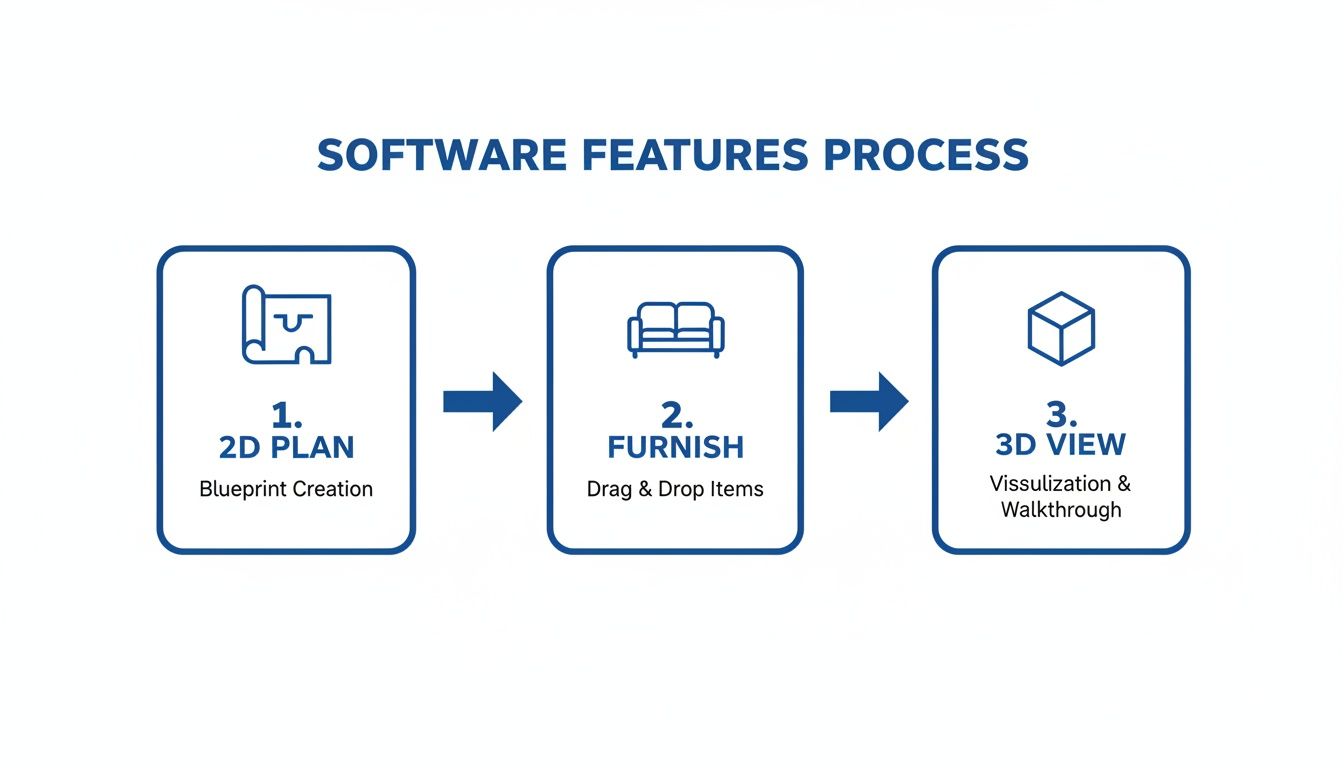
As you can see, each step builds directly on the one before it, making the journey from a flat 2D plan to a rich 3D visualization feel smooth and natural.
Step 1: Start with an Accurate Foundation
Every great design is built on a solid foundation, and in this case, that means accurate measurements. Before you even open the software, grab a tape measure. You'll need to note the room's dimensions—length, width, and ceiling height—along with the precise locations of doors, windows, and any unmovable features like a fireplace or built-in shelving.
Next, you’ll translate those numbers into a digital floor plan. Most beginner-friendly programs make this easy, letting you draw walls and drop in architectural elements. Some of the newer AI tools even allow you to upload a simple sketch or a photo of the room, and they'll generate a scaled floor plan for you automatically.
Think of your digital floor plan as the blueprint for your entire project. If you get this part right, every piece of furniture and decor you add later will fit just as you imagined, saving you from expensive mistakes down the road.
Step 2: Furnish and Arrange Your Space
Now for the fun part. With your digital room laid out, you can start bringing it to life with furniture. A good rule of thumb is to place the big, important pieces first—the sofa, the bed, the dining table. These items anchor the room and define its main function and traffic patterns. You want to make sure you can walk around comfortably!
For instance, in a living room, you need a clear path from the door to the couch. For more tips on this, check out our guide to effective living room design.
Once your main furniture is in place, you can fill in the gaps with smaller items like side tables, lamps, and decor. This is where you can really experiment. Drag-and-drop functionality makes it painless to try out different layouts until you find one that feels right.
Step 3: Generate Your Final Vision
This is the magic moment. The final step is to convert your 2D floor plan into a realistic 3D rendering. This is when your design truly jumps off the screen, letting you see exactly how the light will hit the walls, how different textures play off each other, and what the space will actually feel like.
A high-quality render is the ultimate decision-making tool. It gives you a photorealistic preview of the finished room, giving you the confidence to move forward with your design choices.
Comparing Traditional vs. AI-Powered Design Workflows
The path from a blank slate to a finished design looks very different depending on the tools you use. Traditional software requires a lot of manual work and technical skill, while modern AI-powered tools automate many of the most time-consuming steps. This table shows just how much simpler the process can be for a beginner.
| Step | Traditional Software Approach | AI-Powered Approach (e.g., RoomStudioAI) |
|---|---|---|
| 1. Space Creation | Manually draw walls, doors, and windows to precise measurements. | Upload a photo of your room; AI generates the 2D floor plan automatically. |
| 2. Layout Planning | Browse extensive libraries to find, place, and resize each furniture item. | Describe your style and needs; AI suggests multiple fully furnished layouts. |
| 3. Material & Color Selection | Manually apply textures and paint colors to every surface, one by one. | Select a style (e.g., "Scandinavian," "Industrial") and AI applies a cohesive palette. |
| 4. Lighting Setup | Place and configure individual light sources (ambient, task, accent) for realism. | AI automatically simulates realistic lighting based on windows and time of day. |
| 5. Rendering | Adjust complex camera angles, render quality settings, and wait minutes to hours. | Click a button. AI generates a high-quality, photorealistic render in seconds. |
As you can see, AI-driven platforms like RoomStudioAI are built to remove the technical barriers. Instead of spending hours on manual drafting and configuration, you can focus almost entirely on the creative side of design, making it a far more accessible and enjoyable process for anyone just starting out.
How AI Is Changing the Game for Home Design
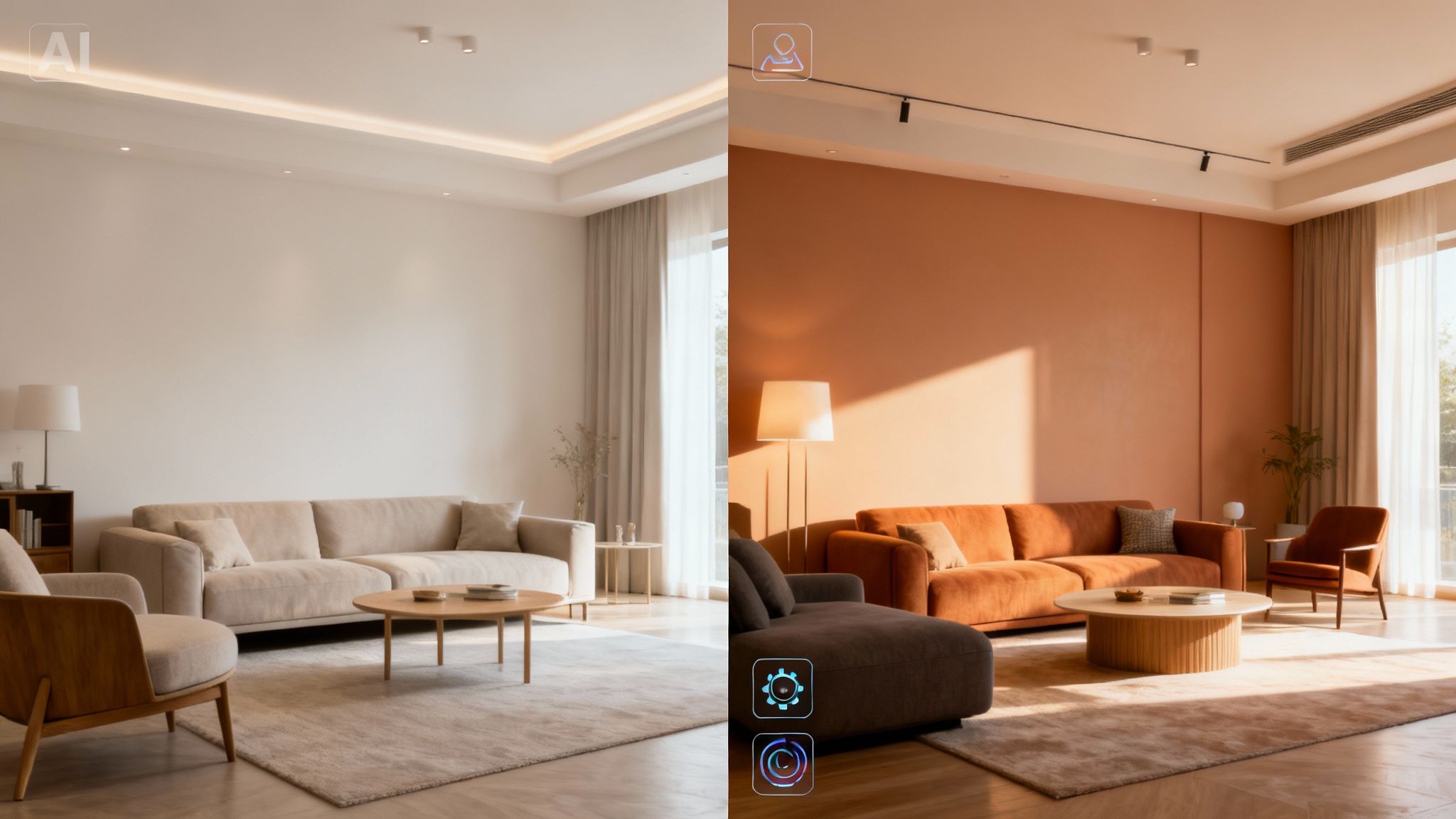
Think of artificial intelligence as the ultimate design co-pilot, especially if you're just starting out. It completely flattens the steep learning curve that used to come with professional design software, putting high-quality results within reach for anyone with a good idea.
The core concept is brilliantly simple. Instead of painstakingly building a digital room from scratch, you begin with a photo of your actual space. Modern AI tools can analyze that photo, intelligently recognizing your room’s unique layout, windows, and lighting. This is the real magic. Because the AI understands the bones of your space, it can generate entirely new styles in seconds while keeping the room’s identity intact. The result looks real because it is real—it's your room, just reimagined.
Instant Redesigns, Zero Manual Labor
Let's say you want to see your cluttered living room as a clean, minimalist retreat. In the old days, that meant hours of tedious 3D modeling. Now, AI-powered interior design software for beginners can pull it off in just a few clicks. These tools are packed with specific features that automate the heavy lifting.
- Automatic Furniture Removal: Instantly clears out your existing furniture, giving you a completely blank canvas to work with.
- Virtual Clutter Cleanup: The AI can digitally erase stray objects and general mess, helping you see the room's true potential.
- One-Click Style Swaps: Apply a whole new aesthetic—like Modern, Japandi, or Rustic—and watch the AI instantly furnish and decorate the room to match.
This level of automation is shaking things up. The interior design services market is projected to grow by USD 31.77 billion, but software adoption is climbing more than twice as fast. It’s a clear signal that people are moving toward DIY digital tools, with 45% of interior projects now using software to cut down on costs. Even in real estate, listings with virtual staging sell 20% quicker, a task AI makes incredibly fast and simple. You can dive into the full market analysis on Technavio.
For a beginner, this is a game-changer. You can whip up dozens of stunning design concepts in the time it used to take to sketch a single floor plan. This kind of rapid-fire iteration is perfect for figuring out what you truly like and building up your design confidence.
From Inspiration to Reality with a Single Click
One of the most powerful developments in AI design is "shop the look" technology. This finally closes the gap between seeing a design you love and actually being able to create it. After the AI renders a beautiful new look for your room, it can use visual search to identify the specific furniture and decor items in the image.
AI doesn't just show you what's possible; it provides a direct path to making it happen. It turns a static image into an interactive, shoppable design concept.
From there, the software will suggest similar, real-world products you can buy from online stores. So, if you fall in love with a sofa in your AI-generated design, you can get a link to purchase it (or a very close alternative) almost immediately. This takes the software from being a simple visualization tool to a practical assistant for the entire project. Platforms offering a free AI interior design tool often include these features, letting you play around and find your style without any commitment.
Choosing the Right Software and Pricing Plan
With so many tools out there, picking your first interior design software for beginners can feel like a project in itself. The trick is to tune out the marketing buzz and focus on how you'll actually use it. You want a tool that gets out of your way and lets your creativity flow, not something that creates technical headaches or eats up your budget.
Think of it like choosing a phone plan. The “best” option is completely personal. Are you a weekend warrior tackling a single room, or do you have bigger plans to redesign multiple spaces over the next year? Knowing this upfront makes the decision a whole lot easier.
Free vs Paid Software
Many fantastic programs offer free versions, and they are the perfect place to start. A free plan is your no-risk sandbox—a place to experiment with basic floor plans, play with layouts, and just get a feel for the platform’s controls.
But, as you’d expect, free versions usually have some guardrails.
- Watermarked images that aren't great for showing off your ideas.
- Lower-resolution renders that look a bit fuzzy and lack that professional sheen.
- A limited catalog of furniture, textures, and decor to choose from.
Paid plans are where these programs really open up. This is where you unlock premium features like photorealistic 4K renders, massive style libraries, and advanced AI tools that can genuinely transform your workflow. For any serious project, the upgrade is almost always worth it.
Understanding Pricing Models
Once you're ready to invest, you’ll typically run into two main ways to pay. A one-time purchase grants you a lifetime license to a specific version of the software. This can feel like a great deal long-term, but you might miss out on major updates and new features down the road.
What's far more common these days are subscription plans. With monthly or annual billing, you get constant access to the latest and greatest version of the tool, including all updates, new features, and customer support. This model gives you incredible flexibility, whether you need the software for a quick one-month project or for ongoing design work.
The right software choice isn’t just about the features; it’s about matching the cost to the scope of your project. A flexible plan ensures you get maximum value, whether you're designing for a weekend or a year.
The smartest approach? Always start with a free trial. See if the workflow clicks with you. When you’re ready to commit, look at the different tiers. For a simple breakdown of options built for different needs, from a single room makeover to professional use, you can explore the pricing plans for RoomStudioAI.
Common Questions About Interior Design Software
Diving into a new piece of software always feels like a bit of a leap. When it comes to interior design tools for beginners, a few questions tend to pop up again and again. Is this going to be too complicated? How real will the final images actually look? Let's clear the air and tackle those common concerns head-on.
Do I Need Design Experience to Use This Software?
Absolutely not. The whole point of modern interior design software, especially the AI-powered tools, is that they’re built for people without a lick of design or technical experience. They’re designed to be intuitive right out of the box.
Instead of throwing you into a complex 3D modeling environment, many tools now start with something simple: a photo of your own room. From there, it's all about playing. You can apply different styles, swap out furniture, and test new colors with just a few clicks. The technical stuff is handled for you, so you can focus on what matters—your ideas.
Can I Use This Software for Just a Single Room?
Of course. These tools are perfect for projects of any scale. Whether you're planning a massive home renovation or just want to figure out what to do with your spare bedroom, the software is more than up to the task. Most people actually use it to tackle one space at a time.
This makes it a lifesaver for renters or homeowners who want to see how a new layout for their office or living room will look before they spend a dime or lift a hammer. It's a smart way to focus your energy right where you need it.
The best beginner software isn’t about giving you more buttons to press. It’s about removing technical barriers so you can focus entirely on your creative vision. It turns complex tasks into simple, enjoyable actions.
How Realistic Are the Final Designs?
This is the big one, and the answer is: surprisingly realistic. While the quality can vary between platforms, today's top-tier tools produce stunningly photorealistic results. AI-driven software is particularly good at this because it uses a real photo of your space as the starting point.
This simple but brilliant approach means all the important details—like the way natural light hits the walls, the existing shadows, and the room's true proportions—are already baked in. The final render you get looks uncannily like how the redesigned room would actually appear in real life, giving you a trustworthy preview to guide your decisions.
What Is the Difference Between Free and Paid Software?
This is a key question for anyone working with a budget. Free software is a fantastic way to get your feet wet. You can map out basic layouts and just get a feel for how everything works. But you'll probably hit a wall pretty quickly.
The free versions usually come with some real limitations:
- Lower-Resolution Images: Your designs might end up looking a bit blurry or pixelated, which isn't great for showing them off.
- Watermarks: Most free tools will stamp their logo all over your final images.
- Smaller Furniture Libraries: You’ll have a much more limited catalog of furniture, decor, and materials to work with.
- Restricted Features: The coolest tools, especially the AI-powered ones, are almost always kept behind the paywall.
A paid plan, which is usually a subscription, is where you unlock the software's true power. You get access to crisp, high-resolution 4K renders, a massive library of styles and items, advanced AI features, and rights to use the images for commercial purposes. For anyone serious about getting a high-quality visualization, a paid plan just offers far more creative freedom and a much more professional result.
Ready to stop wondering and start designing? With RoomStudioAI, you can transform a photo of your room into dozens of stunning, photorealistic designs in seconds. Get started for free today and bring your vision to life!
Ready to redesign your space?
Try our AI interior design tool and see your room transformed in seconds.
Try Free Design

