At its heart, interior design render software is a tool that turns flat, 2D ideas into vivid, lifelike 3D images. The best way to think about it is as a digital camera for a room that doesn’t exist yet. It lets you see precisely how a space will feel long before you pick up a paintbrush or order a single piece of furniture.
From Imagination to Photorealistic Reality
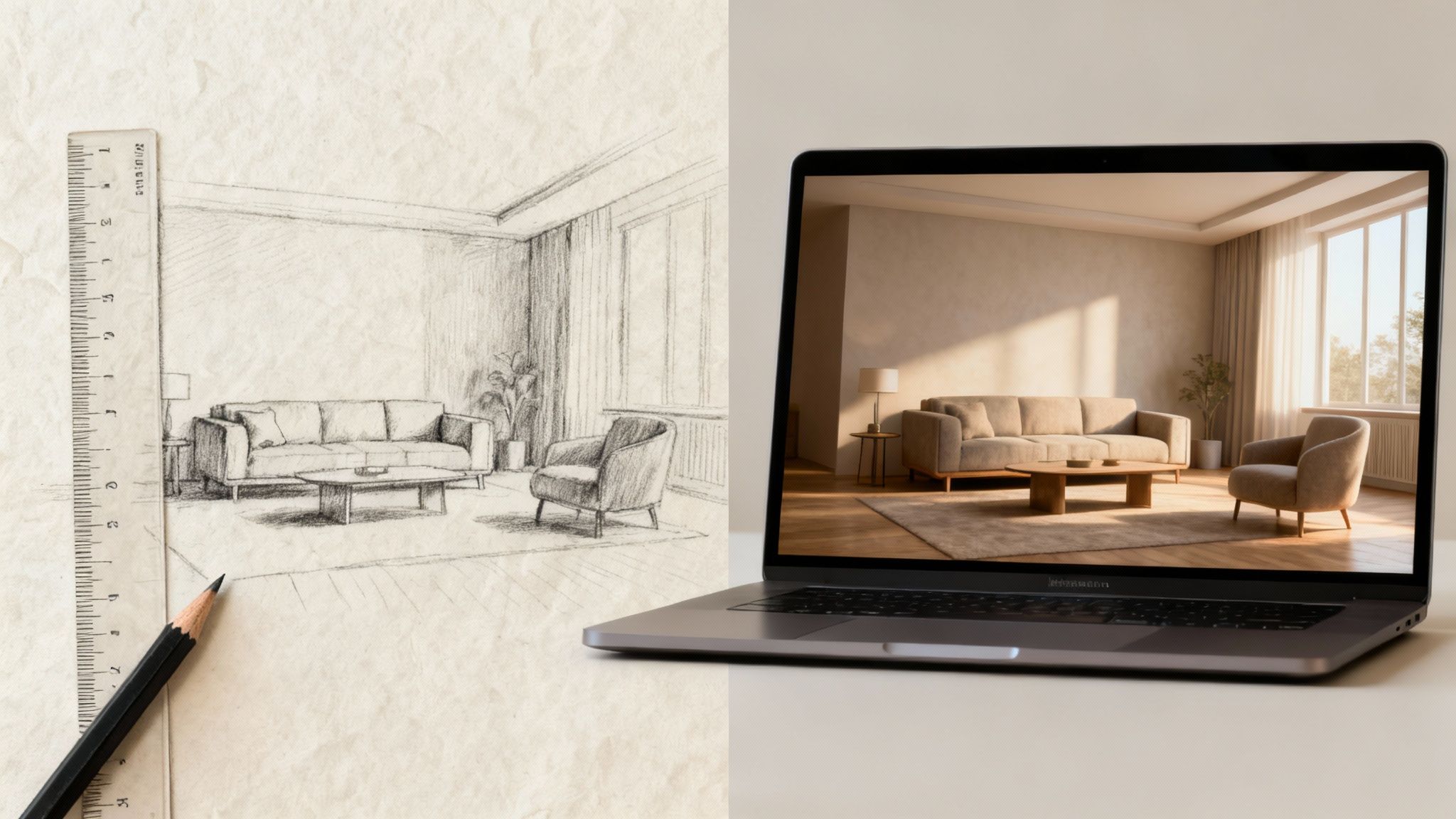
Before tools like this were available, bringing a design concept to life involved hand-drawn sketches, physical mood boards, and a fair bit of imagination. While those methods have a certain charm, they could never quite capture the subtle interplay of light, texture, and dimension. Clients and homeowners had to connect the dots themselves, hoping that a fabric swatch and a furniture cutout would translate into a beautiful, cohesive room.
Modern interior design render software completely closes that gap. It gives you the power to build, furnish, and decorate a virtual room with an incredible level of detail. You can test out dozens of wall colors, swap between hardwood and tile flooring, or see exactly how the afternoon sun will fall across a velvet sofa.
A Game Changer for Everyone
This evolution from manual sketches to digital renders is about more than just creating impressive images; it’s about making smarter, more confident decisions. For a professional designer, it's a crucial tool for communicating a vision to a client. For a homeowner, it’s a personal sandbox for exploring styles and layouts without any risk. If you're looking for inspiration, you might enjoy browsing these living room ideas to see what’s possible.
This shift is fueling massive industry growth. The global interior design software market was valued at USD 5,373.8 million in 2024 and is expected to hit USD 9,656.6 million by 2030, according to a report from Grand View Research. This boom is driven by a worldwide surge in home renovation projects, where tools like RoomStudioAI are making top-tier visualization accessible to everyone.
The core value of rendering software is its ability to eliminate uncertainty. It replaces the question, "I wonder what this will look like?" with the confident statement, "I know exactly what this will look like."
To really grasp how much things have changed, it helps to see a side-by-side comparison. The table below breaks down the differences between the old way of doing things and the new, streamlined approach offered by modern render software.
Traditional Design vs Modern Render Software
The leap from hand-drawn sketches to photorealistic renders represents a fundamental shift in how we approach interior design. It's a move from approximation to precision.
| Attribute | Traditional Methods (Sketches, Mood Boards) | Modern Render Software (e.g., RoomStudioAI) |
|---|---|---|
| Speed | Slow, manual process taking days or weeks | Extremely fast, generating visuals in seconds or minutes |
| Realism | Suggestive and artistic, but lacks photorealism | Hyper-realistic outputs with accurate lighting and textures |
| Revisions | Time-consuming; requires completely new drawings | Instantaneous changes to colors, materials, and furniture |
| Cost | High cost for professional hand-drawn perspectives | Cost-effective with scalable subscription models |
Ultimately, modern tools empower creativity by removing the friction and guesswork that once defined the design process, leading to better outcomes for professionals and homeowners alike.
What Really Makes a Great Interior Design Render?
At first glance, you might think all interior design render software does the same thing: make a picture of a room. But the difference between a clunky tool and a professional platform is all in the details. Once you understand the core features, you'll know exactly what to look for to bring your vision to life.
The ultimate goal of any render is photorealism. We're not just talking about making an image look "nice." We're talking about tricking the human eye into believing it's looking at a real photograph. The magic behind this illusion comes down to a few critical components working in perfect harmony.
The Building Blocks of Realism
Think of creating a render like staging a scene for a movie. For the set to feel believable, the lighting, shadows, and props (the materials) all need to look and feel authentic.
Lighting and Shadow Casting: This is probably the most important piece of the puzzle. High-quality software doesn’t just plop a generic light source into a room. It simulates how natural light from a window would actually diffuse across a space, creating soft, accurate shadows behind a chair or casting a warm, gentle glow on a wooden floor.
Material and Texture Accuracy: This goes way beyond just applying a "wood" color to a table. It means rendering the subtle grain of the oak, the faint sheen on a polished marble countertop, or the soft, woven texture of a linen curtain. The best software makes materials look tangible enough to touch.
A great render is a masterclass in subtlety. It's not the big, obvious things that convince us; it's the tiny imperfections—the way light reflects off a metal lamp, the soft texture of a rug, and the realistic shadows in a corner—that make a digital space feel real.
The starting point for your project also says a lot about the software's capabilities. For years, creating a render meant building a full 3D model from scratch in a complex program—a painstaking process that could take days, if not weeks. It required a ton of technical skill, patience, and a beast of a computer.
Now, there's a much smarter, more efficient approach: starting with a simple 2D photograph. Instead of building a digital room from the ground up, you use an image of the actual space. This is not only faster, but it also guarantees the final render is grounded in reality. This is where a game-changing feature comes into play: layout preservation.
The Power of Layout Preservation and AI
Layout preservation is the technology that keeps the original room's architectural bones—its walls, windows, doors, and unique perspective—completely intact while letting you redesign everything inside. This is absolutely critical for creating redesigns that look believable. Without it, a render can feel distorted or just plain fake, like the furniture doesn't quite belong in the space.
This is where artificial intelligence has completely changed the game. AI has turned those clunky old design tools into smart, intuitive platforms that can produce stunning, layout-preserving redesigns from a single photo. While North America is currently the biggest market, the Asia-Pacific region is the fastest-growing, driven in part by the massive shift to remote work. With over 40% of professionals now working in a hybrid model, the demand for quick home office visualizations has exploded. You can learn more about these trends in this insightful Market Research Future report.
AI-driven features in modern rendering software automate the tedious tasks that used to take hours of manual labor. These are the capabilities that separate legacy systems from next-generation tools.
Key AI-Powered Capabilities:
- Automatic Room Emptying: With a single click, the software can digitally remove all the existing furniture and clutter, giving you a clean slate for a total redesign without messing with the room's structure.
- One-Click Stylistic Application: Instantly apply a cohesive design style like 'Japandi,' 'Modern Farmhouse,' or 'Minimalist' to an entire room. The AI already understands the core principles of each style and populates the space with the right furniture, colors, and decor.
- Sketch-to-Render Conversion: This amazing feature lets you upload a rough, hand-drawn sketch of a layout and watch as the AI transforms it into a polished, photorealistic render. It truly bridges the gap between a back-of-the-napkin idea and a client-ready visual.
These advanced features give both professionals and homeowners the power to explore creative ideas with incredible speed and ease. If you're curious to see how this all works, you can experiment with this powerful free AI interior design tool.
At the end of the day, the best software doesn't just create an image; it provides an intuitive, powerful, and realistic canvas for your imagination.
How Different Professionals Use Render Software
It’s one thing to talk about the theory behind interior design render software, but it’s another thing entirely to see it in action. This isn't just about making pretty pictures; it's a powerful problem-solving tool that adapts to different goals, timelines, and industries. Whether it's a homeowner figuring out their living room or a real estate agent trying to sell a high-stakes listing, the software flexes to meet their specific needs.
To really bring this to life, let’s walk through how three different people might use this technology to get their jobs done. Each story spotlights a unique way the software makes a real, immediate impact.
The Homeowner Planning a Makeover
Meet Sarah. She’s been staring at her dated living room for months, dreaming of a change. The room has good bones—high ceilings and a big window—but the furniture feels clunky and the color scheme is just… tired. She has a Pinterest board full of "Modern Farmhouse" inspiration, but she's completely stuck, terrified of making a costly mistake.
Her goal is simple: experiment freely and visualize different styles before she has to commit any real money.
Here’s how she’d tackle it:
- Photo Upload: Sarah snaps a few clear, well-lit photos of her living room on her phone and uploads one to the software.
- Room Prep: She clicks the "Empty Room" feature. Instantly, the program digitally erases her old couch, coffee table, and rug, giving her a clean slate while keeping the room's exact dimensions and architectural details intact.
- Style Application: Next, she finds the "Modern Farmhouse" style in the design library and applies it. In about 30 seconds, the software generates several fully furnished concepts, filling the space with neutral-toned furniture, rustic wood accents, and cozy textiles that nail the aesthetic.
- Iteration and Refinement: She loves one of the concepts but isn’t sold on the light-colored sofa. She runs the render again, this time adding a simple text prompt: "dark gray sofa." New visuals pop up, showing her exactly how a charcoal couch would anchor the space.
After just an hour of playing around, Sarah has a crystal-clear vision. She’s holding a photorealistic image of her future living room that she can now use as a shopping guide, feeling completely confident in her choices.
This whole process, from a simple photo to a final design, is surprisingly straightforward.
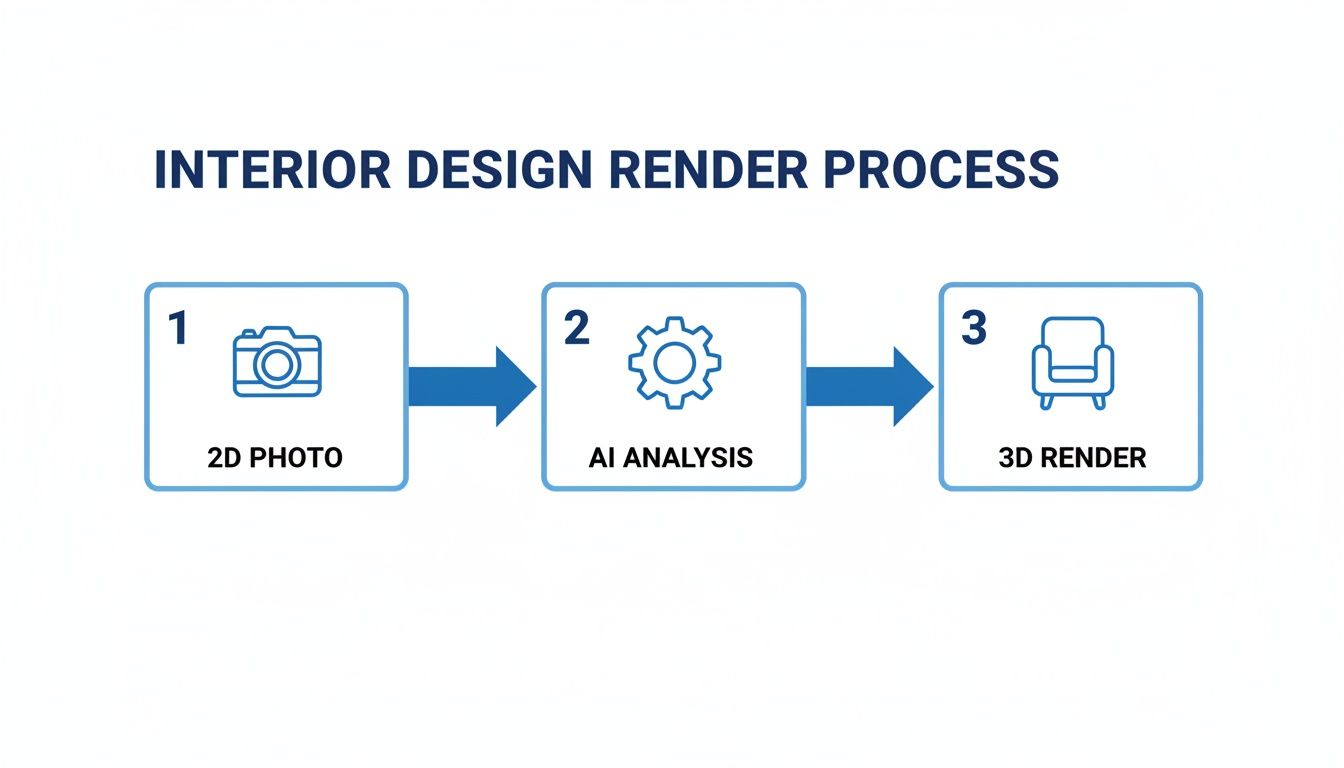
As the flowchart shows, it’s all about turning a basic 2D photo into a polished 3D render through smart AI analysis, which simplifies what used to be a very complex workflow.
The Interior Designer on a Deadline
Now, let's look at David, an interior designer working with a new client. They want to redesign their master bedroom, but their vision is a bit vague—they’ve used words like "calm and luxurious" but can't articulate much more. David’s first big presentation is in two days, and he needs to show up with multiple high-quality concepts to get the ball rolling.
His goal is different from Sarah's: rapidly generate diverse, professional concepts to facilitate client feedback.
For a designer, speed is currency. The ability to produce multiple high-quality visuals in minutes, not days, allows for a more collaborative and iterative design process, leading to happier clients and better outcomes.
David's workflow is all about professional efficiency:
- Client Photo: He starts with a photo the client sent him of their current bedroom.
- Initial Concepts: He first applies a "Luxury" style filter to establish a baseline. Then, knowing they both evoke a sense of calm, he reruns the render with more specific styles like "Japandi" and "Coastal."
- Material and Color Variations: For the Japandi concept, he generates a few variations, one specifying "light oak furniture" and another with "dark walnut accents," to show the client how different materials can change the mood.
- Presentation Prep: In less than 30 minutes, David has a dozen 4K-quality renders that showcase four distinct design directions. He drops them into a sleek presentation, ready to wow his client.
Instead of burning days modeling a single concept in traditional 3D software, David uses AI to explore a huge range of possibilities almost instantly. This turns that crucial first client meeting into a productive, visual brainstorming session. To see more professional applications, explore these interior design use cases.
The Real Estate Agent Staging a Property
Finally, let’s talk about Maria, a real estate agent with a new listing. It's a beautiful condo, but it's completely empty. She knows from experience that vacant properties feel cold and sterile, making it hard for potential buyers to imagine themselves living there. Physical staging is an option, but it's expensive and a logistical headache.
Maria’s goal is purely strategic: use virtual staging as a powerful marketing tool to attract buyers and sell the property faster.
Her process is geared toward creating compelling marketing assets:
- High-Quality Photos: Maria has professional photos taken of the empty living room, master bedroom, and dining area.
- Virtual Furnishing: She uploads the photo for each room and applies a "Modern Minimalist" style—a popular aesthetic with broad appeal. The software fills the empty spaces with stylish, perfectly scaled furniture.
- Enhancing Key Features: The living room has a fantastic view. Maria makes sure the generated layout orients the virtual sofa toward the window, subtly drawing attention to one of the property's best selling points.
- Marketing Integration: She downloads the high-resolution renders and immediately makes them the lead images on the online property listing and in her marketing brochures.
The virtually staged photos completely transform the listing. Buyers no longer see an empty box; they see a warm, move-in-ready home, which helps them form an emotional connection to the space. This approach is proven to boost buyer interest and can lead to a quicker sale at a better price—all for a fraction of the cost of physical staging.
Meet RoomStudioAI: The AI-Powered Advantage
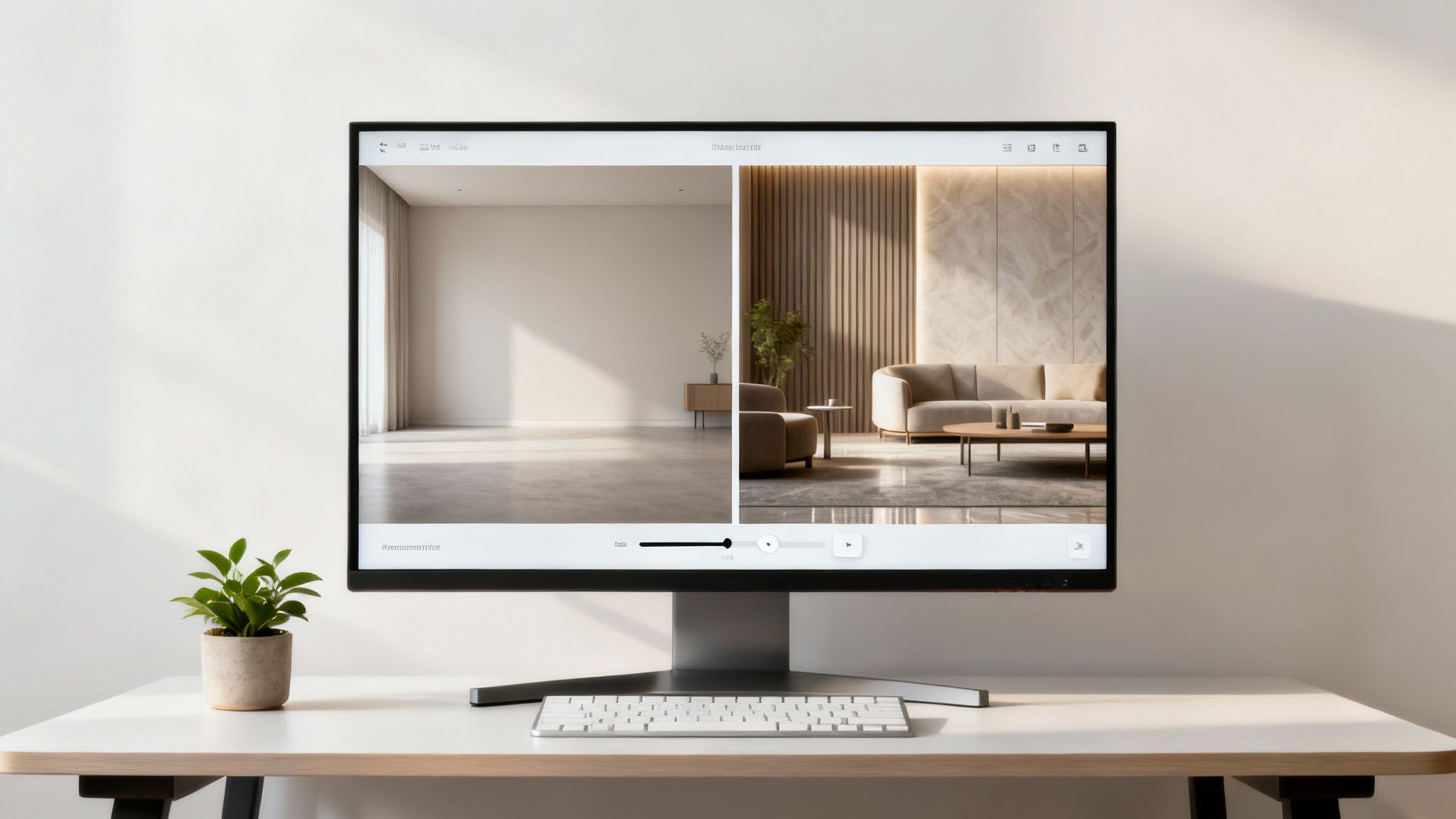
While traditional rendering software is incredibly powerful, it's no secret that it can be slow and complicated. Mastering 3D modeling or spending hours tweaking lighting settings can create a serious bottleneck for busy professionals and a massive headache for homeowners. This is exactly where a new breed of AI-powered tools comes in.
RoomStudioAI is one of these modern solutions, built from the ground up for speed and simplicity without compromising on quality. The promise is simple: take any photo of an actual room and get a professional, photorealistic redesign in just a few seconds. It jumps right over the technical hurdles, putting your creative vision first.
Instead of building a room from scratch in a complex program, you start with what you already have. This photo-first approach keeps every redesign grounded in reality, making the final visuals both stunning and practical.
Unlock Effortless Creativity
The whole platform is designed around smart, intuitive features that automate the tedious parts of the rendering process. This focus on efficiency means you can explore more ideas in less time, completely changing how you approach a design project.
A standout feature is the proprietary layout-preserving technology. This is crucial because it ensures the room's core structure—the walls, windows, and unique angles—stays exactly the same. The AI redesigns what's inside the space while respecting the architecture, which is why the final images look so authentic.
The real magic of AI in design is how it handles the technical heavy lifting almost instantly. This frees up your brainpower to focus on what actually matters: making creative choices and finding the perfect look for a space.
For anyone planning a major renovation or starting with a blank slate, the 'Empty Room' function is a lifesaver. With one click, it digitally clears out all the furniture and clutter, giving you a clean canvas to work with. This feature alone can save hours of photo editing, making it a game-changer for virtual staging and gut-renovation planning.
From Inspiration To Action
RoomStudioAI isn’t just for creating pretty pictures; it’s about bridging the gap between a digital idea and a real-world project. That’s where its massive style libraries and clever shopping features come into play.
Extensive Style Libraries: Want to see what your living room looks like in a 'Modern Farmhouse' or 'Japandi' style? You can apply dozens of distinct design aesthetics instantly and watch them adapt to your room. This kind of rapid-fire experimentation is simply impossible with manual methods.
'Shop the Look' Feature: This smart function uses visual search to identify furniture and decor in the renders it creates. It then points you to similar, shoppable items from major retailers, turning a beautiful image into an actionable shopping list.
This seamless connection from visualization to purchasing makes the entire design process more practical for everyone. For a closer look at what it can do, you can explore the full range of features on the RoomStudioAI platform.
Professional Tools for Business Growth
Beyond its appeal for personal projects, RoomStudioAI is packed with professional-grade features built for commercial use. These tools give interior designers, real estate agents, and marketing teams the ability to produce top-tier visuals with incredible efficiency.
The table below breaks down some of the key features and their benefits.
| RoomStudioAI Feature Breakdown | | :--- | :--- | :--- | | Feature | Description | Best For | | AI Redesigns | Instantly generates new designs from a photo. | Designers, homeowners, and real estate pros needing quick concepts. | | 'Empty Room' Function | Digitally removes all furniture with a single click. | Real estate agents for virtual staging and renovators planning a project. | | Layout-Preserving Tech | Maintains the room's original architecture in every render. | Anyone who needs realistic, believable visuals that honor the existing space. | | 4K Exports | Generates ultra-high-resolution images for professional use. | Marketers and designers creating print materials or high-end presentations. | | Team Accounts | Allows multiple users to collaborate in a shared workspace. | Design firms and real estate teams working on projects together. | | Commercial Usage Rights | Provides full licensing to use renders for business purposes. | Professionals who need to use visuals in listings, portfolios, and ads. |
By combining lightning-fast AI with these essential business tools, RoomStudioAI offers a practical and powerful solution for anyone who needs professional interior visuals without the traditional wait times and complexity.
How to Choose the Right Rendering Software
Choosing the right interior design render software is a lot like an artist picking the right paintbrush. The right tool feels like an extension of your own creativity, bringing ideas to life effortlessly. The wrong one just leads to frustration and hours of wasted effort. The trick is to find the perfect match for your specific goals, budget, and how tech-savvy you are.
Before you dive in, you need to ask yourself what you’re really trying to accomplish. Are you a homeowner just playing with a few ideas for a weekend renovation? Or are you a professional designer on a tight deadline who needs to wow a client? Your answer will point you in a completely different direction.
For example, a heavyweight 3D modeling program gives you incredible control, but be prepared for a steep learning curve that can take months. On the flip side, newer AI-powered tools like RoomStudioAI are built for speed and simplicity, turning a single photo into a high-quality design in seconds. Understanding that fundamental difference is the first big step.
Defining Your Core Needs
To start narrowing things down, let’s get practical. Think about these three factors. Getting them right will mean the difference between a tool that helps you and one that holds you back.
- Ease of Use: Honestly, how much time do you have for training? If you need to start producing visuals now, an intuitive, AI-driven platform is the clear winner. But if you genuinely enjoy the technical side of things and want absolute control over every pixel, then a traditional 3D suite might be a better fit for your personality.
- Rendering Speed: In the professional world, time is money. How fast do you need to go from a blank slate to a finished image? Software that chugs along for hours to render one scene is a non-starter for fast-paced client work. A tool that delivers a great-looking visual in under a minute gives you a massive advantage.
- Output Quality: What level of realism are you aiming for? If you're creating marketing materials or getting a final sign-off from a client, photorealistic quality is essential. Look for software that absolutely nails realistic lighting, shadows, and material textures. Pro tip: always check out a tool's example gallery before you commit.
Understanding Pricing and Licensing
The cost structure is just as important as the feature list. A lot of software now uses a subscription model, which is flexible but adds up over time. Others might offer a one-time purchase, which is a bigger hit upfront. It's crucial to understand what you're actually getting for your money; our guide to RoomStudioAI pricing breaks down how different plans work.
For any professional use—whether you're an interior designer, architect, or real estate agent—a commercial license is not just a feature; it's a requirement. Using images generated from a personal-use license for business purposes can lead to serious legal issues.
Finally, think about where your software fits into the bigger picture. The interior design market is huge—it’s projected to grow from USD 145.96 billion in 2024 to USD 214.35 billion by 2034. Furniture makes up a whopping 35% of that market, and clients increasingly want modular, ergonomic pieces. Some of the newer AI tools can actually help you source those items directly from a render. You can dig into more of these numbers over at Fortune Business Insights. Picking a tool that connects your designs to the real world of sourcing and purchasing can make your entire workflow smarter and more efficient.
Answering Your Top Questions
Stepping into the world of interior design render software can feel a bit like learning a new language. You start hearing terms like "GPU," "cloud rendering," and "commercial license," and it's easy to get lost in the jargon. We've been there. To help cut through the noise, we’ve rounded up the questions we hear most often and answered them in plain English.
Think of this as your personal cheat sheet. Whether you're a homeowner wondering about computer specs or a pro trying to weigh your options, these answers will give you the clarity you need to move forward with confidence.
Do I Need a Powerful Computer for Rendering?
This is probably the biggest and most persistent myth out there. For decades, the answer was a hard "yes." Traditional desktop programs like 3ds Max or V-Ray were absolute beasts, demanding expensive, high-octane computers with powerful graphics cards (GPUs) to do the heavy lifting.
But the game has completely changed. Modern, cloud-based tools like RoomStudioAI have flipped the script, moving all that intense work from your machine to their own powerful servers.
The best way to think about it is that your device is now just a window to the process, not the engine itself. This shift has democratized high-end rendering, putting professional-grade tools into the hands of anyone with a standard laptop and an internet connection.
This means you can create gorgeous, photorealistic renders from almost any computer, laptop, or even a tablet. The number-crunching happens somewhere else, freeing you from a multi-thousand-dollar hardware investment and making top-tier design software more accessible than ever.
How Long Does It Take to Create a Render?
Honestly, this is like asking how long it takes to cook a meal—it depends on whether you’re making microwave popcorn or a seven-course dinner. The time it takes to get a final image can vary dramatically based on the software you're using.
With traditional 3D modeling, the process is painstaking. A skilled artist might spend hours, or even days, building a 3D model from scratch, meticulously arranging lighting, applying textures, and then waiting for the final render to process. A single, highly detailed image could easily demand over 24 hours from start to finish.
This is where AI-powered tools come in and just blow the old timelines out of the water. They are built for one thing: speed.
A Quick Timeline Comparison
- Traditional 3D Modeling: A complex scene can take anywhere from 8 to 48 hours to model, light, and render.
- AI-Powered Software: A platform like RoomStudioAI can generate multiple high-quality design variations from a photo in less than 30 seconds.
That incredible speed is a game-changer. It transforms rendering from a long, technical chore into a fun, interactive part of the creative process, whether you're a pro on a tight deadline or a homeowner just wanting to see ideas quickly.
Can I Use Rendered Images for My Business?
Pay close attention to this one, because it has major legal and financial implications. You can't just assume that you can use your rendered images for commercial purposes, like in real estate listings, your design portfolio, or on social media. It all comes down to the software's licensing agreement.
Many free or consumer-focused tools explicitly forbid using their images for anything that makes money. If you violate their terms, you could be on the hook for copyright infringement.
It’s absolutely critical to pick a platform that gives you clear commercial usage rights. For example, a subscription with RoomStudioAI, like the Pro or Enterprise plan, includes a commercial license right in the package. This gives you the peace of mind that you legally own the images you create and can use them to grow your business without looking over your shoulder. Always, always read the fine print.
Is AI Rendering as Good as Manual 3D Modeling?
This isn't really about which one is "better," but which is the right tool for the job. It's like comparing a custom-tailored suit to a fantastic off-the-rack one. Both are great, but they serve different needs.
Manual 3D modeling, in the hands of a true expert, offers infinite control. It’s the undisputed king for projects where every last screw and wood grain needs to be perfect—think Hollywood blockbusters or multi-million dollar architectural proposals. The catch? It requires a massive amount of skill, time, and money.
For the vast majority of real-world interior design work, however, AI rendering is the clear winner. It delivers an unbeatable blend of speed, quality, and affordability. The results are photorealistic and professional-grade, but they're ready in a tiny fraction of the time. This makes it the smarter, more practical choice for tasks like:
- Quickly generating design concepts for clients.
- Creating virtual staging for property listings.
- Producing a steady stream of content for marketing.
- Helping homeowners visualize a renovation without the wait.
AI is built to deliver stunning results with maximum efficiency, making it the perfect partner for most design projects where speed and iteration are what truly matter.
Ready to see what AI-driven design can do for you? With RoomStudioAI, you can turn any room photo into a professional redesign in seconds. Stop waiting and start creating. Try RoomStudioAI for free today and bring your vision to life.
Ready to redesign your space?
Try our AI interior design tool and see your room transformed in seconds.
Try Free Design

