
So, you're on the hunt for the best home design software for Mac? The right tool really boils down to your specific project. If you need lightning-fast, photorealistic redesigns from a single photo, RoomStudioAI is a game-changer. For intricate 3D modeling from scratch, SketchUp remains a powerhouse. And for simple, no-fuss floor plans, Sweet Home 3D is a great free starting point.
Choosing Your Ideal Mac Home Design Software
Finding powerful, intuitive design software that feels right at home on macOS used to be tough. For years, the industry was dominated by complex CAD programs with steep learning curves. Now, we're seeing a welcome shift toward user-friendly platforms that deliver professional-grade results without the headache.
This change couldn't have come at a better time. The home design software market, valued at $2.5 billion in 2024, is expected to grow at a 12% CAGR through 2033. That growth is no surprise when you see the staggering numbers behind the home renovation boom—U.S. homeowners spent an incredible $463 billion on projects in the first quarter of 2024 alone. You can read more about these market trends and see the full research.
Navigating Your Options
To cut through the noise, it helps to think about these tools in three distinct categories. Most home design software for Mac falls into one of these buckets:
- AI-Powered Redesign Tools: Platforms like RoomStudioAI are all about speed and visual impact. They use AI to take a photo of an existing room and instantly generate multiple design concepts. This is perfect for homeowners, designers, and real estate agents who need quick, realistic visualizations.
- 3D Modeling and CAD Software: This is the territory of industry staples like SketchUp and Chief Architect. These tools give you total creative control to build detailed architectural models, custom furniture, and precise construction plans from the ground up.
- Simple Floor Planners: Apps like Sweet Home 3D and Floorplanner are focused on one thing: creating straightforward 2D and basic 3D floor plans. They’re fantastic for beginners or anyone who just needs to map out a room layout and test furniture placement.
The real fork in the road is the workflow. AI tools start with a real-world photo of what you have, while traditional CAD software starts with a blank digital canvas. Your choice comes down to whether you're redesigning an existing space or creating a new one from your imagination.
Before we get into the weeds, here's a quick table to frame the core differences. You can also explore different pricing options to find a plan that fits your budget and project scope.
| Software Category | Best For | Learning Curve | Primary Input |
|---|---|---|---|
| AI Redesign Platforms | Quick photorealistic concepts, virtual staging | Low (minutes) | Room Photo |
| 3D Modeling Software | Custom architecture, detailed models | High (hours to days) | Blank Canvas/Blueprint |
| Simple Floor Planners | Basic layouts, furniture arrangement | Low (minutes to hours) | Blank Canvas/Blueprint |
A Detailed Comparison of Top Mac Design Tools
Choosing the right home design software for Mac is less about finding the one with the longest feature list and more about matching a tool to your specific project. A homeowner dreaming up a kitchen remodel has entirely different needs than an architect preparing construction documents. This comparison cuts through the noise to focus on what really matters in real-world use.
The market for these tools is booming. The 3D interior design software space, which includes Mac favorites like SketchUp and RoomSketcher, was valued at $2.49 billion in 2025 and is expected to climb to $2.68 billion in 2026, growing at a 7.90% clip. This growth highlights a clear divide: DIYers and homeowners lean toward intuitive apps for quick renovations, while design and architecture professionals require sophisticated BIM features for complex projects.
Feature Matrix of Leading Home Design Software for Mac
To get a quick overview, this table breaks down the core differences between the top contenders for macOS users. It's a high-level look at where each tool shines.
| Software | Primary Use Case | Learning Curve | Rendering Quality | AI Features | Pricing Model |
|---|---|---|---|---|---|
| RoomStudioAI | Instant AI redesigns from photos | Extremely Low | Photorealistic | Core of the product | Subscription |
| SketchUp | Flexible 3D modeling & custom design | High | Stylized (Photorealistic with plugins) | Minimal/Extensions | Subscription |
| Chief Architect | Professional BIM & construction docs | Very High | Professional-grade photorealistic | Some automation tools | Perpetual License |
| Sweet Home 3D | Basic 2D/3D floor planning | Low-Medium | Basic/Functional | None | Free (Open Source) |
This matrix shows a clear trade-off between power, speed, and ease of use. Now, let's dive deeper into the specifics.
Rendering Quality and Speed
Rendering is the magic step that turns your digital blueprint into a convincing visual. The gap between a basic 3D model and a photorealistic image can mean the difference between winning over a client and getting a confused look.
- RoomStudioAI is the clear winner for speed and realism. It leverages AI to produce stunning photorealistic renders from a single photo in less than a minute. What makes its quality so impressive is how it preserves the original room's lighting and unique architectural details, creating a result that feels instantly authentic.
- Chief Architect delivers professional-grade, physically-based renders that look incredibly lifelike. But that quality comes at a cost. Achieving it requires a significant time investment in setup and a powerful machine, with renders often taking many minutes, or even hours, to complete.
- SketchUp, out of the box, produces more stylistic renders. However, its real power comes from its vast ecosystem of plugins like V-Ray, which can be used to create truly beautiful, photorealistic scenes.
- Sweet Home 3D provides simple, functional 3D views. They are perfect for getting a sense of space and layout but don't have the polished quality needed for a professional presentation or marketing materials.
The flowchart below can help you quickly match your project needs to the right category of software.
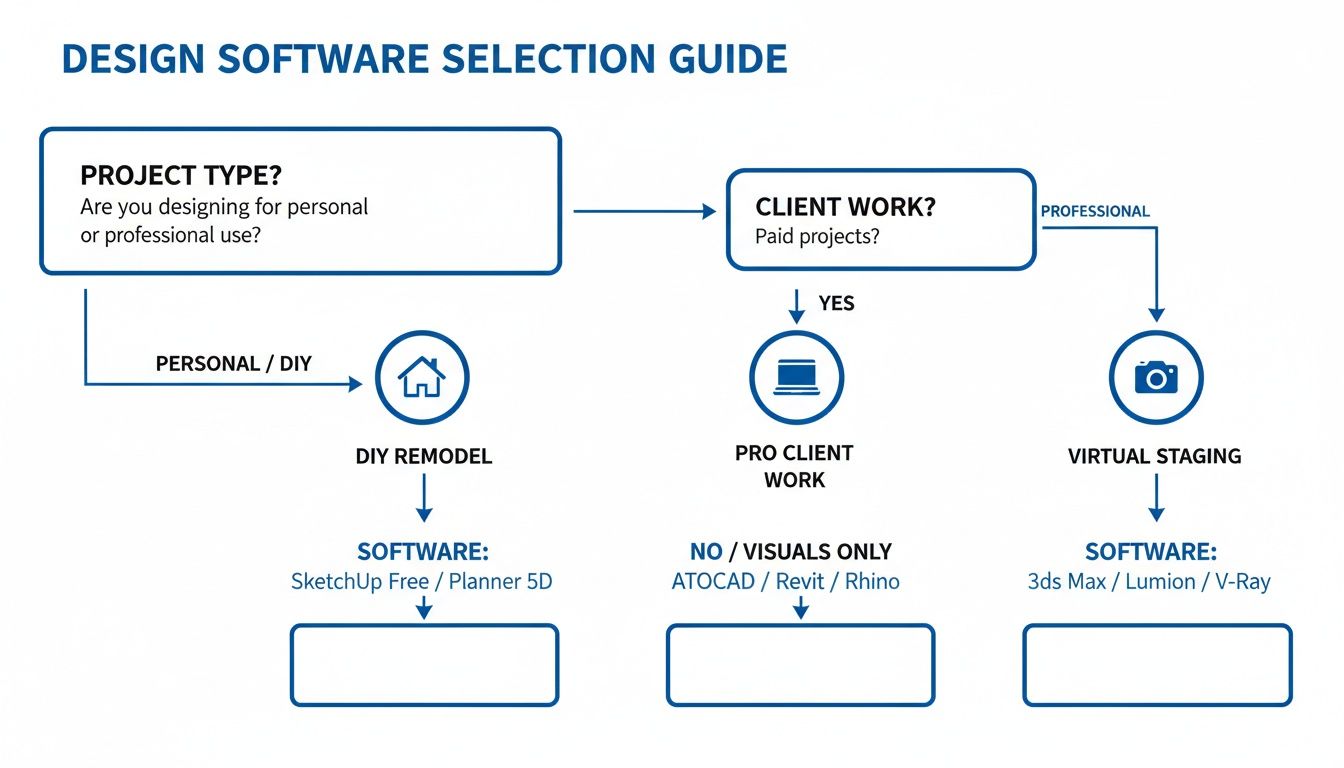
As you can see, the right choice really boils down to whether you're tackling a personal DIY project, serving a professional client, or needing to stage a property quickly.
Learning Curve and Usability
How much time are you willing to invest just to get started? Some of these programs demand weeks of dedicated training, while others let you create beautiful designs within minutes.
RoomStudioAI has almost no learning curve. If you can upload a photo and type a prompt, you have all the skills you need. This makes it an incredibly powerful tool for homeowners, real estate agents, and designers who need professional results without a massive time commitment.
On the other end of the spectrum, Chief Architect and SketchUp are deep, complex programs. Becoming proficient means learning the fundamentals of 3D modeling, drafting, and rendering settings. They are immensely capable tools, but they’re built for professionals who will invest the time to master them.
Sweet Home 3D offers a great middle ground. It's far more approachable than a professional CAD program but still requires you to get comfortable with its 2D-to-3D workflow. It’s a solid entry point for anyone new to floor planning.
Core Features and Workflow
Beyond the visuals, the core functionality dictates what you can actually do. Each of these tools is built around a fundamentally different approach to design.
The biggest difference is the starting point. RoomStudioAI begins with reality—an existing photo—and reimagines it. Traditional CAD programs like SketchUp and Chief Architect start with a blank digital canvas, forcing you to build that reality from the ground up.
This core distinction shapes their entire feature sets.
- SketchUp’s claim to fame is its intuitive "push/pull" 3D modeling. It feels more like digital sculpting than drafting, making it the go-to for creating custom furniture, unique objects, and complex architectural shapes.
- Chief Architect is a true BIM (Building Information Modeling) tool. Every line you draw is packed with data. A wall isn't just a shape; it's an object with specific materials and dimensions, which is absolutely critical for generating accurate construction documents.
- Sweet Home 3D is laser-focused on 2D floor plan creation with a simple 3D preview. Its features are streamlined for one job: laying out rooms and arranging furniture from its object library.
- RoomStudioAI’s features are all about AI-powered transformation. You can instantly change a room’s style (e.g., from modern to rustic), digitally remove clutter, virtually empty a space, and even use its "shop the look" feature to find real products. For a practical look at this workflow, see how it can be applied to a living room design.
In the end, the best home design software for Mac is the one that fits your job. If you need to produce beautiful, photorealistic redesigns of existing spaces almost instantly, RoomStudioAI's workflow is in a class of its own. But if you’re building a custom home from scratch and need detailed blueprints, the depth and control offered by SketchUp or Chief Architect are essential.
The Impact of AI on Interior Design Workflows
Artificial intelligence isn't just a buzzword in the design world anymore; it's a practical tool that is completely changing how we approach creative projects. For anyone using home design software for Mac, this shift is profound. We're moving away from workflows that demanded hours of painstaking manual modeling and into an era where stunning visuals can be generated in seconds. AI is taking over the tedious parts, making high-level design accessible to more people, and dramatically speeding up the entire conceptualization phase.
Instead of staring at an intimidating blank canvas, new AI-powered platforms start with something much simpler: a photograph of an actual room. This fundamentally changes the experience from the ground up. The software intelligently scans the space—taking note of its dimensions, lighting, and unique architectural details—and uses that information as the foundation for new concepts. It's a smart approach that ensures every design is grounded in reality and perfectly suited to the room's character.

From Manual Labor to Instant Inspiration
Traditional 3D modeling is a true skill, but one that requires immense time and technical expertise. A professional designer could easily spend hours, if not days, creating a single photorealistic render of a room. AI has completely removed that bottleneck.
Think of a tool like RoomStudioAI as your creative co-pilot. You can upload a photo of your living room, pick a style like "Japandi" or "Coastal," and get back a handful of fully furnished design options in less than a minute. The AI does all the heavy lifting: it can digitally empty the room, clear out clutter, and then fill it with beautiful, appropriate furniture and decor that respects the original layout. This allows for incredibly rapid iteration—a designer can show a client ten solid concepts in the time it once took to build just one.
Making Professional Design Accessible
This tech shift is also opening up the market. While professionals still accounted for 63.02% of demand for design tools in 2024, the DIY homeowner segment is growing at an impressive 12.18% CAGR. This boom is happening because AI interfaces are making professional-grade results available to everyone. You can turn a simple sketch into a photorealistic room or generate a 4K render right from a picture on your phone. You can dive deeper into this growing market on mordorintelligence.com.
AI's real magic is its ability to turn an idea into a high-quality visual almost instantly. It closes the gap between a homeowner's vision and a professional render, taking down the technical hurdles that used to stand in the way.
For a homeowner, this means they can finally see what that kitchen remodel will look like without needing to learn complex software. For a real estate agent, it means they can virtually stage an entire house in an afternoon. You can learn how to get started with a free AI interior design tool at http://roomstudioai.com/free-ai-interior-design and see the results for yourself.
A New Workflow for Mac Users
This AI integration has given rise to a new, much more efficient workflow, and it’s a perfect fit for the creative professionals and design lovers in the Mac ecosystem. The whole process is built for speed and iteration, not slow, manual creation.
Here’s a look at this new workflow in action:
- Capture the Space: Just take a clear photo of the room you want to redesign. No need for measuring tapes or blueprints.
- Define Your Vision: Use simple text prompts or click on a style to tell the AI what you're imagining. Think, "a modern living room with a leather sofa and warm wood tones."
- Generate Concepts: The AI gets to work, producing several high-quality design variations based on your input, all while keeping the room's original structure intact.
- Refine and Select: Look through the generated images, pick your favorites, and use them as your final vision or as a jumping-off point for more tweaks.
- Shop the Look: Some of the more advanced platforms like RoomStudioAI even have a visual search feature, letting you identify furniture in the render and find similar, shoppable pieces from online stores.
This AI-driven approach doesn't replace a designer's creativity; it supercharges it. By taking care of the technical grunt work, it frees you up to focus on what really matters: exploring ideas, making smart decisions, and bringing a creative vision to life faster than you ever could before.
Practical Workflows for Different User Needs
The best home design software for Mac isn't a one-size-fits-all program; it’s the tool that fits the job you need to do. To bring this idea to life, let's walk through three common scenarios. Each workflow is built around a specific user, showing you the most direct path to getting professional-level results without the traditional hassle.
These examples prove that the right software choice can completely change the design process, whether you're a homeowner planning a weekend refresh or a professional juggling client demands.
For the Homeowner Visualizing a Living Room Makeover
Let's say you're a homeowner who's just tired of looking at the same old living room. You have some great ideas, but you can't quite picture how a new sofa and a different wall color will actually look together in your space. The goal is simple: you want a realistic "after" photo before you spend a dime or pick up a paintbrush.
In this situation, jumping into complex CAD software is like using a sledgehammer to hang a picture frame. It’s overkill. An AI-powered tool gets you to the finish line much, much faster.
The Optimal Workflow:
- Capture Your Space: Snap a clear, well-lit picture of your living room with your phone.
- Upload and Define: Drop that photo directly into RoomStudioAI. Instead of drafting a floor plan, your picture becomes the canvas.
- Generate Concepts Instantly: Pick a style you love, like "Modern Farmhouse" or "Minimalist." In less than a minute, the AI generates several photorealistic redesigns, keeping your room's exact layout, windows, and natural light intact.
- Refine and Finalize: Look through the options. You can easily adjust your prompts to see different color schemes or furniture styles until one feels just right. That image becomes your blueprint for shopping and decorating.
The real win here is the combination of speed and realism. For a homeowner, turning a quick photo into a concrete design goal takes all the guesswork out of the project and gives you the confidence to get started.
For the Interior Designer Creating Client Concepts
An interior designer's job is all about momentum. Clients need to see exciting concepts quickly to keep a project moving, but building detailed 3D models just for an initial mood board is a massive time sink. The priority is to generate a variety of high-quality ideas to get the conversation started.
The workflow has to be built for speed and iteration. Here, an AI tool acts as a powerful brainstorming partner, letting a designer explore dozens of looks in the time it used to take to model just one. You can see how professionals are adopting these new methods by exploring modern use cases for interior design.
The Optimal Workflow:
- Use Client Photos: Start with pictures of the client's actual home. This keeps every concept grounded and relevant from the very beginning.
- Rapid Ideation with AI: Upload the photos to RoomStudioAI and generate a wide range of styles. Create concepts for "Coastal," "Industrial," and "Bohemian" to show the client the full spectrum of what's possible.
- Build a Digital Mood Board: Export the best AI renders and arrange them in a presentation. These photorealistic images are the heart of the mood board and are far more compelling than fabric swatches alone.
- Collaborate and Get Feedback: Share the concepts with your client. Getting instant visual feedback is critical for aligning on a direction early, which saves countless hours of revisions later on.
For the Real Estate Agent Staging an Empty Property
An empty listing is a tough sell. Most buyers can't walk into a vacant house and imagine it as a home, but physical staging costs a lot of money and takes time to coordinate. The objective is to create beautiful, inviting marketing photos that help a property stand out and sell faster.
For this job, virtual staging has to be two things: photorealistic and fast. A fake-looking render is worse than an empty room, and a process that takes days just isn't practical in a competitive market.
The Optimal Workflow:
- Photograph the Empty Rooms: Take high-quality photos of the most important spaces—the living room, primary bedroom, and kitchen or dining area.
- AI-Powered Virtual Staging: Upload each photo into a tool like RoomStudioAI. Choose a style with broad appeal, such as "Modern" or "Transitional."
- Generate Furnished Spaces: The AI will intelligently fill the empty rooms with perfectly scaled furniture and decor, all while respecting the existing light sources. The final images look as if a professional stager and photographer were on site.
- Enhance Listings: Use these virtually staged photos on Zillow, Redfin, and other listing sites. This grabs the attention of online browsers and helps them form an emotional connection with the property before they ever set foot inside.
Why RoomStudioAI Is a Top Choice for Mac Users

After looking at the top contenders, one thing is clear: different tools are built to solve different problems. While a full-featured CAD program gives professionals granular control, it comes with a steep learning curve. For a much broader audience, RoomStudioAI stands out as a premier home design software for Mac. Its real strength is how it tackles the biggest frustrations in design: speed, complexity, and achieving a realistic look.
Most people—homeowners, designers, and real estate agents—don’t need to become 3D modeling experts. They just need to create beautiful, convincing visuals as fast as possible. RoomStudioAI is engineered around this very idea, delivering an experience that feels both powerful and intuitive, which is a perfect fit for the macOS environment.
Bridging the Gap Between Idea and Reality
The biggest hurdle in home design has always been the sheer effort it takes to turn a vision into a photorealistic render. Traditional software forces you to build a room from the ground up, a painstaking process of drawing floor plans, inputting measurements, and placing 3D objects one by one.
RoomStudioAI completely flips this workflow on its head. It all starts with a simple photograph of an existing room, which immediately grounds every design concept in reality. This photo-first approach is what truly sets it apart. It removes the need for technical drafting skills and dramatically shortens the time it takes to get from an idea to a finished visual.
For the average Mac user, the ability to upload a photo and get back multiple, fully-furnished design concepts in under a minute is a massive advantage. It tears down the technical barrier that has kept high-quality design out of reach for so many.
Solving Key User Pain Points with AI
Legacy design tools, while capable, often come with a demanding learning curve and sluggish rendering times. RoomStudioAI was clearly developed to fix these specific frustrations, offering a smarter, more direct path to the final image.
Think about these common challenges and how RoomStudioAI offers a practical solution:
- The "Blank Canvas" Problem: Staring at an empty grid in a CAD program is intimidating. RoomStudioAI gives you a real-world starting point, making the process feel more like redecorating than complex architectural modeling.
- The Time Sink of Rendering: Professional renders can take hours to process. RoomStudioAI uses AI to generate its visuals in seconds, allowing for the kind of rapid iteration that’s priceless for both personal projects and client feedback.
- The Need for Realism: Basic 3D models can look flat or cartoonish, failing to capture a room’s true potential. By working from an actual photo, RoomStudioAI preserves the original lighting, perspective, and architectural quirks, making its outputs feel authentic and believable.
Standout Features for Mac Creatives
Beyond its core workflow, a few key features make RoomStudioAI especially compelling for the visually-oriented Mac user base. These aren't just bells and whistles; they push the tool from a simple visualizer into a complete ideation platform.
The style transformation feature is a great example. You can take a photo of a dated living room and instantly see it reimagined in styles like Japandi, Modern, or Coastal. The AI is smart enough to apply the new aesthetic while respecting the existing layout, giving you a genuine preview of the final look.
Even better, the "shop the look" visual search is a game-changer for turning inspiration into action. If you see a chair or a lamp you love in an AI-generated render, the tool can help you find similar, buyable items from real retailers. It closes the loop between design and decoration. You can explore RoomStudioAI's capabilities on their website and see how this all comes together.
Ultimately, RoomStudioAI earns its spot as a top choice because it's the most direct and efficient tool for the most common design tasks. It’s a powerful piece of home design software for Mac that genuinely understands its users value both their time and a high-quality visual.
Frequently Asked Questions
Jumping into home design software on a Mac can bring up a few practical questions. From hardware needs to file types, here are some straight answers to help you navigate the common hurdles.
Can I Really Run Professional Design Software on a MacBook Air?
You can, but it really depends on the software. Newer, cloud-based tools like RoomStudioAI are a great fit for the MacBook Air. Since they do all the heavy lifting in the cloud, they run beautifully on lighter machines without bogging them down.
On the other hand, traditional 3D modeling programs like SketchUp or Chief Architect can push a MacBook Air to its limits, especially with complex models and high-resolution textures. If you're planning on doing a lot of intense rendering, you’ll be much happier with a MacBook Pro that has a dedicated GPU. But for redesigning from photos or basic virtual staging, your MacBook Air is plenty powerful.
What's the Best Free Home Design Software for Mac?
For straightforward 2D floor plans and simple 3D views, Sweet Home 3D is a very popular open-source choice that works well. SketchUp also has a capable free version that runs in your web browser, though it's trimmed down compared to the Pro subscription.
Keep in mind that free versions usually come with strings attached, like watermarks on your final images or restrictions on commercial use. If you need photorealistic results without paying upfront, there’s another way.
A smart move is to take advantage of the free trials or starter credits that premium tools offer. For example, a platform like RoomStudioAI lets you generate a handful of high-quality AI renders to test out its full capabilities before you ever have to commit to a plan. It's a great way to experience the professional-grade output for yourself.
How Do I Import My Existing Floor Plans?
Most professional-grade Mac design software can handle common file formats like JPG, PNG, and even architectural standards like DWG and DXF. The standard process is to import an image of your floor plan and then trace over it inside the program to build an editable 2D model.
However, some of the latest AI tools flip this process on its head. Instead of needing a floor plan to start, they work directly from a photo of the room you want to change. This is often way faster for redesigns because the software just analyzes the existing space and builds from there.
Can I Collaborate with PC Users from My Mac?
Absolutely. The easiest way to work with someone on a PC is to use cloud-based software. Tools like RoomStudioAI or SketchUp for Web are designed for this exact scenario, with everything running through a browser or synced cloud storage.
This lets you share your entire project with a simple link. Your collaborators can then open, view, and even edit the design on whatever machine they have—Mac or Windows. It completely sidesteps the old headaches of file compatibility and version control, making sure everyone is always looking at the latest draft. It's a much cleaner system than emailing massive files back and forth.
Ready to see how fast AI can transform your space? RoomStudioAI turns your room photos into stunning, photorealistic redesigns in just a few seconds.
Ready to redesign your space?
Try our AI interior design tool and see your room transformed in seconds.
Try Free Design

