
The hunt for the best room planning software usually ends with one simple truth: the right tool is the one that fits your specific project. If you need to whip up fast, realistic redesigns of a room you’re already in, an AI-powered tool like RoomStudioAI is a game-changer. But if you’re drawing up architectural plans from the ground up, you'll need traditional 3D modeling software.
How to Select Your Ideal Room Planning Software
Choosing the right room planning software can feel like a huge task, but it’s much easier if you know what to look for. These tools are no longer just for pros; they’ve become essential for homeowners, interior designers, and real estate agents who need to see a vision come to life before pulling out a paintbrush or a checkbook. Their real power is in closing the gap between what you can imagine and what you can actually create.
This guide will give you a straightforward way to make a smart decision. We'll put the top contenders side-by-side, focusing on the features that actually make a difference in a real-world design process. By understanding what sets these tools apart, you can pick one that fits your goals, whether you're just rearranging furniture or gutting the entire space.
Core Evaluation Criteria
To find the perfect match, we need to measure each software against the same practical benchmarks. Here’s what we’ll be looking at:
- AI Rendering Quality: How realistic are the images? Do they make architectural sense?
- Ease of Use: Is it intuitive enough for a DIY-er, or do you need a background in design to figure it out?
- Core Feature Set: Is it built for redesigning from a photo, creating 2D floor plans, or building complex 3D models?
- Commercial Use Rights: Can you use the designs for your business—like in client presentations or property listings—without getting into legal trouble?
The simplicity of modern tools is clear when you see them in action. Photo-based redesign has really leveled the playing field for everyone.

This kind of workflow—just uploading a photo to get instant design concepts—is exactly what lets users skip the steep learning curve of traditional modeling software.
Understanding the Market and Your Needs
The demand for these tools is exploding. The global market for room planners was valued at around USD 1,432.8 million and is expected to grow at a compound annual growth rate (CAGR) of 9.3% starting in 2025. This rapid growth means more tools are hitting the market, which makes a clear evaluation process more important than ever.
The best way to choose is to match the software's main strength to your primary goal. For restyling an existing room, a photo-first AI tool is the quickest path. For designing a new build, a floor planner is non-negotiable.
By the time you're done with this guide, you’ll have a solid grasp of the key differences between platforms like RoomStudioAI, Homestyler, and Floorplanner. You'll know how to look past the marketing hype and choose the software that will actually improve your design process. If you’re ready to jump in, you can try out our free AI interior design tool to see how it works. We’ll dive into detailed comparisons, real-world examples, and clear recommendations to help you find the perfect fit.
Core Features That Define Top-Tier Design Software
Not all design tools are created equal. While plenty of platforms can help you map out a basic floor plan, the best room planning software really distinguishes itself with a suite of smart, powerful features. These tools don't just create simple sketches; they produce stunningly realistic results and dramatically speed up the entire design process.
Understanding what these core capabilities are is the first step to picking the right tool. For a designer juggling multiple client projects, shaving hours off concept generation is a game-changer. Likewise, a real estate agent can now virtually stage an empty house in under an hour, creating marketing materials that genuinely capture buyer interest.
AI Rendering and Photorealistic Redesign
The most significant advance in modern room planning has to be AI-powered rendering. This is much more than just dropping 3D models into a digital space. The best tools use sophisticated algorithms to analyze a photo of an actual room, intelligently identifying architectural features like windows, doors, and ceiling height.
This underlying analysis allows the AI to generate redesigns that honor the room's specific lighting and perspective. The outcome isn't some generic, sterile render; it's a photorealistic image that looks like it was professionally staged and photographed. This is what separates a convincing visual from something that just looks like a computer drawing.
A key differentiator in top-tier AI is layout preservation. The software doesn't just randomly fill a space with furniture. It maintains the original room's integrity, ensuring the final designs are both beautiful and structurally believable for that specific environment.
Empty, Declutter, and Furnish from a Photo
Designers and real estate agents constantly face the challenge of a room filled with clutter or dated furniture. The ability to digitally "empty" a room from a single photo is an incredibly powerful tool. It gives you a blank canvas to work with, no physical labor or expensive staging required.
This feature set usually includes a few key functions:
- Virtual Emptying: The software intelligently removes all furniture and objects, seamlessly filling in the floors, walls, and ceiling behind them.
- Decluttering: For a lighter touch, the tool can erase specific items like stray boxes or personal photos to present a cleaner, more neutral space.
- Instant Furnishing: Once the room is cleared, the AI can furnish it in dozens of different styles, transforming a cluttered living space into a market-ready showcase in just a few minutes.
Sketch to Visual Conversion
For those moments when an idea starts as a rough concept, sketch-to-visual technology is the perfect bridge to a polished render. You can upload a simple, even hand-drawn, sketch of a room layout, and the AI will interpret it to generate a fully rendered, professional visual.
This is invaluable for quick ideation. An interior designer can literally sketch out a floor plan during a client meeting and produce a realistic concept on the spot. This allows for immediate feedback and helps everyone get on the same page faster, removing the technical hurdles of traditional 3D modeling.
Visual Search and Shop the Look
The final piece of the puzzle is turning that beautiful design into a reality. The most forward-thinking platforms are now building in "shop the look" features, powered by visual search technology that identifies the furniture and decor within a generated image.
After you've created the perfect design, you can simply click on a sofa or a lamp, and the software will find similar, buyable products from online retailers. This closes the loop between inspiration and action, turning a design concept into a practical shopping list. For homeowners, it completely simplifies the process of bringing their vision to life. You can see how these features come together on platforms like RoomStudioAI, where photo-based redesign is central to the entire workflow.
A Detailed Look at the Top Room Planning Tools
When you’re trying to pick the best room planning software, it really boils down to one thing: your starting point. The market is split between two very different approaches. On one side, you have rapid, AI-powered tools that redesign from a photo. On the other, you have traditional 2D and 3D modeling software built for creating spaces from scratch.
This comparison will get into the weeds of how platforms like RoomStudioAI, Homestyler, and Floorplanner work for different people and projects. We're going beyond a simple feature checklist to look at the real-world trade-offs, helping you decide which tool actually fits your workflow.
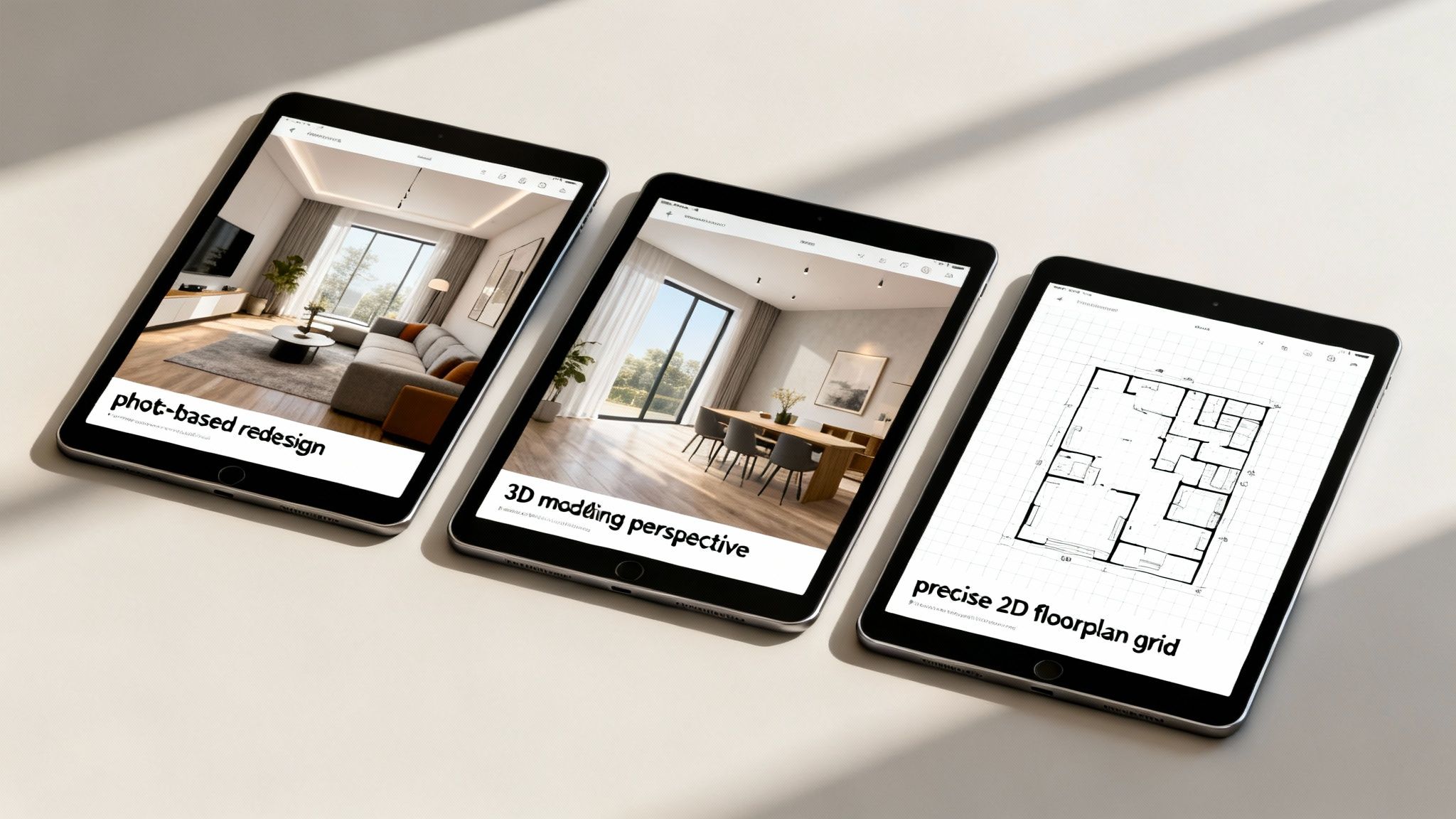
The image above nails the three main workflows you'll find today: AI-driven redesign on the left, detailed 3D modeling in the middle, and precise 2D layouts on the right.
AI Render Quality and Redesign Speed
The first big question is how fast you can get a realistic design concept. This is where the difference between AI-first platforms and old-school modelers is crystal clear.
RoomStudioAI is designed around a "photo-first" idea. You just upload a picture of a room, and its AI generates photorealistic redesigns in under 30 seconds. The magic is in its layout preservation—the AI actually understands the room's specific architecture, lighting, and perspective. This means the final images look like they truly belong in that space, making it a game-changer for anyone needing to visualize changes in a real home, fast.
Homestyler is built on a 3D modeling core. It has AI features, sure, but its main job is to help you build a digital version of a room from the ground up. Getting a high-quality 4K render takes a lot more time—we're talking minutes, not seconds. The results can be stunning, but you have to put in the work to build the entire scene first.
Floorplanner couldn't be more different. It’s all about 2D architectural accuracy, not flashy renders. Its strength is creating clean, to-scale floor plans. While you can get 3D views, they lack the polished, photorealistic look of the other tools. Here, speed is about how fast you can draw a layout, not render a picture.
The crucial differentiator is the starting point. RoomStudioAI's speed comes from augmenting reality (an existing photo), whereas Homestyler and Floorplanner require you to create a reality (a 3D model or 2D plan) before you can visualize it.
Usability For Different Audiences
Who is each platform actually for? The answer depends heavily on your technical skills and what you're trying to accomplish. A tool that’s perfect for a homeowner could feel limiting for an architect.
For Homeowners and DIY Enthusiasts: RoomStudioAI is the clear winner for ease of use. The workflow—upload a photo, choose a style, get a design—is incredibly simple. You don't need any design or software background, which makes it the best room planning software for anyone looking for quick, believable inspiration for their own space.
For Interior Designers: This is where it gets interesting. For fast client concepts and showing what's possible in their actual home, RoomStudioAI is unbeatable for speed. But, if a project demands custom furniture modeling or major structural changes, Homestyler offers that deep, granular control, though it comes with a much steeper learning curve.
For Architects and Real Estate Agents: Floorplanner is the standard for creating accurate 2D floor plans needed for listings or construction documents. However, agents will likely get more day-to-day value from RoomStudioAI for virtual staging. It can take photos of a cluttered or empty house and turn them into beautifully furnished, marketable images in just a few minutes.
Core Functionality: Photo Redesign vs. 3D Modeling
The technology powering each tool dictates what it’s good at. You wouldn’t use a hammer for a screw, and you shouldn’t use a floor planner for quick photo restyling.
RoomStudioAI's Core Workflow: Photo-Based Transformation This platform is built to answer one question: "What could this exact room look like?" Its features, like emptying a room or adding new furniture, all start with a photo. It’s perfect for renovations, restyling, and virtual staging where the room's basic structure isn't changing.
Homestyler's Core Workflow: 3D Environment Building Homestyler is for creating a digital space from a blank slate. Its massive library of 3D models and materials gives you the freedom to design a room that doesn’t even exist yet. This makes it the right choice for new construction or major remodels where you’re moving walls.
Floorplanner's Core Workflow: 2D Architectural Planning At its heart, Floorplanner is a drafting tool. Its purpose is to create technically correct 2D layouts with precise measurements. The 3D view is a secondary feature meant to help you understand the 2D plan, not produce marketing-quality photos.
Room Planning Software Feature Comparison
To make things even clearer, this table breaks down the fundamental differences between these three popular tools. It highlights how their core philosophy, target audience, and primary use cases vary significantly.
| Feature | RoomStudioAI | Homestyler | Floorplanner |
|---|---|---|---|
| Primary Workflow | Photo Redesign & Virtual Staging | 3D Modeling & Rendering | 2D Architectural Floor Planning |
| Best For | Renovations, Restyling, Staging | New Builds, Custom Design | Architectural Plans, Layouts |
| Ease of Use | Extremely Easy | Moderate to Difficult | Moderate |
| Time to First Visual | < 30 Seconds | 15-60+ Minutes | 10-30+ Minutes |
| Realism | Photorealistic (from photo) | High-Quality Render (from model) | Basic 3D View (from plan) |
| Primary User | Homeowners, Designers, Agents | Designers, 3D Artists | Architects, Builders, Agents |
This side-by-side view shows that the "best" tool really depends on the job at hand. For speed and realism in an existing space, RoomStudioAI is in a class of its own.
Pricing Models and Commercial Use Terms
Finally, let's talk about money and licensing, which is a huge deal for any professional.
RoomStudioAI keeps it simple with a subscription model that starts around $29/month. Its Pro and Enterprise plans clearly permit commercial use, which is great for designers and real estate pros. The pricing is predictable and based on render volume, which lines up well with project-based work.
Homestyler uses a more confusing system of credits on top of its subscriptions. There’s a free version, but high-quality 4K renders will eat up your credits, which can make costs unpredictable. Commercial use is tied to paid plans, but you need to pay close attention to that credit system.
Floorplanner has tiered subscriptions based on how many projects and "levels" (or floors) you need. The free tier is pretty restrictive. Paid plans are priced fairly for professionals who need to produce a lot of floor plans, and commercial use is included.
For a full breakdown of what you get with each subscription tier, feel free to check out our RoomStudioAI pricing page.
In the end, it all comes back to your workflow. For fast, realistic visuals of existing spaces with straightforward commercial terms, RoomStudioAI is the standout choice. For deep, detailed 3D modeling, Homestyler is a powerhouse. And for precise 2D architectural plans, Floorplanner is still a top dog in its field.
Putting Room Planning Software to the Test
Features on a page are one thing, but the real measure of any tool is how it performs when you put it to work. To see how this software actually holds up, let's walk through three common scenarios. Each story will break down a real-world challenge, the specific workflow used to tackle it, and the results.
These examples show how different tools are built for different goals. We'll see how a homeowner can finally break through indecision, how a designer can land clients faster, and how a real estate agent can turn a tough listing into a hot property.
The Homeowner's Redesign Project
The Challenge: A homeowner wants to give their living room a fresh look but is completely stuck. They're drawn to several different styles—Modern Farmhouse, Japandi, and Coastal—but can't picture how any of them would translate to their own space. The fear of spending thousands on furniture only to hate the result is real.
The Workflow Solution: Grabbing their phone, the homeowner snaps a picture of their current living room and uploads it to a tool like RoomStudioAI. They use the AI redesign feature to instantly generate concepts for each style they're curious about. In less than five minutes, they have five distinct, professional-looking visuals.
The Outcome: The homeowner can immediately see that while Modern Farmhouse is popular, the Coastal style is a much better fit for their home’s natural light and architecture. This visual confirmation gives them the confidence to start buying furniture, using the AI-generated image as their blueprint. The entire process sidesteps the financial risk and anxiety that comes with guessing.
The Interior Designer's Client Pitch
The Challenge: An interior designer has a promising first meeting with a potential high-end client. The catch? The client is talking to other designers and wants to see a compelling vision—fast. The designer has less than 24 hours to create a pitch that seals the deal.
The Workflow Solution: During the meeting, the designer takes a few quick photos of the client's main living area. Back in the office, they use RoomStudioAI to generate a dozen photorealistic design concepts spanning various luxury and minimalist aesthetics. They pick the top three renders, drop them into a clean presentation, and have it in the client's inbox that evening.
This approach completely changes the game for client acquisition. Instead of spending days building a complex 3D model for one idea, a designer can present multiple polished options in under an hour. It’s a powerful way to show off their creative flexibility and efficiency right from the start.
The Outcome: The client is stunned by the speed and quality. Seeing their own home transformed makes the designer's vision feel concrete and exciting. The designer lands the project, having delivered more tangible value in a few hours than their competitors could in days. You can see how to get similar results in our guide to living room design concepts.
The Real Estate Agent's Virtual Staging Solution
The Challenge: A real estate agent has a listing with tenants whose furniture is cluttered and dated. Professional photos are out of the question, and physical staging is too costly and complicated. They need marketing images that highlight the home's potential, not the current mess.
The Workflow Solution: The agent snaps photos of the cluttered rooms. Using a tool with a "virtual empty" feature, they first digitally erase all the tenants' furniture. With a clean slate, they then use AI to furnish the empty space in a tasteful, broadly appealing Transitional style, creating a full set of virtually staged marketing photos.
The Outcome: The property goes live with stunning, professionally staged images that pull in 40% more online views in the first week. Buyers can finally see the home's true layout and potential without distractions, leading to a faster sale at a better price. This saves the seller thousands in physical staging costs while making the agent's marketing far more effective. It's no surprise that the adoption of these tools is skyrocketing, a trend confirmed by market analysis from sources like Grand View Research.
Making the Right Choice for Your Specific Needs
When you're wading through all the options for room planning software, the decision really boils down to one simple question: what problem are you actually trying to solve? The best tool isn't always the one with the longest feature list. It’s the one that directly addresses your immediate goal.
Your role and the specific project at hand are the biggest factors here. A homeowner looking for a fresh coat of paint and some new furniture has completely different needs than a designer drafting a floor plan or a real estate agent trying to stage a vacant listing.
This decision tree gives you a clear visual path based on what you want to accomplish.
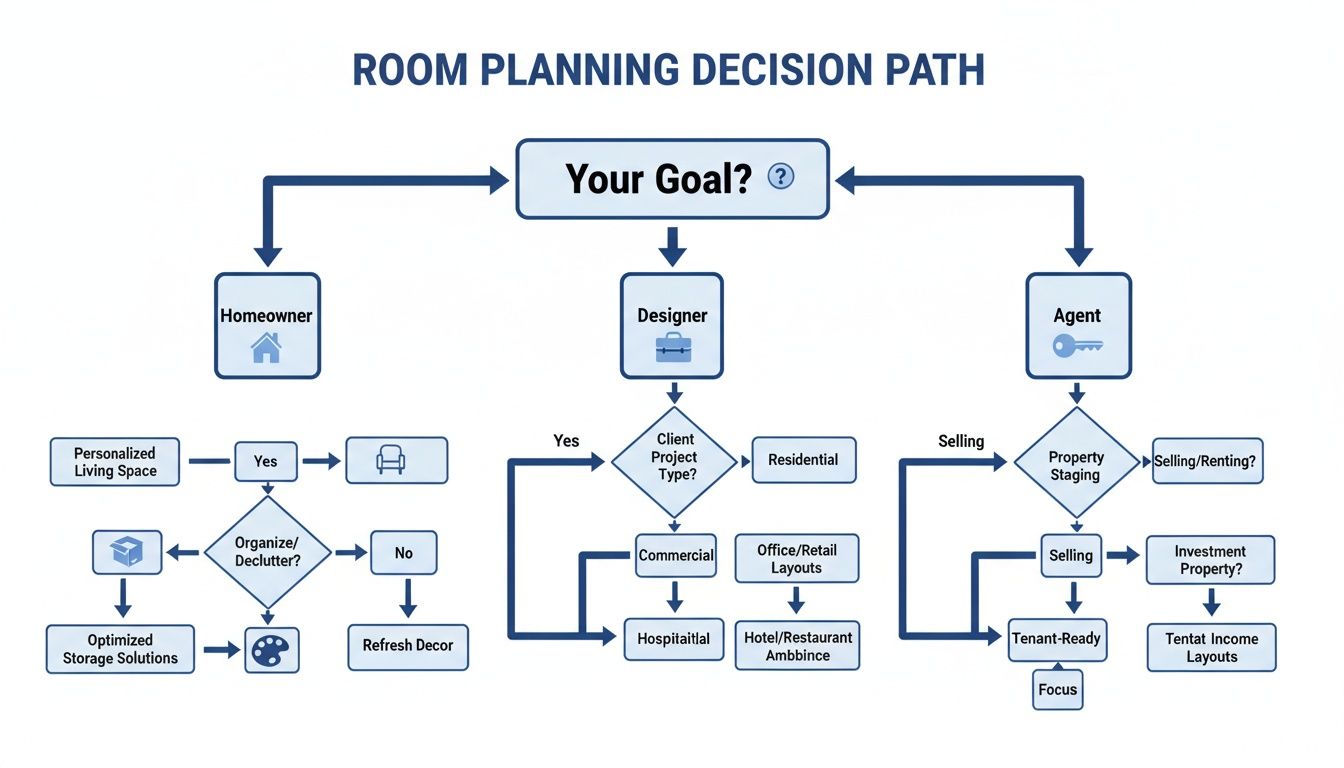
As you can see, if your goal is a quick redesign of an existing space, a photo-first AI tool is the most direct and efficient route for just about everyone.
Situational Recommendations
To make this choice even easier, let's break it down into real-world scenarios. This goes beyond a simple pros-and-cons list and gives you practical advice based on common project types.
Go with RoomStudioAI if... your main goal is to rapidly visualize different design concepts in a room that already exists. Its photo-first approach is unbeatable for speed and realism when you just need to see what’s possible in your actual space without building a 3D model from the ground up.
Consider Homestyler if... your project requires detailed 3D modeling or you're designing a room from scratch. It offers deep creative control with its massive library and manual tools, which is exactly what you need for new builds or complex architectural work where precision is everything.
Choose Floorplanner if... you primarily need to create accurate, to-scale 2D floor plans. Its strengths are in technical drafting for things like construction documents or real estate listings, not in producing photorealistic design concepts.
Ultimately, your starting point determines the best tool. If you're starting with a photo of a room, an AI redesign tool like RoomStudioAI is the fastest way to a high-quality visual. If you're starting with a blank canvas, a 3D modeler is non-negotiable.
The Final Verdict
For the majority of people—homeowners, designers who need quick concepts for clients, and real estate agents requiring virtual staging—RoomStudioAI really stands out. It tackles the most common challenge head-on: how to quickly and easily visualize change in a real space, with minimal technical fuss. It's the perfect choice when you need some fresh home office ideas or want to rethink any other room in your home.
This digital-first approach isn't just for residential projects, either. Space management software is becoming critical across professional sectors. In 2021, over 80% of spending in this area was focused on office, education, and healthcare facilities, as organizations rely on data to make smarter real estate decisions. You can dig into more of this market data on ResearchAndMarkets.com.
While tools like Floorplanner and Homestyler are fantastic for their specific, more technical niches, RoomStudioAI is built for how we work today: fast and visually. It brings high-end design visualization within reach for anyone with a camera and an idea.
Common Questions About Room Planning Software
Jumping into digital design tools can bring up a lot of questions, especially when you're trying to figure out which room planning software is right for you. Let's clear up some of the most common ones so you can pick the right tool and use it like a pro.
Can I Use This Software with No Design Experience?
Yes, absolutely. Most modern AI-powered room planners were built specifically for people without a design degree. The whole point is to make the process intuitive.
You don't need to know anything about complex 3D modeling. You just start with a photo of your room, click a style you like, and the software does all the heavy lifting to create a realistic new look. This approach lets homeowners and DIYers play around with professional-level designs without the steep learning curve.
What Is the Difference Between AI Redesign and 3D Modeling?
They might both create beautiful room visuals, but how they get there and what they’re used for are completely different. Getting this distinction is crucial for picking the right software.
AI Redesign works with what you already have. You upload a photo, and the AI intelligently re-imagines the space while keeping your room's actual layout, lighting, and architecture. It's built for speed—perfect for quick mockups, restyling ideas, and virtual staging.
3D Modeling starts from scratch. You create a room from a blank slate, drawing every wall and placing every object yourself. It gives you total control down to the last inch, but it takes a lot more time and technical skill.
The real difference is the question each one answers. AI redesign asks, "What could this specific room look like?" In contrast, 3D modeling asks, "What could any room look like?"
Are the Items in AI Renders Available for Purchase?
This is where things get really interesting. Many of the top room planning tools are now adding "shop the look" features. When the AI generates a design you love, you can often click on an item—say, a cool armchair or a floor lamp—and find similar products you can actually buy from online stores.
This feature closes the gap between your design inspiration and making it real. It turns a concept into a concrete shopping list, which simplifies the whole process of bringing a design to life. You might not always find an exact 1-to-1 match for every single item, but it gets you incredibly close.
How Much Does Professional Room Planning Software Cost?
The price can vary quite a bit, depending on who it's for and what it does. You’ll usually see a few common pricing models.
Many tools have a free version or a trial, which is perfect for anyone just trying it out. For professionals who rely on this for their work, subscription plans are the norm. These can run anywhere from $29 to $99 per month, with the price depending on things like how many renders you get, advanced features, and whether you can use the images for business. If you're a designer or real estate agent, make sure your plan includes a commercial license.
Ready to stop guessing and start visualizing? With RoomStudioAI, you can transform a photo of any room into dozens of photorealistic design ideas in under 30 seconds. See your space in a whole new light and find the perfect style for your home or project. Get started for free today
Ready to redesign your space?
Try our AI interior design tool and see your room transformed in seconds.
Try Free Design

