For anyone looking to redesign their space, the sheer number of software options can be dizzying. If you're a homeowner or a DIY enthusiast just getting your feet wet, my top recommendations for the best free interior design software are Planner 5D for its easy-to-use interface and AI smarts, SketchUp Free for serious 3D modeling, and HomeByMe for its stunningly realistic renders and massive library of real-world furniture.
These tools give you a fantastic starting point to bring your vision to life without spending a dime.
Why Free Interior Design Software Is a Game-Changer
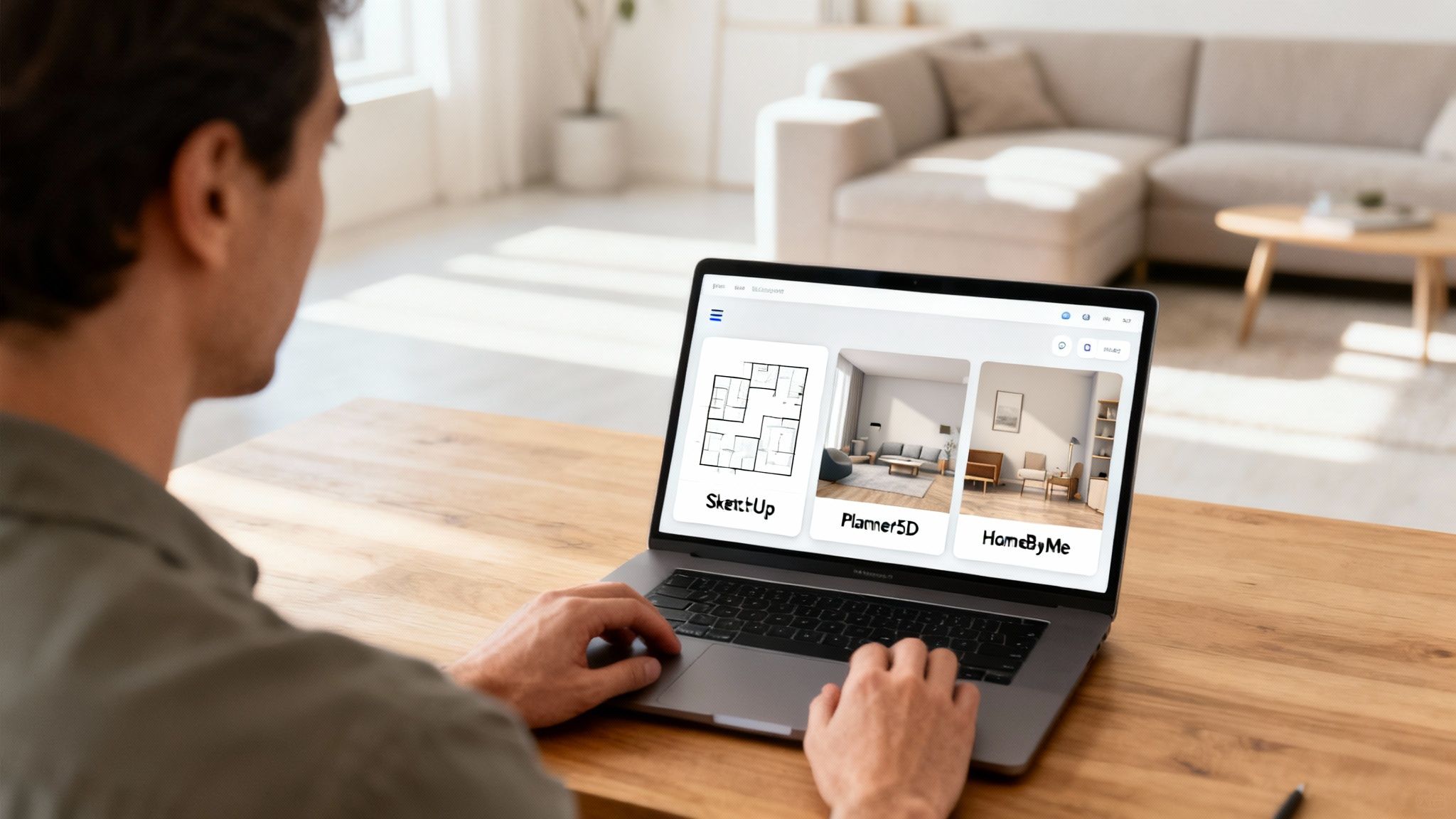
Let's face it, hiring a professional designer isn't always in the budget. Modern software, however, puts powerful visualization tools right at your fingertips. This guide is designed to cut through the clutter and give you a straightforward comparison of the best free options out there, helping you move from a rough idea to a concrete plan with confidence.
The demand for these tools is exploding. The global interior design software market is on track to hit USD 12.86 billion by 2031, and homeowners are driving more than half of that growth. This makes sense when you consider that home renovation spending in the U.S. alone reached a staggering USD 463 billion in early 2024. People are investing in their homes, and they need accessible tools to plan those investments wisely. You can dig into these market trends on Mordor Intelligence.
A Clear Framework for Making Your Choice
To help you find the right fit, we’ll be looking closely at leading tools like SketchUp Free, Planner 5D, and HomeByMe. But instead of just listing features, we’ll focus on what actually matters to homeowners, DIYers, and aspiring designers.
We'll break it down based on a simple framework so you can choose a tool that truly aligns with your needs:
- Project Scale: Are you just redecorating a single room, or are you mapping out a full-blown renovation?
- Technical Skill: Do you need a simple drag-and-drop tool, or are you comfortable with more advanced 3D modeling?
- Creative Vision: Is your goal a basic floor plan, or do you want to create a photorealistic render that looks like the real thing?
For those eager to see how artificial intelligence is shaping the future of design, it’s worth exploring a free AI interior design tool to witness how automation can generate ideas in seconds.
Top Free Design Tools at a Glance
To get started, here's a quick summary of our top picks and who they’re best suited for. This table should give you a high-level idea of where each tool shines.
| Software | Best For | Key Differentiator | Learning Curve |
|---|---|---|---|
| SketchUp Free | Custom 3D Modeling | Powerful and precise 3D drawing tools for unique designs. | High |
| Planner 5D | Beginners & Quick Layouts | AI-powered room creation and a massive object library. | Low |
| HomeByMe | Realistic Decorating | Extensive catalog of real, branded furniture and decor. | Low |
| Floorplanner | Simple 2D Floor Plans | Fast, browser-based 2D planning with no downloads. | Low |
Now, let's dive deeper into what makes each of these tools tick.
How We Judged the Best Design Tools
To give you a practical, no-nonsense comparison of the best free interior design software, we developed a simple evaluation framework. We’re not just looking at a laundry list of features; we’re focused on what actually makes a difference when you’re trying to bring a project to life. Our analysis boils down to seven key areas that separate the genuinely useful tools from the frustrating ones.
We put every single platform through the same wringer. This ensures our recommendations are consistent and based on real-world use, helping you answer the most important question: which tool is right for your project?
Ease of Use and Learning Curve
A great design tool is one you can actually use without pulling your hair out. We timed how fast a total beginner could get a basic floor plan down and start adding furniture. Tools with a simple drag-and-drop feel, good tutorials, and no complicated setup shot to the top of our list. After all, a steep learning curve can kill your creative momentum before you even get started.
Realism and Visualization Quality
Let's be honest, the whole point is to see what your space will look like. We judged the quality of the 2D floor plans, but we put a much bigger emphasis on the realism of the 3D renderings. Making confident decisions about paint, flooring, and that new sofa is so much easier when the preview on your screen looks like a real photograph.
An overly simplistic or cartoonish render can lead to disappointing real-world choices. The closer a digital design gets to reality, the more you can trust it as a planning tool.
Core Features and Object Library
Once you have the basics down, the tool's creative firepower really matters. We dug into the specifics:
- Furniture and Decor: We looked for a wide variety of high-quality models, especially those based on real products you can actually buy.
- Customization: How easy is it to change colors, swap out textures, or resize a cabinet? The more control, the better.
- Unique Capabilities: We gave extra points for special features, like tools for building custom furniture or generating a room layout automatically.
A skimpy object library forces you to make compromises. A big, diverse one lets your creativity run wild, which is often more valuable than having complex modeling features you'll never touch.
Export and Collaboration Options
Creating your design is only half the battle; sharing it is just as important. We checked out the export options for each tool, paying close attention to common free-tier limitations like watermarks or low-resolution image downloads. We also looked at collaboration features, like sharing a link with your partner or contractor for feedback.
Knowing these limitations upfront is key, especially as you think about moving from a simple project to something more professional. You can see how advanced platforms overcome these hurdles by exploring a comprehensive design solution like RoomStudioAI.
A Detailed Comparison of Free Interior Design Software
Picking the right design tool isn't a one-size-fits-all decision. The best software for a quick 2D floor plan is often completely wrong for modeling a custom piece of furniture. To help you choose wisely, we're going to put four of the most popular free options under the microscope: SketchUp Free, Planner 5D, HomeByMe, and Floorplanner.
This isn't just a list of features. We’ll look at how these tools actually perform in the real world, focusing on their practical strengths and where they fall short. By the end, you'll have a much clearer picture of which platform is the best free interior design software for what you're trying to accomplish.
SketchUp Free: The Precision Modeler
Let’s be clear: SketchUp Free is in a different league from the others on this list. It’s a true 3D modeling program, not just a room planner. That distinction is everything. Its superpower is creating custom objects and architectural details from scratch with absolute geometric precision.
Say you want to design a set of built-in bookshelves for an awkward, angled wall. With SketchUp, you can draw the exact dimensions, define the thickness of every shelf, and model the decorative trim. The drag-and-drop planners simply can't touch that level of granular control.
But all that power comes with a price: a steep learning curve. Unlike its competitors, SketchUp doesn’t come with a giant built-in library of branded furniture. Instead, you get the 3D Warehouse, a massive, user-generated library of models. You can find almost anything in there, but the quality is a mixed bag, and models often need tweaking to work in your project.
Evaluation Breakdown
- Ease of Use: This is SketchUp’s biggest challenge for newcomers. The entire workflow is built around tools like "Push/Pull," "Line," and "Orbit," which take real practice to master. It’s far less intuitive than a drag-and-drop system.
- Realism: The out-of-the-box visuals are very basic and schematic. Photorealism is achievable, but it requires advanced rendering plugins that are only available in the paid desktop versions.
- Features: Its defining feature is total 3D modeling freedom. You're not stuck with a pre-set catalog; you can build anything you can imagine, from a one-of-a-kind coffee table to the entire frame of a house.
- Best For: Aspiring designers, architects, woodworkers, and serious DIYers who need to create dimensionally accurate custom models and are willing to put in the time to learn a powerful piece of software.
Key Takeaway: SketchUp Free is the undisputed champ for custom 3D creation. If your project involves anything more complex than arranging pre-made furniture—like designing a bespoke kitchen island or planning structural changes—this is the tool for the job.
Planner 5D: The User-Friendly Visualizer
Planner 5D is built for one thing: getting ideas out of your head and onto the screen as quickly and easily as possible. This makes it a fantastic starting point for homeowners or anyone new to design who just wants to visualize a new room layout. The interface is incredibly intuitive—you literally drag walls to shape a room, drop in furniture from a huge catalog, and flip to a 3D view to see it all come together.
One of its coolest tricks is the AI Smart Wizard. If you're staring at a blank page, this feature can automatically generate a furnished room layout based on your room's shape, dimensions, and preferred style. You could tell it you have a 12'x15' "Modern" living room, and it will give you a fully furnished concept to start customizing.
The free version gives you a generous slice of its massive 7,000+ item library, though some of the fancier models are reserved for paying customers. The 3D render quality is surprisingly good for a free tool, giving you a solid sense of space, color, and texture without needing any technical know-how.
Evaluation Breakdown
- Ease of Use: Top-notch. The drag-and-drop system and helpful wizards make it arguably the easiest tool to pick up on this list. A total beginner can map out a furnished room in less than an hour.
- Realism: The standard 3D renders are quite good and more than enough for most planning. True high-definition 4K renders are a premium feature, but the free quality gets the job done.
- Features: Its strengths are the huge object library, the AI room generator, and the seamless switch between 2D plans and 3D views. Customization is limited to resizing and changing the materials of existing items.
- Best For: Homeowners, renters, and design newbies who want a fast, no-fuss way to visualize new room layouts and decorating ideas.
HomeByMe: The Realistic Decorator
HomeByMe brilliantly straddles the line between ease of use and high-quality visuals, with a clear focus on the decorating process. Its killer feature is a huge catalog filled with furniture and decor from real brands. This means you can design your room using the actual sofa from Crate & Barrel or the exact light fixture from West Elm you've been considering.
This connection to real-world products is a game-changer for anyone who’s actually planning to buy furniture for their space. As you drop items into your design, the software even keeps a running total of the cost, making it easier to stick to a budget.
The workflow is simple: draw your 2D floor plan, then jump into 3D to furnish and decorate. The rendering engine produces some of the most realistic images you can get from a free tool, particularly when it comes to lighting and textures. While the free plan caps your number of projects and high-res renders, it’s plenty for planning out several rooms. For a deeper look into these applications, check out our guide on using AI for interior design projects.
Evaluation Breakdown
- Ease of Use: Very straightforward. The interface is clean and logical, guiding you smoothly from the floor plan stage right through to final decoration.
- Realism: Excellent for a free platform. HomeByMe's renders are known for their photorealistic quality, which is a massive help when you're trying to make confident design decisions. It even offers 360° virtual tours.
- Features: The branded product catalog is the star of the show. Creating a shopping list directly from your design is a uniquely practical feature you won't find everywhere.
- Best For: Decorators and homeowners who want to plan a room using real, purchasable furniture and see a highly realistic preview of how it will all look together.
Key Takeaway: HomeByMe closes the gap between digital design and real-world shopping. Its focus on branded products makes it the most practical tool for planning a room you actually intend to furnish.
Floorplanner: The Quick and Simple Planner
Just as the name implies, Floorplanner is all about one thing: creating clean, simple, and accurate 2D floor plans as fast as possible. It’s a browser-based tool with zero downloads and a very gentle learning curve, making it perfect for when a straightforward layout is all you need.
This is the go-to for a real estate agent who needs a floor plan for a listing, or for a homeowner who just wants to figure out the basic furniture placement for an upcoming move. The interface is clean and uncluttered, giving you just the essential tools for drawing walls, adding doors and windows, and dropping in basic furniture symbols.
It does offer a 3D view, but the visuals are more functional than they are inspirational. Floorplanner’s real strength is its 2D output. The free version lets you work on one project at a time and gives you access to a library of over 150,000 models, though most are simple and schematic.
Evaluation Breakdown
- Ease of Use: Incredibly easy. By focusing purely on floor planning, it avoids the complex modeling or rendering features that can bog down other tools.
- Realism: The 3D view is basic. It's helpful for getting a sense of the space, but it doesn't have the photorealistic polish of a HomeByMe or Planner 5D.
- Features: Its core strength is lightning-fast 2D plan creation. The ability to quickly add labels and measurements to rooms is also a key feature for practical use.
- Best For: Real estate professionals, contractors, or anyone who just needs to produce a clear, simple 2D floor plan with minimal fuss.
Feature Comparison of Leading Free Design Tools
Sometimes, seeing it all side-by-side is the best way to make a decision. This table offers an at-a-glance look at how these four popular tools stack up against each other.
| Feature | SketchUp Free | Planner 5D | HomeByMe | Floorplanner |
|---|---|---|---|---|
| Primary Use Case | Custom 3D modeling | Quick room visualization | Realistic decorating | Simple 2D floor plans |
| Learning Curve | High | Low | Low | Very Low |
| 3D Realism | Basic (schematic) | Good | Excellent | Basic |
| Object Library | 3D Warehouse (user-gen) | 7,000+ items (curated) | Branded product catalog | 150,000+ items (basic) |
| Custom Modeling | Yes (core feature) | No | No | No |
| Platform Support | Web browser only | Web, iOS, Android, Win, Mac | Web, iOS, Android | Web browser only |
| Commercial Use | Not permitted on free plan | Not permitted on free plan | Not permitted on free plan | Not permitted on free plan |
As you can see, the "best" tool really comes down to your specific project needs. For pure creative freedom, SketchUp is unmatched. For ease and real-world decorating, HomeByMe and Planner 5D shine. And for straightforward floor plans, Floorplanner is the fastest tool for the job.
Finding the Right Tool for Your Specific Needs
Let's be clear: there's no single "best" free interior design tool. The right choice depends entirely on what you're trying to accomplish and how much time you're willing to invest. A real estate agent needing a quick floor plan has vastly different needs than a budding designer who wants to model a custom piece of furniture. Picking the right software from the get-go saves you a world of frustration.
This matters more than ever. Individual design applications are booming, driving a market that's expected to reach USD 14.4 billion by 2033. This growth is all about accessibility—a DIY culture where anyone can visualize their ideas without hiring a pro. You can dig deeper into the growth of the interior design software market to see the trends.
To cut through the noise, this simple decision tree can help you narrow down the options based on your main goal.
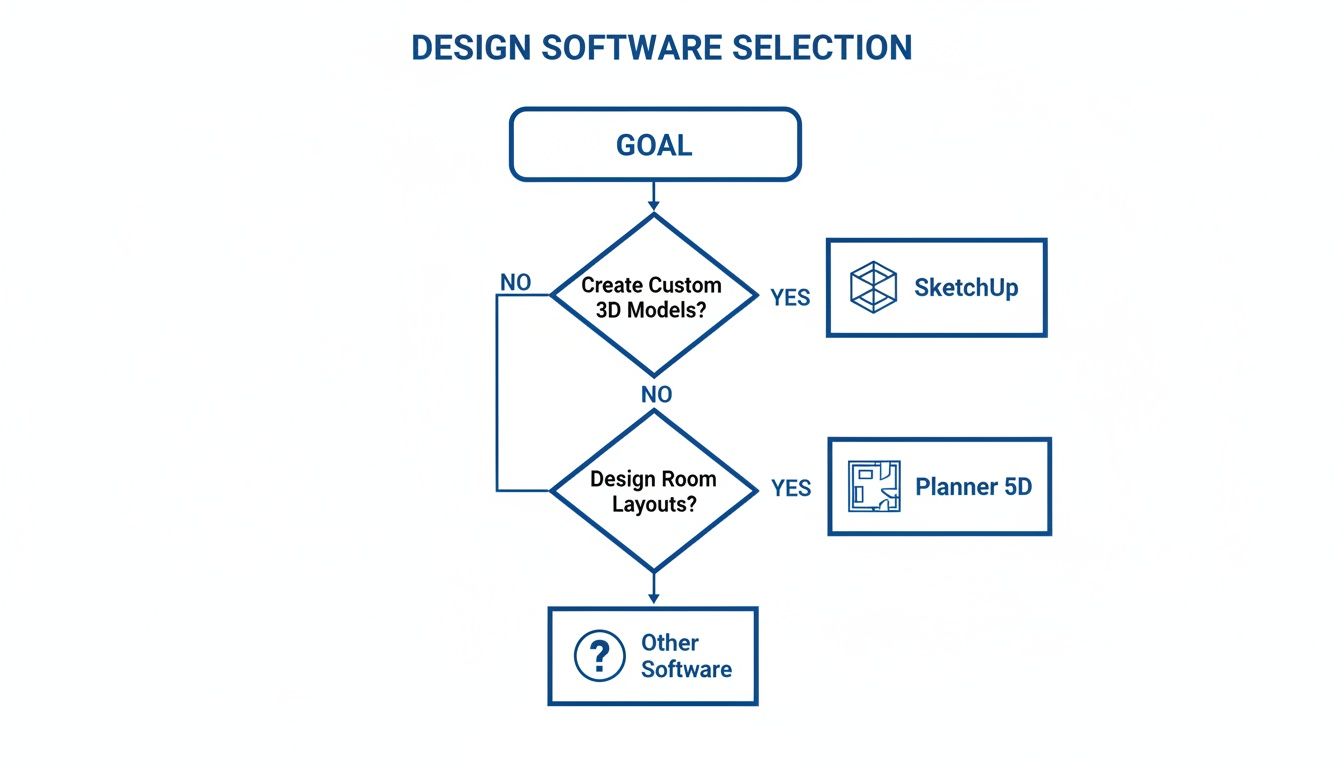
As you can see, it all comes down to your primary objective. Are you just trying to create a basic layout, or do you need a detailed 3D model? Your answer points the way.
For the DIY Homeowner
If you're a homeowner or renter, you need something fast, simple, and packed with real-world items. You’re not trying to become a CAD expert; you just want to know if that new sofa will fit or if that paint color will look right.
For this, Planner 5D and HomeByMe are your best bets.
- Planner 5D is fantastic for whipping up layouts in a hurry. Its drag-and-drop interface is a breeze, and its massive object library means you can mock up an entire room in less than an hour. It's perfect for just playing around with different furniture arrangements.
- HomeByMe really stands out with its catalog of branded, shoppable furniture. This is a game-changer if you’re actually planning to buy the items you're placing, as it connects your digital vision to a real-world shopping list.
Recommendation: Start with Planner 5D for quick space planning. If you find yourself wanting to design with specific, purchasable furniture, then pivot to HomeByMe to create a more concrete and actionable plan.
For the Real Estate Professional
Agents, stagers, and property managers play a different game. Your priority isn't photorealistic renders—it's clean, professional, and easy-to-read 2D floor plans for listings and client communication. Speed and clarity are everything.
Floorplanner is the undisputed champion here. It was designed from the ground up for exactly this purpose. You can generate a crisp, professional-looking 2D floor plan with minimal fuss, and because it's browser-based, you can design and share a layout from any device. The clean output is ideal for dropping into a property listing or attaching to an email. For some practical layout ideas, check out our guide on living room design concepts.
For the Aspiring Designer or Student
If you're a student or a serious hobbyist aiming to build real skills, you need a tool with a much higher ceiling. Your goal isn't just to plop down pre-made models but to truly understand spatial design and maybe even create your own custom pieces.
For you, the choice is SketchUp Free. Period. It has the steepest learning curve of the bunch, but that’s because it’s a genuine 3D modeling program, not just a room planner. Learning SketchUp gives you a rock-solid foundation in 3D design principles that directly translate to professional software. It forces you to think about form, scale, and construction in a way that drag-and-drop tools simply can't. Its precision is unmatched for modeling custom cabinetry, architectural details, or unique furniture.
What's the Catch with Free Design Software?
Let's be realistic—while the free interior design tools out there are fantastic, they aren't charities. These companies offer a free version for a reason, and it's smart to know what you're getting into before you invest hours into a project.
Think of the free tier as a generous free sample. It’s designed to show you what's possible, but the best features are almost always kept behind a paywall. Knowing the common limitations from the get-go will save you a ton of frustration later on.
The Most Common Trade-Offs
Right away, you'll likely run into a limited object library. Free plans usually come with a basic set of generic furniture and materials. It’s enough to block out a room, but that perfect velvet armchair or the specific Calacatta marble you had in mind? That's almost certainly part of the premium collection. You'll have to settle for "close enough."
You'll also notice constraints when it comes time to show off your work. The quality of your final images is a major dividing line between free and paid.
- Watermarks Everywhere: Expect the software's logo plastered on every image you export. That's fine for your own reference, but it screams "amateur" if you're trying to share it with a client or contractor.
- Low-Resolution Renders: Forget about crisp, high-definition images. Free exports are typically capped at a lower resolution, making them look grainy or pixelated on a large display.
- No Photorealistic Magic: Those stunning, true-to-life renders you see in the ads? That's the result of powerful rendering engines that are exclusively for paying customers. Your free version will give you a good 3D model, not a photograph.
Here's the bottom line: These aren't bugs or oversights; they're strategic business decisions. The goal is to give you just enough to see the platform's power, hoping you'll upgrade for the professional-grade results.
The Big One: Commercial Use
This is probably the most critical limitation for anyone thinking of using these tools for work. Almost without exception, the terms of service for free interior design software strictly forbid commercial use.
That means you can't legally use your designs for client presentations, real estate listings, or any other for-profit purpose. It’s a huge liability. If you're a professional, this alone is the reason to move past the free options and invest in a proper tool. When your livelihood is on the line, you need a tool that gives you the rights to use your work commercially.
When to Upgrade to a Professional AI Design Tool
Free interior design software is fantastic for getting your feet wet. It’s perfect for roughing out a floor plan or just playing with ideas. But at a certain point, you’ll likely hit a wall where your vision is bigger than what the free tool can deliver. When you need professional speed, photorealistic quality, and visuals that are ready to show a client, it's time to look at upgrading.
This is where AI-powered platforms completely change the equation. Instead of spending hours meticulously placing every last piece of furniture or fiddling with lighting settings, these tools can produce incredible results in just a few seconds. They’re built specifically to solve the biggest headaches of free software: slow, clunky workflows and renders that just don't look real.
The Leap From Manual Planning to AI Generation
The core difference comes down to the workflow. With most free software, you're essentially building a room from the ground up, piece by piece. An AI tool like RoomStudioAI flips that process on its head. It starts with a real photo of your actual room and generates new designs almost instantly.
You just upload a picture, pick a style—say, "Modern" or "Japandi"—and the AI gets to work, creating a photorealistic concept that honors your room's unique architecture and natural light. It shifts your role from a drafter to a creative director, which saves a massive amount of time and mental energy.
This before-and-after from RoomStudioAI is a perfect example of how a simple photo becomes a fully realized, photorealistic concept.
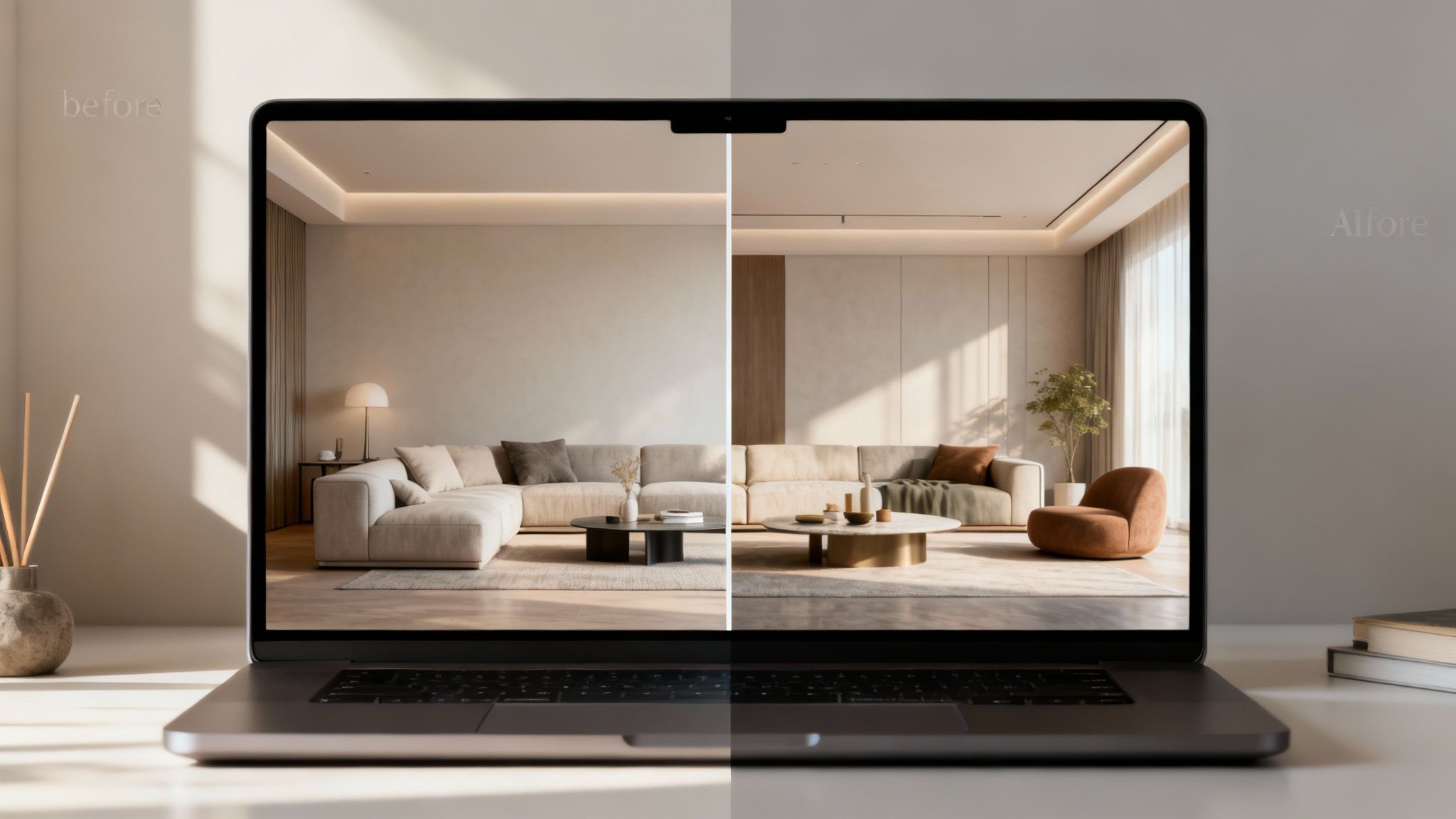
The AI doesn't just plop furniture into a picture; it genuinely reimagines the entire space while keeping the core structure intact. It gives you a preview that looks and feels true to life.
Solving Key Professional Challenges
If you're a professional—a designer, realtor, or home stager—moving to an AI tool isn't a luxury; it's a smart business move. It solves real-world problems that free software simply isn't equipped to handle.
- Virtual Staging: You can instantly furnish an empty home or declutter a messy one to produce stunning, attractive photos for a property listing.
- Client Communication: Generate several high-quality design options in a matter of minutes. This helps clients see exactly what you're proposing, eliminating guesswork and confusion.
- Workflow Efficiency: The time saved on creating initial concepts is enormous. It frees you up to focus on what really matters, like building client relationships and managing the project itself.
An AI design tool isn't just a souped-up version of free software; it's a fundamentally different way of working. It replaces tedious manual labor with automated generation, turning hours of effort into seconds of inspiration.
When your work demands commercial-use rights, flawless visuals, and a process that respects your time, upgrading is the obvious next step. You can check out the straightforward pricing for professional AI tools like RoomStudioAI to see how a small investment can make a huge impact on your efficiency.
Frequently Asked Questions
When you're first dipping your toes into the world of interior design software, a few key questions always pop up. Let's get them answered so you can pick the right tool and get to work.
What's the Easiest Free Interior Design Software to Learn?
If you're brand new to this, your best bet is to start with either Planner 5D or HomeByMe. I consistently recommend these two for beginners because they skip the steep learning curve.
Both platforms are built around a simple drag-and-drop system. You don't need to know anything about 3D modeling; just pick furniture from their massive libraries and place it in your room. This approach lets you focus on what really matters—your design ideas—without getting bogged down by complicated software.
Can I Actually Use These Free Tools for My Business?
That’s a hard no. Every free tool on our list—and pretty much any other reputable free software out there—comes with a license that strictly forbids commercial use.
This is a critical point. You can't use designs or images from a free plan for client presentations, to market a property, or for any other business purpose.
A Word of Caution: Always, and I mean always, read the terms of service. Using free software for commercial work can land you in legal hot water. If you're a professional, you'll need to upgrade to a paid plan with a commercial license. It’s a non-negotiable part of doing business.
Do I Have to Download Anything to Start Designing?
Thankfully, no. Most of the best free options are entirely browser-based. This is a huge plus because it means you can jump right in from any computer with an internet connection, no installation required.
This web-based approach gives you the freedom to work from anywhere and guarantees you’re always on the latest version of the software. While some companies offer more robust desktop apps with their paid plans, you can get a surprising amount done with nothing more than a web browser.
Ready to move past the limitations of free tools? If you need professional-grade results without the manual effort, RoomStudioAI can turn a simple room photo into a stunning, photorealistic design in just a few seconds. See how RoomStudioAI works with a free trial.
Ready to redesign your space?
Try our AI interior design tool and see your room transformed in seconds.
Try Free Design

